<?xml version="1.0" encoding="utf-8"?><?xml-stylesheet type="text/xsl" href="atom.xsl"?>
<feed xmlns="http://www.w3.org/2005/Atom">
    <id>https://docs-v1-2.testplanit.com/blog/</id>
    <title>TestPlanIt Blog</title>
    <updated>2026-11-17T00:00:00.000Z</updated>
    <generator>https://github.com/jpmonette/feed</generator>
    <link rel="alternate" href="https://docs-v1-2.testplanit.com/blog/"/>
    <subtitle>TestPlanIt Blog</subtitle>
    <icon>https://docs-v1-2.testplanit.com/img/logo.svg</icon>
    <entry>
        <title type="html"><![CDATA[TestPlanIt 1.2: Failure Patterns, Alerts, Risk Scores, and Automation Rules]]></title>
        <id>https://docs-v1-2.testplanit.com/blog/v1.2-release/</id>
        <link href="https://docs-v1-2.testplanit.com/blog/v1.2-release/"/>
        <updated>2026-11-17T00:00:00.000Z</updated>
        <summary type="html"><![CDATA[TestPlanIt 1.2 turns a wall of red automated results into a short list of real problems, scores every test case so the riskiest ones are one sort away, watches your testing metrics and tells you when one crosses a line, and lets a pull request start the testing on its own.]]></summary>
        <content type="html"><![CDATA[<p>Today we're releasing <strong>TestPlanIt v1.2.0</strong>.</p>
<p>Automated testing's second act is the hard one. The suite goes red, and someone still has to work out whether that's one problem or forty, whether anyone is already on it, and whether the run will even get started. 1.2 is aimed squarely at that: it turns a wall of red into a short list of real problems, watches the metrics you care about so you hear about trouble before you go looking, and lets a merged pull request start the testing on its own. And when you can't run everything, it now scores every case on how much it deserves a run.</p>
<h2 class="anchor anchorTargetStickyNavbar_cQvB" id="highlights">Highlights<a href="https://docs-v1-2.testplanit.com/blog/v1.2-release/#highlights" class="hash-link" aria-label="Direct link to Highlights" title="Direct link to Highlights" translate="no">​</a></h2>
<ul>
<li class=""><strong><a class="" href="https://docs-v1-2.testplanit.com/docs/user-guide/failure-patterns/">Failure Patterns</a></strong> — Every automated failure is grouped by what actually went wrong, so a run with two hundred red rows comes down to a handful of problems. AI gives each one a root cause from a catalogue you control, and linking the issue that explains it marks the pattern as a known issue right in the run, so the next person doesn't rediscover it.</li>
<li class=""><strong>Quarantine</strong> — A test failing for a reason you already know about keeps running, but stops counting against your pass rate until it passes consistently again. Your green stays meaningful while the fix is in flight.</li>
<li class=""><strong><a class="" href="https://docs-v1-2.testplanit.com/docs/user-guide/alerts/">Alerts</a></strong> — Pick a metric, set a threshold, choose who hears about it: a test that keeps failing, a case that has started to flake, a run below your pass bar or stalled, a milestone falling behind. Delivered in the app, by email, in the digest, or to Slack by webhook.</li>
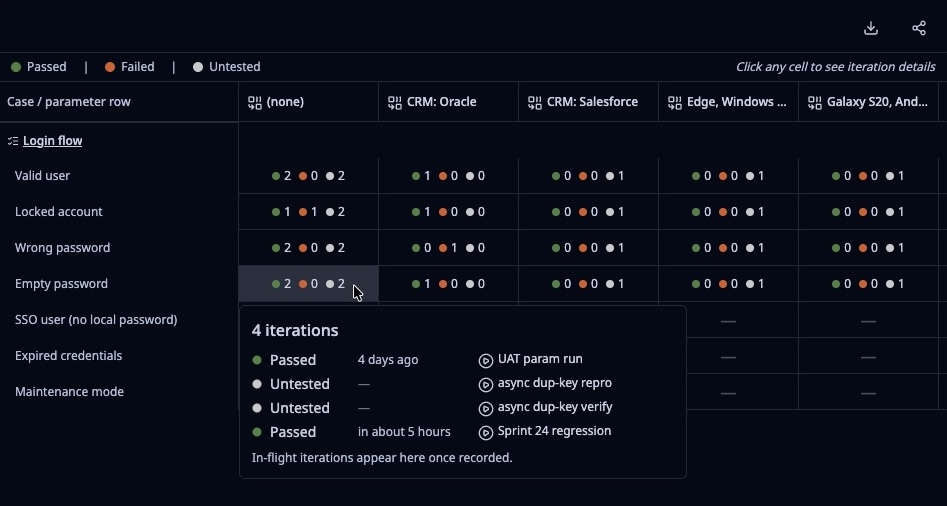
<li class=""><strong><a class="" href="https://docs-v1-2.testplanit.com/docs/user-guide/risk-scores/">Risk Scores</a></strong> — Every test case carries a score from 0 to 100 for how much it deserves a run right now, blending failure history, flakiness, staleness, the criticality of the requirements it covers, and its open defects. Sort or filter the repository by it, pick a run's cases by it, weigh it beside Impact Analysis, and click any score to see exactly which signals produced it. Scoring is deterministic and never calls an AI model.</li>
<li class=""><strong><a class="" href="https://docs-v1-2.testplanit.com/docs/user-guide/webhooks/">Automation rules on webhooks</a></strong> — A merged pull request or a new ticket can import the issue, build a run from just the tests that change affects, and send it off for automated execution, with nobody opening TestPlanIt.</li>
</ul>
<h2 class="anchor anchorTargetStickyNavbar_cQvB" id="also-in-12">Also in 1.2<a href="https://docs-v1-2.testplanit.com/blog/v1.2-release/#also-in-12" class="hash-link" aria-label="Direct link to Also in 1.2" title="Direct link to Also in 1.2" translate="no">​</a></h2>
<ul>
<li class=""><strong><a class="" href="https://docs-v1-2.testplanit.com/docs/user-guide/projects/test-case-links/">Test case dependencies</a></strong> — Hold a case in a run until its prerequisites pass, then tell the next tester it's their turn.</li>
<li class=""><strong><a class="" href="https://docs-v1-2.testplanit.com/docs/user-guide/projects/staged-test-cases/">Staged test cases</a></strong> — Write cases across several sittings in private, then add them to the repository together.</li>
<li class=""><strong><a class="" href="https://docs-v1-2.testplanit.com/docs/user-guide/integrations/">ClickUp</a></strong> — Connect ClickUp as fully as Jira: create, link, and sync tasks, custom fields included.</li>
<li class=""><strong><a class="" href="https://docs-v1-2.testplanit.com/docs/user-guide/notifications/">Notification settings per type</a></strong> — Silence milestone reminders and still hear about review requests and mentions.</li>
<li class=""><strong>Steps side by side</strong> — Put each expected result beside its step instead of beneath it, and see far more of a test case at once.</li>
<li class=""><strong><a class="" href="https://docs-v1-2.testplanit.com/docs/user-guide/projects/reports/results-trend/">Failure rate trend report</a></strong> — Answers one question: is your failure rate getting better or worse? Reports with a date can now be grouped by day, week, month, quarter, or year.</li>
<li class=""><strong><a class="" href="https://docs-v1-2.testplanit.com/docs/user-guide/advanced-search/">Counts on every search filter</a></strong> — See how many results each filter option returns before you click, and stop narrowing a search into nothing.</li>
<li class=""><strong><a class="" href="https://docs-v1-2.testplanit.com/docs/user-guide/audit-logs/">Audit log retention</a></strong> — Hold audit history to a window you choose instead of letting it grow forever.</li>
<li class=""><strong><a class="" href="https://docs-v1-2.testplanit.com/docs/user-guide/projects/reports/report-builder/">More ways to slice a report</a></strong> — New Result Source, Issue, and Root Cause dimensions, metrics over when cases were created, an Exclude mode on every value filter so "everything except the sandboxes" keeps working as new values appear, and calendar-aligned week and month ranges.</li>
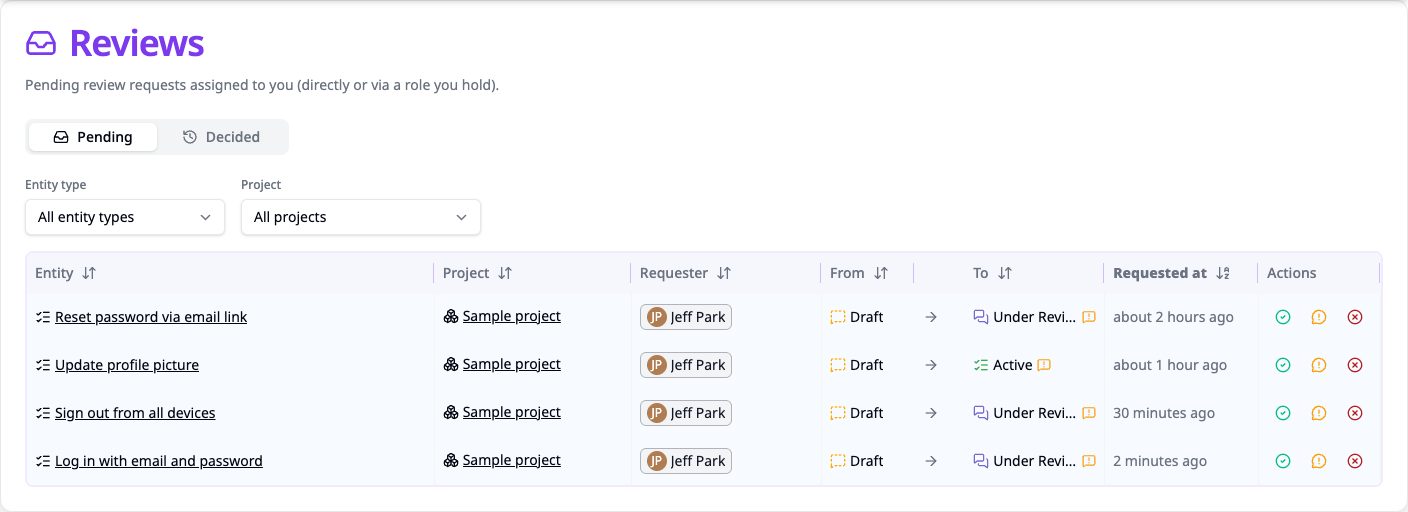
<li class=""><strong><a class="" href="https://docs-v1-2.testplanit.com/docs/user-guide/review-approvals/">Revert a review decision</a></strong> — Undo an approval or rejection made in error, within a time limit each project can tighten.</li>
<li class=""><strong><a class="" href="https://docs-v1-2.testplanit.com/docs/user-guide/trash/">Restore your own deletes</a></strong> — Deleted a test case, folder, run, session, or milestone by mistake? A new <strong>Trash</strong> section on your profile lists what you deleted, by name, and restores it along with everything that went with it — no administrator required. Administrators choose how many days that window stays open, or turn it off.</li>
<li class=""><strong><a class="" href="https://docs-v1-2.testplanit.com/docs/user-guide/sso/">Several SAML providers at once</a></strong> — Run more than one SAML identity provider side by side, each with its own configuration, its own toggle, and its own button on the sign-in page.</li>
<li class=""><strong><a class="" href="https://docs-v1-2.testplanit.com/docs/user-guide/templates-fields/">A default template per project</a></strong> — Each project chooses which template new test cases start from, and you pick it when you create the project.</li>
<li class=""><strong>Smaller wins</strong> — Runs offer to close themselves when the last result lands, clear formatting and a grouped toolbar in the rich-text editor, per-row detail that opens in a row of its own, collapsible panels on test cases, dragging cases whatever the sort, imports that name the fields you missed, milestone completion over the API, and review reminders measured in days instead of hours.</li>
</ul>
<h2 class="anchor anchorTargetStickyNavbar_cQvB" id="upgrading">Upgrading<a href="https://docs-v1-2.testplanit.com/blog/v1.2-release/#upgrading" class="hash-link" aria-label="Direct link to Upgrading" title="Direct link to Upgrading" translate="no">​</a></h2>
<p><strong>Back up your database before upgrading.</strong> Migrations apply automatically on container start, or with <code>pnpm db:deploy</code> on a source install. See the <a class="" href="https://docs-v1-2.testplanit.com/docs/installation/#upgrading">upgrade notes</a>.</p>
<ul>
<li class=""><strong>Two new role permissions.</strong> Failure Patterns needs no action: every role that could already add or edit test runs has it. <strong>Alerts</strong> starts ungranted, so give it to the roles that should create alerts. Administrators always have both. See <a class="" href="https://docs-v1-2.testplanit.com/docs/user-guide/roles/">Roles</a>.</li>
<li class=""><strong>Failure Patterns starts with your next results.</strong> To fold in results you already have, run <strong>Analyze existing results</strong> once from the project's settings. Root cause suggestions need an AI model connected; grouping and quarantine don't.</li>
<li class=""><strong>Risk scoring is on by default.</strong> Cases are rescored shortly after a run receives results, plus a nightly sweep per project; only changed scores are written, and recomputes stay out of the audit log. Turn it off per project under <strong>Project Settings → Risk Scoring</strong> — existing scores are kept but stop updating, and the repository's Risk Score filter goes away. The Risk Score column is off until you add it from the column picker.</li>
<li class=""><strong>Self-service restore is on, with a 30-day window.</strong> Every user can restore their own deletes from the <strong>Trash</strong> section of their profile for 30 days. Change the window, or set it to 0 to turn self-service restore off, from <strong>Admin → Trash</strong>.</li>
<li class=""><strong>One API relation was renamed.</strong> On the test case model, the relation to a run's cases is now <code>testRunCases</code> rather than <code>testRuns</code>, which matches the <code>TestRunCases</code> records it actually returns. If you query the model API directly — <code>include</code> or <code>select</code> on <code>repositoryCases</code> — update those calls. Nothing changes in the UI, in CSV imports, or for the <code>testRuns</code> relation on issues, milestones, tags, and projects, which are different relations and keep their names.</li>
</ul>
<h2 class="anchor anchorTargetStickyNavbar_cQvB" id="thank-you">Thank You<a href="https://docs-v1-2.testplanit.com/blog/v1.2-release/#thank-you" class="hash-link" aria-label="Direct link to Thank You" title="Direct link to Thank You" translate="no">​</a></h2>
<p>To everyone who filed an issue, opened a pull request, translated a locale, or told a colleague about TestPlanIt: this release is yours too.</p>
<ul>
<li class="">Star the repo on <a href="https://github.com/testplanit/testplanit" target="_blank" rel="noopener noreferrer" class="">GitHub</a></li>
<li class="">Follow <a href="https://x.com/TestPlanItHQ" target="_blank" rel="noopener noreferrer" class="">@TestPlanItHQ</a> for updates</li>
<li class="">Join our <a href="https://discord.gg/kpfha4W2JH" target="_blank" rel="noopener noreferrer" class="">Community Discord</a></li>
<li class="">Report issues and suggest features on GitHub</li>
</ul>]]></content>
        <author>
            <name>TestPlanIt Team</name>
            <uri>https://testplanit.com</uri>
        </author>
        <category label="Release" term="Release"/>
        <category label="Announcement" term="Announcement"/>
        <category label="Open Source" term="Open Source"/>
    </entry>
    <entry>
        <title type="html"><![CDATA[Three Questions Your Release Process Should Be Able to Answer]]></title>
        <id>https://docs-v1-2.testplanit.com/blog/three-questions-every-release-should-answer/</id>
        <link href="https://docs-v1-2.testplanit.com/blog/three-questions-every-release-should-answer/"/>
        <updated>2026-10-31T00:00:00.000Z</updated>
        <summary type="html"><![CDATA[Is it covered? What do we need to retest? Can we prove it? The release artifacts that answer each one, when to produce them, who they're for, and where to start if you have none of them today.]]></summary>
        <content type="html"><![CDATA[<p>It's the day before a release. Someone asks, "Did we test the new permissions model?" The room goes quiet, someone opens a spreadsheet, and someone else says "I'm pretty sure that got covered last sprint."</p>
<p>Every release raises the same three questions. <em>Is it covered? What do we need to retest? Can we prove it?</em> Most teams answer from memory. Memory is what goes quiet in that meeting, and it's what walks out the door when a senior tester leaves. Here's how to answer from records instead: what to produce, when, and for whom.</p>
<h2 class="anchor anchorTargetStickyNavbar_cQvB" id="the-artifacts">The Artifacts<a href="https://docs-v1-2.testplanit.com/blog/three-questions-every-release-should-answer/#the-artifacts" class="hash-link" aria-label="Direct link to The Artifacts" title="Direct link to The Artifacts" translate="no">​</a></h2>
<p>Before the details, the inventory. A release process that can answer all three questions produces five things:</p>
<table><thead><tr><th>Artifact</th><th>When</th><th>For whom</th></tr></thead><tbody><tr><td>Coverage matrix: requirements mapped to tests, with current results</td><td>Continuously; reviewed at release candidate</td><td>QA lead, product owner</td></tr><tr><td>Scoped regression list, with the reason each test is on it</td><td>Every pull request</td><td>Developers, testers</td></tr><tr><td>Execution record: every result with build, timestamp, and name</td><td>Every run</td><td>Whoever asks, months later</td></tr><tr><td>Open defects and accepted risks</td><td>Release candidate</td><td>Release manager, stakeholders</td></tr><tr><td>Sign-off record: frozen numbers, frozen matrix, approvers, time</td><td>Sign-off</td><td>Auditors, leadership, your future self</td></tr></tbody></table>
<p>If you produce none of these today, the rest of this post is about where to start. If you produce some, it's about making them trustworthy.</p>
<h2 class="anchor anchorTargetStickyNavbar_cQvB" id="is-it-covered">Is It Covered?<a href="https://docs-v1-2.testplanit.com/blog/three-questions-every-release-should-answer/#is-it-covered" class="hash-link" aria-label="Direct link to Is It Covered?" title="Direct link to Is It Covered?" translate="no">​</a></h2>
<p>To answer this, you need to know which tests verify each requirement in the release, whether those tests have run, and whether the requirement changed after they did. That's the coverage matrix.</p>
<p>The cost of not having one is quiet. Features ship with a requirement nobody tested, you find out from a customer, and nobody traces it back to the matrix that didn't exist.</p>
<p>A few habits keep it accurate:</p>
<ul>
<li class=""><strong>Link tests to individual requirements, not features.</strong> A test linked to "Checkout" tells you nothing. A test linked to "Cart totals recalculate when a coupon is removed" tells you exactly what's verified.</li>
<li class=""><strong>Use the requirements product management already wrote.</strong> Don't maintain a second copy. It drifts within a sprint. If those requirements are one-line tickets, link to them anyway. A one-line ticket with a test linked to it beats a detailed spec linked to nothing.</li>
<li class=""><strong>Look at the gaps first.</strong> Requirements with no tests, and requirements whose tests have never run. Those are the ones that will surprise you.</li>
<li class=""><strong>Re-verify after a requirement changes.</strong> When the text changes, every linked test has to run again before it counts. Mark them and don't clear the mark until they do.</li>
</ul>
<p><strong>Where to start:</strong> take this release's requirements, however rough, and put a test id next to each one. The empty rows are your first finding.</p>
<h2 class="anchor anchorTargetStickyNavbar_cQvB" id="what-do-we-need-to-retest">What Do We Need to Retest?<a href="https://docs-v1-2.testplanit.com/blog/three-questions-every-release-should-answer/#what-do-we-need-to-retest" class="hash-link" aria-label="Direct link to What Do We Need to Retest?" title="Direct link to What Do We Need to Retest?" translate="no">​</a></h2>
<p>To answer this, you need to know which tests exercise the code that changed in this build, and why each one is on the list. That's the scoped regression list, and the "why" is what makes a team trust it instead of running everything anyway.</p>
<p>The cost of not having it is the full regression pass on every build. It takes days, it delays feedback until the developer has moved on, and it teaches everyone to treat results as noise.</p>
<p>Start from the diff. It describes exactly what changed, and it exists for every build. Turn changed files into tests using three sources, in order of confidence:</p>
<ol>
<li class=""><strong>Tests someone has tied to that code.</strong> A tester or developer said "this test covers this module." The most reliable source, and the only one that captures knowledge that isn't in the code.</li>
<li class=""><strong>Tests that ran the last time that code changed.</strong> Your own history, and it gets better with every release.</li>
<li class=""><strong>Tests whose names or steps match the change.</strong> The widest net, and the one that catches what nobody thought to tie to the code.</li>
</ol>
<p>Write the reason next to every test on the list. "Tied to the totals module, and failed the last time it changed" is something a tester can check and act on. Leave out files that change in every build, like changelogs, or every scoped list becomes the full suite.</p>
<p>Then start the run the moment the pull request opens. Put the automated and manual tests in the same run, send the automated ones to the pipeline right away, and leave the manual ones for a tester. The developer gets results while the change is fresh. The tester opens a run that's already half done. Keep full regression for release candidates, where it belongs.</p>
<p><strong>Where to start:</strong> tag every test with the module it covers, and ask developers to name the modules a pull request touches. Matching the two by hand is a scoped list. Until it builds itself, write the scope and the reason in the run description.</p>
<h2 class="anchor anchorTargetStickyNavbar_cQvB" id="can-we-prove-it">Can We Prove It?<a href="https://docs-v1-2.testplanit.com/blog/three-questions-every-release-should-answer/#can-we-prove-it" class="hash-link" aria-label="Direct link to Can We Prove It?" title="Direct link to Can We Prove It?" translate="no">​</a></h2>
<p>To answer this, you need the numbers exactly as they were at sign-off, who approved them, what was known to be broken, and what risk was accepted. That's the execution record, the defect list, and the sign-off record together.</p>
<p>The cost of not having them shows up months later. A live report says 97% at sign-off and 94% today because a flaky suite was re-run. Both numbers are true, and neither is proof, because neither is tied to a moment. Then an escaped bug prompts "why didn't we test that?" and nobody can show that it was a known gap someone accepted.</p>
<ul>
<li class=""><strong>Freeze the sign-off report.</strong> Capture the numbers at approval, record who and when, and never let that copy change. Keep the live version for day-to-day monitoring.</li>
<li class=""><strong>Freeze the coverage matrix at each release.</strong> Comparing two releases shows which requirements gained coverage, lost it, or shipped with none.</li>
<li class=""><strong>Record what you didn't test and who accepted it.</strong> At release candidate, list open defects with severity, the gaps left open, and the name of the person who said ship anyway. That list protects the team more than any pass rate.</li>
<li class=""><strong>Don't assemble evidence after the fact.</strong> Every execution should already carry a build, a timestamp, a result, and a name. Sign-off is freezing what's there.</li>
</ul>
<p><strong>Where to start:</strong> at your next sign-off, export the report, the matrix, and the open defect list to a dated folder, and write the approver's name on it. That's a sign-off record. Make it automatic later.</p>
<h2 class="anchor anchorTargetStickyNavbar_cQvB" id="the-bottom-line">The Bottom Line<a href="https://docs-v1-2.testplanit.com/blog/three-questions-every-release-should-answer/#the-bottom-line" class="hash-link" aria-label="Direct link to The Bottom Line" title="Direct link to The Bottom Line" translate="no">​</a></h2>
<p>Is it covered? A coverage matrix at the requirement level, re-verified when requirements change. What do we retest? A regression list built from the diff with a reason beside every test, started as a run the moment the change lands. Can we prove it? Frozen numbers, a frozen matrix, a list of what was knowingly left open, and the names on the approval.</p>
<p>Five artifacts, each produced at a known moment for a known audience. Start with whichever one your last release was missing when the room went quiet.</p>
<p>That's the thinking behind <a class="" href="https://docs-v1-2.testplanit.com/blog/v1.1-release/">TestPlanIt 1.1</a>, and it holds whatever tool you use.</p>]]></content>
        <author>
            <name>Brad DerManouelian</name>
            <uri>https://testplanit.com</uri>
        </author>
        <category label="Best Practices" term="Best Practices"/>
        <category label="Thought Leadership" term="Thought Leadership"/>
    </entry>
    <entry>
        <title type="html"><![CDATA[TestPlanIt 1.1: Requirements, Impact Analysis, and Automated Execution]]></title>
        <id>https://docs-v1-2.testplanit.com/blog/v1.1-release/</id>
        <link href="https://docs-v1-2.testplanit.com/blog/v1.1-release/"/>
        <updated>2026-10-13T00:00:00.000Z</updated>
        <summary type="html"><![CDATA[TestPlanIt 1.1 answers the questions every release raises — is it covered, what do we retest, can we prove it — with requirements traceability, git-driven impact analysis, automated execution launched from the test run, plus saved and frozen reports, reusable CSV import mappings, auto-save for test cases, DeepSeek support, and SCIM for multiple identity providers.]]></summary>
        <content type="html"><![CDATA[<p>Today we're releasing <strong>TestPlanIt v1.1.0</strong>.</p>
<p>Every release raises the same three questions: <em>Is it covered? What do we need to retest? Can we prove it?</em> 1.1 is built to answer them. Requirements management, our most-requested feature, ties every test to what it verifies. Impact analysis narrows a regression run to what actually changed, and automated execution runs that shortlist from the run itself, so a code change gets an answer in minutes instead of a full regression cycle. And a set of smaller additions removes friction your team feels every day.</p>
<h2 class="anchor anchorTargetStickyNavbar_cQvB" id="know-whats-covered--and-prove-it">Know What's Covered — and Prove It<a href="https://docs-v1-2.testplanit.com/blog/v1.1-release/#know-whats-covered--and-prove-it" class="hash-link" aria-label="Direct link to Know What's Covered — and Prove It" title="Direct link to Know What's Covered — and Prove It" translate="no">​</a></h2>
<p>Requirements management gives your project a single tree of what the system should do, with every test case linked to the requirement it verifies. The tree fills itself from Jira, Azure DevOps, GitLab, Redmine, MantisBT, GitHub, or Gitea, so nobody re-enters what product management already wrote, and results roll up through the hierarchy so "is this feature covered?" is a glance instead of a spreadsheet.</p>
<p>The payoff compounds over a release:</p>
<ul>
<li class=""><strong>When a requirement changes, you know which tests to rerun.</strong> Suspect flags mark every affected link the moment the content changes, and clear themselves when the test runs again.</li>
<li class=""><strong>Coverage debt is visible before it bites.</strong> The Coverage Gaps report ranks the requirements with no tests, or tests that never ran, and generates test cases straight from a gap.</li>
<li class=""><strong>Sign-off has evidence.</strong> Traceability snapshots freeze the matrix at a point in time, and the Coverage Changes report shows exactly what moved between two of them. Auditors get a record, not a screenshot.</li>
</ul>
<p>Requirements are opt-in per project. See <a class="" href="https://docs-v1-2.testplanit.com/docs/user-guide/projects/requirements/">Requirements</a> to set it up and <a class="" href="https://docs-v1-2.testplanit.com/docs/user-guide/projects/requirements-traceability/">Coverage &amp; Traceability</a> for reports, snapshots, and suspect flags.</p>
<h2 class="anchor anchorTargetStickyNavbar_cQvB" id="test-what-changed-not-everything">Test What Changed, Not Everything<a href="https://docs-v1-2.testplanit.com/blog/v1.1-release/#test-what-changed-not-everything" class="hash-link" aria-label="Direct link to Test What Changed, Not Everything" title="Direct link to Test What Changed, Not Everything" translate="no">​</a></h2>
<p>A full regression pass on every build is the tax teams pay for not knowing what a change touched. Impact Analysis pays it down: point TestPlanIt at the repository of the application under test, pick two commits or a pull request, and get the <strong>Affected Tests</strong> right where you compose the run. It works from the git diff alone, with no coverage agent, no build step, and no instrumentation, so it runs against the first application you connect.</p>
<p>Every selection explains itself, with a pin from the test to the code, a keyword match, a prior run that covered the same change, or an AI ranking against the diff, so the team can trust the shortlist and add to it with confidence.</p>
<p>A project can connect several repositories, each with its own cache, Code Pins, and ticket scans. Path patterns decide which files Impact reads, and an <strong>Exclude</strong> row keeps noisy files out of an analysis, so a changelog or version file that changes in every pull request stops pulling in unrelated test cases. See <a class="" href="https://docs-v1-2.testplanit.com/docs/user-guide/impact/">Test Impact Analysis</a> and the <a class="" href="https://docs-v1-2.testplanit.com/docs/user-guide/projects/settings/impact/">project settings</a> to connect your first repository.</p>
<h2 class="anchor anchorTargetStickyNavbar_cQvB" id="execute-automation-scripts-from-test-runs">Execute Automation Scripts From Test Runs<a href="https://docs-v1-2.testplanit.com/blog/v1.1-release/#execute-automation-scripts-from-test-runs" class="hash-link" aria-label="Direct link to Execute Automation Scripts From Test Runs" title="Direct link to Execute Automation Scripts From Test Runs" translate="no">​</a></h2>
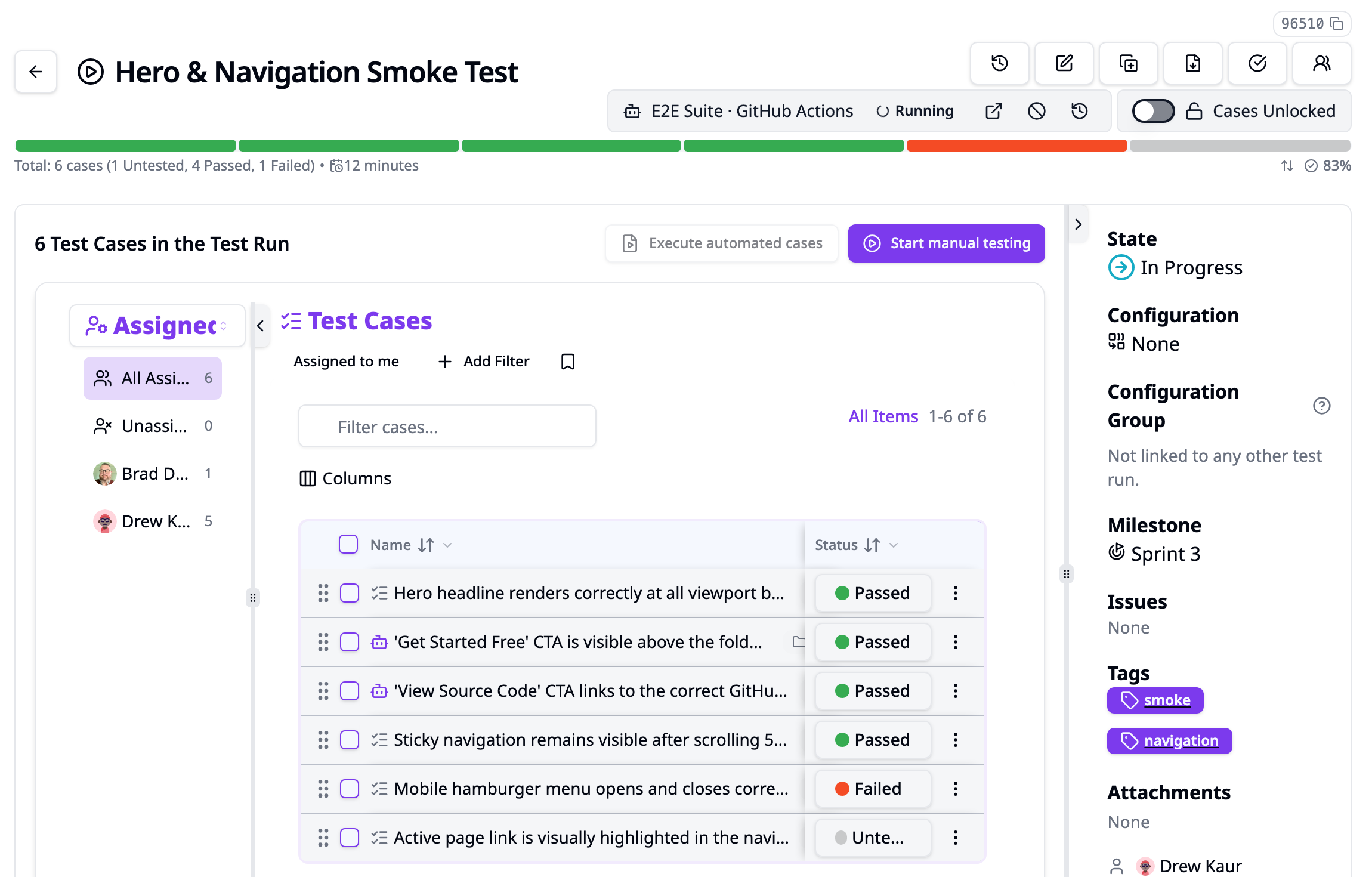
<p>Impact Analysis tells you which tests to run. 1.1 runs them. A test run used to be where automated results <em>ended up</em>; now it is also where they <em>start</em>. Compose the run from the Affected Tests, click <strong>Execute automated cases</strong>, and the automated portion of the run executes in your CI while testers pick up the manual cases. A single automated case gets <strong>Execute automated test</strong> for the same thing in miniature.</p>
<figure><img src="https://docs-v1-2.testplanit.com/img/blog/v1.1-hybrid-run-execution.png" alt="A test run with six cases, two of them automated. The run header shows its execution on the E2E Suite GitHub Actions target as Running, with links to the CI run, cancel, and execution history, next to the Execute automated cases and Start manual testing buttons."><figcaption>The automated cases run in CI while testers work through the manual ones, in the same run.</figcaption></figure>
<p>TestPlanIt starts the job on an <strong>execution target</strong> the project configured — a GitHub Actions workflow, a GitLab CI pipeline, or a signed webhook for anything else — and hands it two things: the run id, and a URL where the job can fetch the <strong>plan</strong> of cases to execute. The job runs the matching tests and reports back with the reporter or CLI you already use, pinned to that run. Every result updates its case in the run, so a run that mixes manual and automated cases stays one checklist with one status per case. Testers can still execute any case by hand, and the newest result wins.</p>
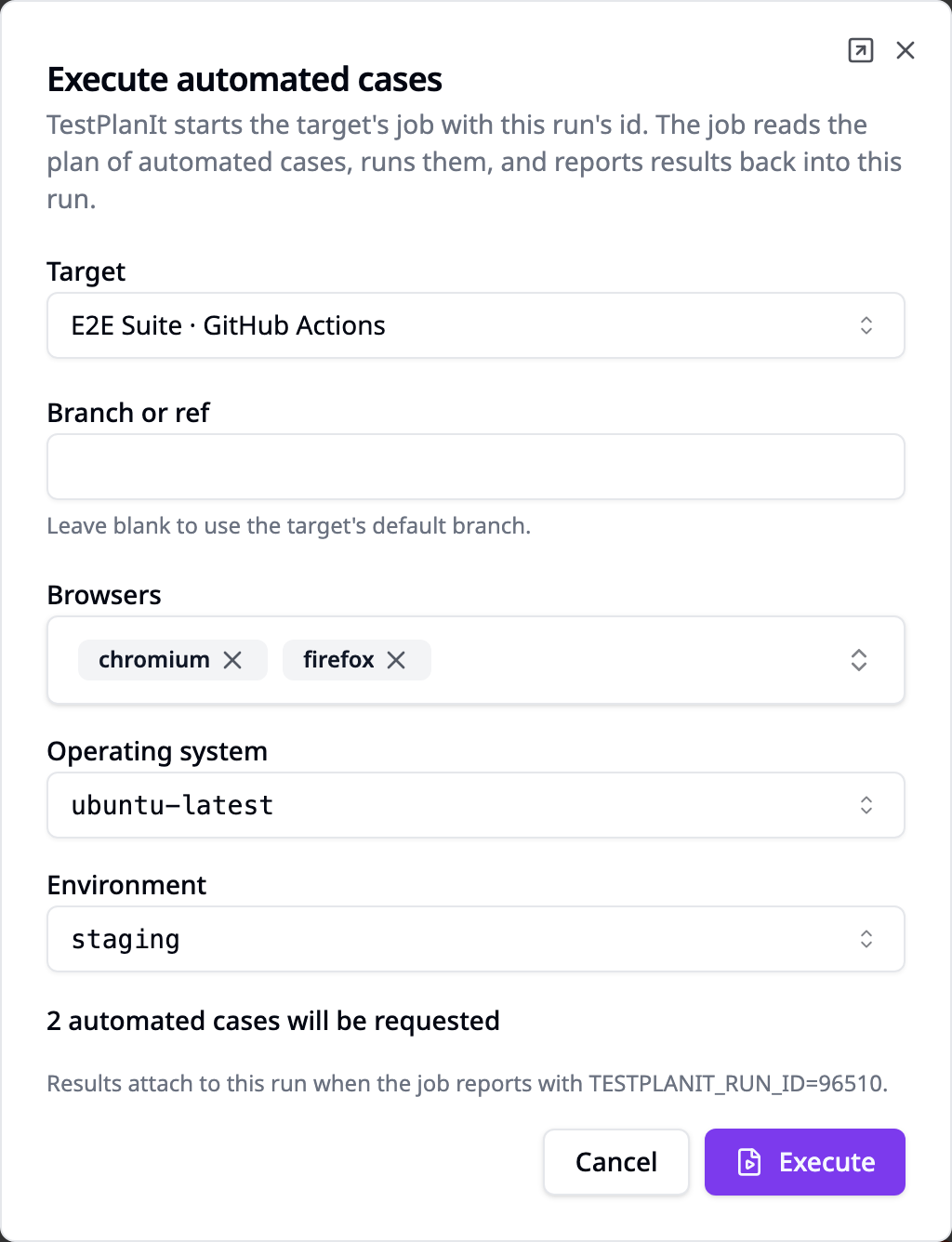
<p>Admins can add <strong>parameters</strong> to a target, like the browsers, operating system, or environment to test against, and whoever executes the run picks from them. Each choice reaches the job as an input, so one workflow covers every combination.</p>
<figure><img src="https://docs-v1-2.testplanit.com/img/blog/v1.1-execute-dialog.png" width="480" alt="The Execute automated cases dialog for a run: the GitHub Actions target, an optional branch, Browsers set to chromium and firefox, Operating system set to ubuntu-latest, Environment set to staging, and a note that 2 automated cases will be requested."><figcaption>Choosing the browsers, operating system, and environment when executing a run.</figcaption></figure>
<p>There is no agent to install and nothing framework-specific inside TestPlanIt. The plan lists each case with the identifiers a runner filter can match on; a short script in your repository turns them into a <code>--grep</code>, <code>-k</code> or <code>--tests</code> expression. Two examples ship with the docs.</p>
<p>We chose this shape deliberately. Tools that launch automation from test management usually either install an agent on your machines or send a list of test ids to CI. Agents are a second product to operate. Test-id lists hit CI limits fast — GitHub caps a dispatch at 25 inputs and 65 KB. TestPlanIt sends a pointer instead, and lets the job pull as many cases as the run holds.</p>
<p>See <a class="" href="https://docs-v1-2.testplanit.com/docs/user-guide/automated-execution/">Automated Execution</a> to set up a target and <a class="" href="https://docs-v1-2.testplanit.com/docs/user-guide/projects/run-details/#hybrid-test-runs">Hybrid Test Runs</a> for how mixed runs behave.</p>
<h2 class="anchor anchorTargetStickyNavbar_cQvB" id="let-the-repository-start-the-run">Let the Repository Start the Run<a href="https://docs-v1-2.testplanit.com/blog/v1.1-release/#let-the-repository-start-the-run" class="hash-link" aria-label="Direct link to Let the Repository Start the Run" title="Direct link to Let the Repository Start the Run" translate="no">​</a></h2>
<p>Impact Analysis and automated execution don't have to wait for someone to click. Add a repository webhook and the repository starts the analysis itself: opening a pull request analyzes it against its target branch, and a push to the base branch analyzes the pushed commits. Each analysis becomes a test run holding the pinned and affected tests, named after the pull request or commit range and linked back to it. A run that came from a merged pull request names that pull request, not just two commit hashes. Set a <strong>minimum score</strong> on the webhook to take every test the analysis ranks at least that high instead.</p>
<p>Turn on <strong>Execute automated cases</strong> for the webhook, and each run's automated cases go to your execution target as soon as the run exists. Manual cases wait in the same run for testers. A pull request opens, and the tests it affects are already running. See <a class="" href="https://docs-v1-2.testplanit.com/docs/user-guide/webhooks/#repository-webhooks">Repository Webhooks</a> and <a class="" href="https://docs-v1-2.testplanit.com/docs/user-guide/webhooks/#executing-automated-cases">Executing automated cases</a>.</p>
<h2 class="anchor anchorTargetStickyNavbar_cQvB" id="never-lose-a-test-case-again">Never Lose a Test Case Again<a href="https://docs-v1-2.testplanit.com/blog/v1.1-release/#never-lose-a-test-case-again" class="hash-link" aria-label="Direct link to Never Lose a Test Case Again" title="Direct link to Never Lose a Test Case Again" translate="no">​</a></h2>
<p>A closed tab, an expired session, or a browser crash no longer costs you the test case you were writing. TestPlanIt keeps your edits as you type and offers them back the next time you open the case, whether you were creating a new one or editing an existing one. Drafts stay private to you and never touch the published case until you click Save. See <a class="" href="https://docs-v1-2.testplanit.com/docs/user-guide/projects/case-draft-autosave/">Auto-Save and Draft Recovery</a>.</p>
<h2 class="anchor anchorTargetStickyNavbar_cQvB" id="one-instance-every-directory">One Instance, Every Directory<a href="https://docs-v1-2.testplanit.com/blog/v1.1-release/#one-instance-every-directory" class="hash-link" aria-label="Direct link to One Instance, Every Directory" title="Direct link to One Instance, Every Directory" translate="no">​</a></h2>
<p>Organizations rarely have one identity provider. 1.1 lets Okta manage your employees and Entra manage your contractors on the same TestPlanIt instance, with each directory owning its own users and neither able to overwrite the other. Rotate a SCIM token without a provisioning outage, hold contractors at the right access tier even when a coarse group would grant more, and scope a group to the projects it works on instead of the whole instance. See <a class="" href="https://docs-v1-2.testplanit.com/docs/user-guide/scim/">SCIM Provisioning</a> and <a class="" href="https://docs-v1-2.testplanit.com/docs/user-guide/groups/#per-project-access">Groups</a>.</p>
<h2 class="anchor anchorTargetStickyNavbar_cQvB" id="deepseek-first-class">DeepSeek, First Class<a href="https://docs-v1-2.testplanit.com/blog/v1.1-release/#deepseek-first-class" class="hash-link" aria-label="Direct link to DeepSeek, First Class" title="Direct link to DeepSeek, First Class" translate="no">​</a></h2>
<p>DeepSeek is now a first-class provider. You could already reach it through the generic OpenAI-compatible endpoint; 1.1 gives it its own integration with model selection, thinking mode, and cost defaults set up for you, so connecting it is one step instead of a workaround. See <a class="" href="https://docs-v1-2.testplanit.com/docs/user-guide/llm-integrations/#deepseek">LLM Integrations</a>.</p>
<h2 class="anchor anchorTargetStickyNavbar_cQvB" id="link-tickets-without-the-busywork">Link Tickets Without the Busywork<a href="https://docs-v1-2.testplanit.com/blog/v1.1-release/#link-tickets-without-the-busywork" class="hash-link" aria-label="Direct link to Link Tickets Without the Busywork" title="Direct link to Link Tickets Without the Busywork" translate="no">​</a></h2>
<p>A ticket key like <code>PROJ-123</code> is now all it takes to link an issue, whether the request comes from a CSV import, the API, or an AI agent working through the MCP server. Nobody has to open the ticket in TestPlanIt first. Migrating an existing repository with thousands of ticket references becomes a single import. See <a class="" href="https://docs-v1-2.testplanit.com/docs/import-export/#linking-issues-on-import">Linking Issues on Import</a> and the <a class="" href="https://docs-v1-2.testplanit.com/docs/sdk/mcp-overview/">MCP Server</a> documentation.</p>
<h2 class="anchor anchorTargetStickyNavbar_cQvB" id="map-a-csv-once">Map a CSV Once<a href="https://docs-v1-2.testplanit.com/blog/v1.1-release/#map-a-csv-once" class="hash-link" aria-label="Direct link to Map a CSV Once" title="Direct link to Map a CSV Once" translate="no">​</a></h2>
<p>Teams that import the same export every week used to re-map the same columns every week. Now you save the column mapping once, with its delimiter, encoding, and row mode, and apply it on the next import. When a file has the same columns as a saved mapping, the wizard suggests it, and one click maps every column. If the file has changed, the wizard tells you which saved columns it couldn't apply.</p>
<p>Share a mapping, and everyone importing with the same template can use it, in every project that uses that template. Saved mappings work in the Test Cases, Shared Steps, and dataset imports. See <a class="" href="https://docs-v1-2.testplanit.com/docs/import-export/#saved-column-mappings">Saved Column Mappings</a>.</p>
<h2 class="anchor anchorTargetStickyNavbar_cQvB" id="save-reports-and-freeze-the-numbers">Save Reports, and Freeze the Numbers<a href="https://docs-v1-2.testplanit.com/blog/v1.1-release/#save-reports-and-freeze-the-numbers" class="hash-link" aria-label="Direct link to Save Reports, and Freeze the Numbers" title="Direct link to Save Reports, and Freeze the Numbers" translate="no">​</a></h2>
<p>The report you build to answer this week's question is usually the one you need next week too. Save any report, pre-built or custom, under a name and a description, and open it again from <strong>Saved Reports</strong> at the top of the Reports page. Saved reports are private to you. A live one reopens with every setting restored and runs against current data.</p>
<p>Dates move with it. Pick <strong>Last week</strong> or <strong>This month</strong> from the date picker, or the new <strong>Last N days, weeks or months</strong>, and a live saved report or share link keeps that meaning: open it next Monday and it covers next Monday's last week, worked out in the timezone of whoever saved it, with the viewer stating the dates it is currently reporting. When the dates matter more than the window, choose <strong>Fixed dates</strong> when you save or share, or pick them on the calendar.</p>
<p>Some numbers must not move. A report shared at release sign-off should show what the team signed off on, not what the data says a month later. Saved reports and share links can now be <strong>frozen</strong>: TestPlanIt captures the results when you save or share, and every open shows exactly those numbers with when they were captured and by whom, in every access mode, including public and password-protected links. Live stays the default, and share lists show which links are live and which are frozen.</p>
<p>See <a class="" href="https://docs-v1-2.testplanit.com/docs/user-guide/projects/reports/#saved-reports">Saved Reports</a> and <a class="" href="https://docs-v1-2.testplanit.com/docs/user-guide/share-links/#live-and-frozen-data">Live and Frozen Data</a>.</p>
<h2 class="anchor anchorTargetStickyNavbar_cQvB" id="and-more">And More<a href="https://docs-v1-2.testplanit.com/blog/v1.1-release/#and-more" class="hash-link" aria-label="Direct link to And More" title="Direct link to And More" translate="no">​</a></h2>
<ul>
<li class=""><strong>Impact reports.</strong> <a class="" href="https://docs-v1-2.testplanit.com/docs/user-guide/projects/reports/impact-analysis-history/">Impact Analysis History</a> and <a class="" href="https://docs-v1-2.testplanit.com/docs/user-guide/projects/reports/code-pin-coverage/">Code Pin Coverage</a> show what each analysis selected and which code your pins cover.</li>
<li class=""><strong>Report Builder totals.</strong> Group rows total their children, and a <strong>Show total line</strong> option sums the plotted series over time. Every pre-built report now filters from one multi-select <strong>Filters</strong> menu.</li>
<li class=""><strong>Everything deleted is in Trash.</strong> <a class="" href="https://docs-v1-2.testplanit.com/docs/user-guide/trash/">Administration → Trash</a> lists every kind of soft-deleted record, ready to restore or purge.</li>
<li class=""><strong>See who can reach a project.</strong> A read-only <a class="" href="https://docs-v1-2.testplanit.com/docs/user-guide/projects/settings/access/">Access</a> page under Project Settings lists every user who can open the project and the role that applies to them.</li>
<li class=""><strong>Details in a new window.</strong> A profile preference opens test cases, review items, and requirements on their own page instead of the docked panel.</li>
<li class=""><strong>A better MCP server.</strong> Rich text comes back as Markdown, so an agent's edit survives the round trip, and results can be recorded per iteration of a data-driven case.</li>
<li class=""><strong>Easier self-hosting.</strong> S3 storage can authenticate through the AWS default credential chain (an instance role or IRSA, no keys in your config), and <code>WORKER_MAX_MEMORY_RESTART</code> and <code>WORKER_MAX_OLD_SPACE_MB</code> raise worker memory limits on busy installs.</li>
</ul>
<h2 class="anchor anchorTargetStickyNavbar_cQvB" id="upgrading">Upgrading<a href="https://docs-v1-2.testplanit.com/blog/v1.1-release/#upgrading" class="hash-link" aria-label="Direct link to Upgrading" title="Direct link to Upgrading" translate="no">​</a></h2>
<p><strong>Back up your database before upgrading.</strong> Migrations apply automatically on container start, or with <code>pnpm db:deploy</code> on a source install. See the <a class="" href="https://docs-v1-2.testplanit.com/docs/installation/#upgrading">upgrade notes</a>.</p>
<ul>
<li class=""><strong>Bundled file storage moves from MinIO to RustFS.</strong> MinIO no longer publishes Docker images, so the storage bundled with Docker Compose and the Helm chart now runs RustFS, an open-source S3-compatible server. A migration script copies your files across and leaves the old directory untouched as a backup. Follow <a class="" href="https://docs-v1-2.testplanit.com/docs/migrating-from-minio/">Migrating from MinIO</a> when you upgrade. Installs that use AWS S3 or their own S3 service are not affected.</li>
<li class=""><strong>Project Settings permission now makes a project admin.</strong> A role with Add/Edit on <strong>Project Settings</strong> makes its holders project admins of every project where it applies, and the role name "Project Admin" no longer carries special meaning. Review your custom roles before upgrading. See <a class="" href="https://docs-v1-2.testplanit.com/docs/user-guide/permissions-guide/#project-admins">Project admins</a>.</li>
<li class=""><strong>Reindex search.</strong> Once the new version is running, run a reindex from <strong>Administration → Search Engine</strong> so requirement data on existing issues is indexed and searchable.</li>
</ul>
<h2 class="anchor anchorTargetStickyNavbar_cQvB" id="thank-you">Thank You<a href="https://docs-v1-2.testplanit.com/blog/v1.1-release/#thank-you" class="hash-link" aria-label="Direct link to Thank You" title="Direct link to Thank You" translate="no">​</a></h2>
<p>To everyone who filed an issue, opened a pull request, translated a locale, or told a colleague about TestPlanIt: this release is yours too.</p>
<ul>
<li class="">Star the repo on <a href="https://github.com/testplanit/testplanit" target="_blank" rel="noopener noreferrer" class="">GitHub</a></li>
<li class="">Follow <a href="https://x.com/TestPlanItHQ" target="_blank" rel="noopener noreferrer" class="">@TestPlanItHQ</a> for updates</li>
<li class="">Join our <a href="https://discord.gg/kpfha4W2JH" target="_blank" rel="noopener noreferrer" class="">Community Discord</a></li>
<li class="">Report issues and suggest features on GitHub</li>
</ul>]]></content>
        <author>
            <name>TestPlanIt Team</name>
            <uri>https://testplanit.com</uri>
        </author>
        <category label="Release" term="Release"/>
        <category label="Announcement" term="Announcement"/>
        <category label="Open Source" term="Open Source"/>
    </entry>
    <entry>
        <title type="html"><![CDATA[TestPlanIt 1.0 Is Here]]></title>
        <id>https://docs-v1-2.testplanit.com/blog/v1.0-release/</id>
        <link href="https://docs-v1-2.testplanit.com/blog/v1.0-release/"/>
        <updated>2026-09-08T00:00:00.000Z</updated>
        <summary type="html"><![CDATA[TestPlanIt reaches 1.0 — the release that completes the feature set we set out to build, graduating a summer-long beta program with unified manual and automated testing, review workflows, AI on your own terms, and a hardened, faster core.]]></summary>
        <content type="html"><![CDATA[<p>Today we're releasing <strong>TestPlanIt v1.0.0</strong>.</p>
<p>Ten months after <a class="" href="https://docs-v1-2.testplanit.com/blog/public/">opening the source</a>, more than forty releases into the 0.x line, and eighteen beta pre-releases later, the version number has caught up with the product: 1.0 completes the feature set we imagined when we started — the platform we always intended TestPlanIt to be.</p>
<h2 class="anchor anchorTargetStickyNavbar_cQvB" id="the-road-to-10">The Road to 1.0<a href="https://docs-v1-2.testplanit.com/blog/v1.0-release/#the-road-to-10" class="hash-link" aria-label="Direct link to The Road to 1.0" title="Direct link to The Road to 1.0" translate="no">​</a></h2>
<p>TestPlanIt went open source in November 2025. Since then the 0.x line grew from a test case repository into a full test management platform: manual and automated execution, exploratory sessions, <a class="" href="https://docs-v1-2.testplanit.com/blog/introducing-parameterized-test-cases/">parameterized test cases</a>, <a class="" href="https://docs-v1-2.testplanit.com/blog/introducing-review-and-approval/">review and approval workflows</a>, <a class="" href="https://docs-v1-2.testplanit.com/blog/introducing-webhooks/">webhooks</a>, an <a class="" href="https://docs-v1-2.testplanit.com/blog/introducing-mcp-server/">MCP server</a>, <a class="" href="https://docs-v1-2.testplanit.com/blog/introducing-scim-provisioning/">SCIM provisioning</a>, <a class="" href="https://docs-v1-2.testplanit.com/blog/data-lake-export/">data lake export</a>, and AI features that run on <a class="" href="https://docs-v1-2.testplanit.com/blog/stop-renting-ai-bring-your-own-llm/">your own LLM</a>.</p>
<p>At the end of June we opened a beta channel and spent the summer finishing the job. Eighteen pre-releases went out to self-hosters who built from source, filed issues, and told us what broke. That feedback loop is the reason 1.0 ships with confidence — thank you to everyone who ran a beta.</p>
<h2 class="anchor anchorTargetStickyNavbar_cQvB" id="what-10-means">What 1.0 Means<a href="https://docs-v1-2.testplanit.com/blog/v1.0-release/#what-10-means" class="hash-link" aria-label="Direct link to What 1.0 Means" title="Direct link to What 1.0 Means" translate="no">​</a></h2>
<p>The 0.x releases were always production-ready — teams have been running TestPlanIt as their system of record for months. What 1.0 marks is completeness: the feature set we originally imagined for the platform is now all here. Along with it:</p>
<ul>
<li class=""><strong>Semantic versioning.</strong> From here on, breaking changes mean a major version, and upgrades within 1.x are routine.</li>
<li class=""><strong>Prebuilt images are back.</strong> The beta channel was source-only; with 1.0, the official Docker images pick the release up again. <code>docker pull</code> gets you the full 1.0 feature set.</li>
<li class=""><strong>A supported upgrade path.</strong> Whether you're coming from the 0.44.3 main line or riding the beta channel, v1.0.0 is the same code graduating to <code>main</code>.</li>
</ul>
<h2 class="anchor anchorTargetStickyNavbar_cQvB" id="whats-new-since-0443">What's New Since 0.44.3<a href="https://docs-v1-2.testplanit.com/blog/v1.0-release/#whats-new-since-0443" class="hash-link" aria-label="Direct link to What's New Since 0.44.3" title="Direct link to What's New Since 0.44.3" translate="no">​</a></h2>
<p>If you stayed on the main line, 1.0 is the biggest set of improvements TestPlanIt has ever shipped at once — <strong>702 commits</strong> since v0.44.3. Here's the complete list.</p>
<h3 class="anchor anchorTargetStickyNavbar_cQvB" id="jira-integration-end-to-end">Jira integration, end to end<a href="https://docs-v1-2.testplanit.com/blog/v1.0-release/#jira-integration-end-to-end" class="hash-link" aria-label="Direct link to Jira integration, end to end" title="Direct link to Jira integration, end to end" translate="no">​</a></h3>
<ul>
<li class=""><strong>Milestone sync</strong> — milestones sync straight from Jira: issue membership, webhooks, and live updates, with milestone imports filterable by Release or Sprint.</li>
<li class=""><strong>A release cockpit</strong> — the milestone page adds burndown with a variance heat strip, a release-readiness "% ready" rollup, a per-case traceability matrix in the PDF export, and an activity log. In-scope issues roll up test cases and results from every linked project.</li>
<li class=""><strong>AI in the Jira panel</strong> — generate test cases and QuickScript automation scripts from the TestPlanIt panel on an issue, without leaving Jira. The panel shows each case's fields per template, with Steps as a count chip that opens a step-list popover — and you can quick-generate cases right from a milestone's scope table.</li>
<li class=""><strong>Self-refreshing OAuth</strong> — expired tokens refresh themselves during background syncs; you're only notified when re-authorization is genuinely needed.</li>
</ul>
<h3 class="anchor anchorTargetStickyNavbar_cQvB" id="ai-generation-that-can-see-your-app">AI generation that can see your app<a href="https://docs-v1-2.testplanit.com/blog/v1.0-release/#ai-generation-that-can-see-your-app" class="hash-link" aria-label="Direct link to AI generation that can see your app" title="Direct link to AI generation that can see your app" translate="no">​</a></h3>
<ul>
<li class=""><strong>Images as context</strong> — pull screenshots from linked Jira issues or Azure DevOps work items, use rich-text documents with embedded images, or let TestPlanIt crawl a URL and capture page screenshots. The AI reads them alongside the text and writes cases that match what's actually on screen.</li>
<li class=""><strong>Any provider</strong> — a multimodal pipeline translates images per provider, so it works with whichever LLM you've connected.</li>
<li class=""><strong>Cost visibility</strong> — a cross-project LLM Usage report shows admins where AI spend goes, and model cost fields auto-fill from provider pricing.</li>
<li class=""><strong>QuickScript anywhere</strong> — generate automation scripts from an API token, the MCP server, or the Jira panel.</li>
</ul>
<h3 class="anchor anchorTargetStickyNavbar_cQvB" id="automated-runs-analyzed">Automated runs, analyzed<a href="https://docs-v1-2.testplanit.com/blog/v1.0-release/#automated-runs-analyzed" class="hash-link" aria-label="Direct link to Automated runs, analyzed" title="Direct link to Automated runs, analyzed" translate="no">​</a></h3>
<ul>
<li class=""><strong>Execution metrics</strong> — per-run metrics and duration, an execution timeline that visualizes real parallelization across workers, within-run flaky detection that understands retry semantics, and result filters to slice big runs.</li>
<li class=""><strong>Live and hands-off</strong> — an Automation Runs card streams live progress, abandoned runs close themselves, explicitly linked cases flip to automated when results arrive, and completed runs can be duplicated straight from the runs list.</li>
<li class=""><strong>Counted correctly</strong> — milestone completion, burndown, member coverage, traceability exports, and project-health metrics resolve automated case status through a single effective-status source, so automated work never reads as "not run".</li>
<li class=""><strong>Agent-readable</strong> — AI agents get it all through the MCP server: automated results, run-case editing, a review-inbox tool, and repository reporting rollups.</li>
</ul>
<h3 class="anchor anchorTargetStickyNavbar_cQvB" id="across-the-app">Across the app<a href="https://docs-v1-2.testplanit.com/blog/v1.0-release/#across-the-app" class="hash-link" aria-label="Direct link to Across the app" title="Direct link to Across the app" translate="no">​</a></h3>
<ul>
<li class=""><strong>A revamped repository</strong> — a dockable, drag-resizable case-details panel; a latest-result column you can sort by; reorderable, resizable columns with remembered order, width, and sort.</li>
<li class=""><strong>Filter across every dimension</strong> — combine multiple filters in one bar with shareable URLs, search inside advanced-filter comboboxes, and save views you return to often.</li>
<li class=""><strong>Review workflows</strong> — request approvals in bulk, work a dedicated review inbox with full case details and decision badges, and track requested reviews in a pending queue with reminders. Approving applies the workflow transition automatically, and reviews cancel themselves when their subject is deleted or moved.</li>
<li class=""><strong>Full result history</strong> — a case's complete history, virtualized to stay fast at any size, with the current run highlighted.</li>
<li class=""><strong>Composition lock</strong> — freeze a run's set of test cases the moment execution starts; manual or auto-lock per project.</li>
<li class=""><strong>Even test distribution</strong> — spread a run's case assignments across the team in one step.</li>
<li class=""><strong>Ready-to-complete notifications</strong> — the right people are notified the moment a run's last result lands, and run and session start/end dates derive from actual results.</li>
<li class=""><strong>Issue list filters</strong> — multi-select status, priority, and issue-type filters.</li>
<li class=""><strong>Infinite-scroll management tables</strong> — issues, users, groups, roles, projects, tags, audit logs, and webhook deliveries load on scroll.</li>
<li class=""><strong>Document previews</strong> — Word, Excel, and PowerPoint render inline, with full-height PDF preview and keyboard navigation.</li>
<li class=""><strong>Link previews</strong> — TestPlanIt links pasted into Slack, Teams, or iMessage unfurl into a card that says what they point to; record details stay private unless the instance opts in.</li>
<li class=""><strong>Sharper duplicate detection</strong> — the compare view highlights the fields that differ with word-level text diffs, and shared-step candidates filter by minimum cases and steps.</li>
<li class=""><strong>Human-readable record keys</strong> — optional project-prefixed identifiers, e.g. PROJ-123.</li>
<li class=""><strong>Accessible Dark theme</strong> — meets WCAG AA, enforced by a CI contrast gate.</li>
<li class=""><strong>17 languages</strong> — including full right-to-left support for Arabic and community-contributed Czech.</li>
<li class=""><strong>Milestone Readiness report</strong> — plots release readiness over time, with automation trends that hold up at scale.</li>
<li class=""><strong>Findable folders</strong> — search the folder tree directly; every folder picker is searchable and virtualized for large trees.</li>
<li class=""><strong>Your work, front and center</strong> — pending reviews sit atop Your Assignments, and profiles gain a role-scoped Assignments section plus a My Comments view with scope filters, search, and infinite scroll.</li>
<li class=""><strong>A user directory with boundaries</strong> — collaborators see only the people who share a project with them.</li>
<li class=""><strong>Guided first sign-in</strong> — new users land on a "Get started" prompt into the create-project wizard.</li>
</ul>
<h3 class="anchor anchorTargetStickyNavbar_cQvB" id="platform--performance">Platform &amp; performance<a href="https://docs-v1-2.testplanit.com/blog/v1.0-release/#platform--performance" class="hash-link" aria-label="Direct link to Platform &amp; performance" title="Direct link to Platform &amp; performance" translate="no">​</a></h3>
<ul>
<li class=""><strong>A rebuilt data and access layer</strong> — the 1.0 foundation: access control enforced at the query layer, two-phase pagination that took the heaviest lists from ~22s to ~270ms, and project access resolved once per request instead of re-asked per query.</li>
<li class=""><strong>Opt-in read-replica routing</strong> — Postgres read/write splitting, entirely in-app.</li>
<li class=""><strong>Official images and a Helm chart</strong> — self-host from prebuilt images with a single-tenant Helm chart; no building from source.</li>
<li class=""><strong>Faster lists everywhere</strong> — runs, users, and audit logs window, prefetch, and stream on scroll, and Trash is redesigned as master-detail with virtualized scrolling.</li>
<li class=""><strong>Operator knobs</strong> — configurable API rate limits, a configurable upload ceiling via <code>UPLOAD_MAX_MB</code>, event-loop lag on <code>/api/health</code>, nginx request timing with local overrides and custom error pages, and capped container logs.</li>
<li class=""><strong>AI Tools admin section</strong> — grouped settings with real provider Test Connection errors.</li>
</ul>
<h3 class="anchor anchorTargetStickyNavbar_cQvB" id="reliability--polish">Reliability &amp; polish<a href="https://docs-v1-2.testplanit.com/blog/v1.0-release/#reliability--polish" class="hash-link" aria-label="Direct link to Reliability &amp; polish" title="Direct link to Reliability &amp; polish" translate="no">​</a></h3>
<ul>
<li class=""><strong>Steadier live updates</strong> — no reconnect refetch storms; connections defer until the browser is idle.</li>
<li class=""><strong>A trustworthy audit trail</strong> — correct actor attribution (API tokens included), rich-text edits captured, readable diffs, richer filtering, and integration credentials encrypted on every write path.</li>
<li class=""><strong>Search that never drifts</strong> — indexing moved to post-commit sync so results always match the database, deletes remove their documents, and search result cards are real links.</li>
<li class=""><strong>Webhooks fan out</strong> — Issue events reach every linked project, and deliveries show which record each one was about.</li>
<li class=""><strong>Edit cases mid-run</strong> — fix a test case in place from the run panel, without leaving execution.</li>
<li class=""><strong>Embedded media, everywhere</strong> — images and videos embedded in descriptions resolve and render wherever they appear.</li>
<li class=""><strong>A long tail of polish</strong> — a modernized header, natural case-insensitive name sorting, no more theme flash, chart metrics correct in every locale, digest emails that skip what you've already read, integration calls that honor Retry-After, and an OpenAPI spec regenerated from the schema with a parity test so it can't drift again.</li>
</ul>
<h2 class="anchor anchorTargetStickyNavbar_cQvB" id="upgrading">Upgrading<a href="https://docs-v1-2.testplanit.com/blog/v1.0-release/#upgrading" class="hash-link" aria-label="Direct link to Upgrading" title="Direct link to Upgrading" translate="no">​</a></h2>
<p><strong>Back up your database before upgrading.</strong> 1.0 moves schema changes to versioned migrations, and a database created by a 0.x release needs a one-time baseline step before its first v1.0 start — see the <a class="" href="https://docs-v1-2.testplanit.com/docs/installation/#upgrading">upgrade notes</a> for the exact commands.</p>
<div class="language-bash codeBlockContainer_sE4S theme-code-block" style="--prism-color:#393A34;--prism-background-color:#f6f8fa"><div class="codeBlockContent_FTHb"><pre tabindex="0" class="prism-code language-bash codeBlock_gTyK thin-scrollbar" style="color:#393A34;background-color:#f6f8fa"><code class="codeBlockLines_tlwV"><div class="token-line" style="color:#393A34"><span class="token plain">git pull origin main</span><br></div><div class="token-line" style="color:#393A34"><span class="token plain">pnpm install</span><br></div><div class="token-line" style="color:#393A34"><span class="token plain">pnpm generate</span><br></div><div class="token-line" style="color:#393A34"><span class="token plain">pnpm db:deploy</span><br></div><div class="token-line" style="color:#393A34"><span class="token plain">pnpm build</span><br></div></code></pre></div></div>
<p>For Docker deployments:</p>
<div class="language-bash codeBlockContainer_sE4S theme-code-block" style="--prism-color:#393A34;--prism-background-color:#f6f8fa"><div class="codeBlockContent_FTHb"><pre tabindex="0" class="prism-code language-bash codeBlock_gTyK thin-scrollbar" style="color:#393A34;background-color:#f6f8fa"><code class="codeBlockLines_tlwV"><div class="token-line" style="color:#393A34"><span class="token plain">docker pull ghcr.io/testplanit/testplanit-selfhost:latest</span><br></div></code></pre></div></div>
<p>Self-hosted deployments use the <code>testplanit-selfhost</code> image — domain-agnostic, so one image serves any hostname, and published for both <code>linux/amd64</code> and <code>linux/arm64</code>.</p>
<p>If you've been on the beta channel, v1.0.0 is the graduation of that line — upgrade as usual.</p>
<h2 class="anchor anchorTargetStickyNavbar_cQvB" id="whats-next">What's Next<a href="https://docs-v1-2.testplanit.com/blog/v1.0-release/#whats-next" class="hash-link" aria-label="Direct link to What's Next" title="Direct link to What's Next" translate="no">​</a></h2>
<p>1.0 is a milestone, not a finish line. Work is already underway on requirements management — linking requirements to test cases and results for end-to-end traceability, our most-requested feature — with more to come driven by your feedback.</p>
<h2 class="anchor anchorTargetStickyNavbar_cQvB" id="thank-you">Thank You<a href="https://docs-v1-2.testplanit.com/blog/v1.0-release/#thank-you" class="hash-link" aria-label="Direct link to Thank You" title="Direct link to Thank You" translate="no">​</a></h2>
<p>To everyone who filed an issue, opened a pull request, translated a locale, ran a beta build, or told a colleague about TestPlanIt: this release is yours too.</p>
<ul>
<li class="">Star the repo on <a href="https://github.com/testplanit/testplanit" target="_blank" rel="noopener noreferrer" class="">GitHub</a></li>
<li class="">Follow <a href="https://x.com/TestPlanItHQ" target="_blank" rel="noopener noreferrer" class="">@TestPlanItHQ</a> for updates</li>
<li class="">Join our <a href="https://discord.gg/kpfha4W2JH" target="_blank" rel="noopener noreferrer" class="">Community Discord</a></li>
<li class="">Report issues and suggest features on GitHub</li>
</ul>
<p>Here's to 1.0 — and to everything your team ships with it.</p>]]></content>
        <author>
            <name>TestPlanIt Team</name>
            <uri>https://testplanit.com</uri>
        </author>
        <category label="Release" term="Release"/>
        <category label="Announcement" term="Announcement"/>
        <category label="Open Source" term="Open Source"/>
    </entry>
    <entry>
        <title type="html"><![CDATA[Your Automated Tests Now Come With Steps]]></title>
        <id>https://docs-v1-2.testplanit.com/blog/automated-tests-with-steps/</id>
        <link href="https://docs-v1-2.testplanit.com/blog/automated-tests-with-steps/"/>
        <updated>2026-06-19T00:00:00.000Z</updated>
        <summary type="html"><![CDATA[Importing automation results used to give you a name and a green checkmark. Now TestPlanIt derives readable Steps from the automation itself — and for tests that have no structure, your own LLM writes them in the background.]]></summary>
        <content type="html"><![CDATA[<p>Import a thousand automated test results into most test management tools and you get a thousand rows that say <em>passed</em> or <em>failed</em> — against a test name and nothing else. The "test case" is an empty shell. If you want it to actually describe what was tested, someone types the steps in by hand.</p>
<p>TestPlanIt now fills in those steps for you. When an automated result creates or matches a case, the case's <strong>Steps</strong> (each an action and its expected result) are derived from the automation that produced it — so your automated cases read like real, reviewable test cases instead of opaque green/red rows.</p>
<h2 class="anchor anchorTargetStickyNavbar_cQvB" id="steps-derived-from-the-automation-itself">Steps, derived from the automation itself<a href="https://docs-v1-2.testplanit.com/blog/automated-tests-with-steps/#steps-derived-from-the-automation-itself" class="hash-link" aria-label="Direct link to Steps, derived from the automation itself" title="Direct link to Steps, derived from the automation itself" translate="no">​</a></h2>
<p>Plenty of automated tests already describe their own structure — you just have to read it the right way. TestPlanIt does, <strong>deterministically</strong> (no AI, no guessing, identical every time):</p>
<ul>
<li class=""><strong>Cucumber / Gherkin</strong> — each <code>Given</code> and <code>When</code> line becomes a step, and a <code>Then</code> becomes the expected result of the step before it, so the assertion lands right next to the action it verifies.</li>
<li class=""><strong>Playwright</strong> — each <code>test.step()</code> title becomes a step, and a nested assertion becomes its expected result.</li>
</ul>
<p>Because a single shared mapping powers this, a test produces the <strong>same</strong> Steps whether you import its results or report them live from a run with the <a class="" href="https://docs-v1-2.testplanit.com/docs/sdk/wdio-test-cases/">WebdriverIO</a> or <a class="" href="https://docs-v1-2.testplanit.com/blog/playwright-reporter/">Playwright</a> reporters. Your automated suite stops being a black box and becomes documentation that's always in sync with the code.</p>
<h2 class="anchor anchorTargetStickyNavbar_cQvB" id="and-the-tests-that-have-no-steps-your-ai-writes-them">And the tests that have <em>no</em> steps? Your AI writes them<a href="https://docs-v1-2.testplanit.com/blog/automated-tests-with-steps/#and-the-tests-that-have-no-steps-your-ai-writes-them" class="hash-link" aria-label="Direct link to and-the-tests-that-have-no-steps-your-ai-writes-them" title="Direct link to and-the-tests-that-have-no-steps-your-ai-writes-them" translate="no">​</a></h2>
<p>Here's where it gets really interesting.</p>
<p>Frameworks like <strong>Mocha and Jasmine</strong> have no native step structure — to a test management system, a test surfaces as just a name and a pass/fail. So in other tools, those cases stay empty forever.</p>
<p>TestPlanIt does something different. It feeds <strong>your own LLM</strong> the actual sequence of commands each test executed — every navigation, element lookup, click, keystroke, and assertion — and turns that command stream into readable, user-facing steps that describe what the test <em>actually did</em>, not a guess from its title. Those commands reach it two ways: the <a class="" href="https://docs-v1-2.testplanit.com/docs/sdk/wdio-test-cases/">WebdriverIO reporter</a> captures them live during the run, and many <strong>imported</strong> result files already embed them — a WebdriverIO junit report, for example, records every command in its output, and TestPlanIt reads it the same way. Only when a result carries no commands at all does it fall back to inferring the steps from the test's descriptive name.</p>
<ul>
<li class=""><strong>It's your AI, your data.</strong> Derivation uses the LLM integration you've already set up for the project — <a class="" href="https://docs-v1-2.testplanit.com/blog/stop-renting-ai-bring-your-own-llm/">bring-your-own</a> OpenAI, Anthropic, Gemini, Azure, or a self-hosted model. Configuring a provider <em>is</em> the opt-in; if you haven't, the feature is completely inert.</li>
<li class=""><strong>It runs in the background.</strong> Suites and imports run at the scale of thousands of cases, so derivation is never done inline — it's queued as a background job and never slows your CI run or your import down.</li>
<li class=""><strong>A human stays in the loop.</strong> When the steps are ready, whoever ran the suite or import gets an <strong>"AI-Derived Test Steps Ready"</strong> notification linking straight to the run, so they can review the steps for accuracy. They're a strong starting point, not gospel — and you can <a class="" href="https://docs-v1-2.testplanit.com/docs/user-guide/prompt-configurations/">tune the prompt</a> that generates them.</li>
</ul>
<p>So a Mocha suite that used to land as a wall of bare names now becomes test cases that actually describe the flow they exercise — derived from the commands they ran, by the model you trust, on infrastructure you control.</p>
<h2 class="anchor anchorTargetStickyNavbar_cQvB" id="safe-by-default--it-never-overwrites-your-work">Safe by default — it never overwrites your work<a href="https://docs-v1-2.testplanit.com/blog/automated-tests-with-steps/#safe-by-default--it-never-overwrites-your-work" class="hash-link" aria-label="Direct link to Safe by default — it never overwrites your work" title="Direct link to Safe by default — it never overwrites your work" translate="no">​</a></h2>
<p>Derivation only ever touches a case that has <strong>no steps</strong>. The moment a case has steps — whether you wrote them, edited them, or they were derived earlier — that case is the source of truth and is left alone. Re-import all you like; your edits are never clobbered.</p>
<p>When you <em>do</em> want a clean re-sync, both the importer and the reporters expose an opt-in, deliberately destructive <code>overwriteSteps</code> switch (off by default) that replaces a case's steps every run — including via the AI path.</p>
<h2 class="anchor anchorTargetStickyNavbar_cQvB" id="turning-it-on">Turning it on<a href="https://docs-v1-2.testplanit.com/blog/automated-tests-with-steps/#turning-it-on" class="hash-link" aria-label="Direct link to Turning it on" title="Direct link to Turning it on" translate="no">​</a></h2>
<ul>
<li class=""><strong>Deterministic steps</strong> (Cucumber, Playwright, WebdriverIO) work out of the box — no setting to flip.</li>
<li class=""><strong>AI-derived steps</strong> for low-structure tests just need an <a class="" href="https://docs-v1-2.testplanit.com/docs/user-guide/llm-integrations/#project-assignment">LLM provider assigned to the project</a>. Both entry points support it: the <a class="" href="https://docs-v1-2.testplanit.com/docs/import-export/#automated-test-results-import">Automated Test Results Import</a> and the WebdriverIO reporter (for Mocha/Jasmine runs, with <code>captureSteps</code> on).</li>
</ul>
<p>Full details are in <a class="" href="https://docs-v1-2.testplanit.com/docs/user-guide/llm-step-derivation/">Test Step Derivation</a>.</p>
<h2 class="anchor anchorTargetStickyNavbar_cQvB" id="why-it-matters">Why it matters<a href="https://docs-v1-2.testplanit.com/blog/automated-tests-with-steps/#why-it-matters" class="hash-link" aria-label="Direct link to Why it matters" title="Direct link to Why it matters" translate="no">​</a></h2>
<p>Test management tools have spent years treating manual and automated testing as two separate worlds — rich, documented cases on one side, anonymous pass/fail counters on the other. This collapses that gap. Your automated results become first-class test cases: readable, reviewable, traceable, and useful to the next person who has to understand what coverage you actually have — without anyone retyping a single step.</p>
<p>That's the kind of living documentation teams keep meaning to write and never do. Now it writes itself.</p>]]></content>
        <author>
            <name>Brad DerManouelian</name>
            <uri>https://testplanit.com</uri>
        </author>
        <category label="Announcement" term="Announcement"/>
        <category label="Test Management" term="Test Management"/>
    </entry>
    <entry>
        <title type="html"><![CDATA[Generate Test Cases Without Leaving Jira]]></title>
        <id>https://docs-v1-2.testplanit.com/blog/generate-test-cases-in-jira/</id>
        <link href="https://docs-v1-2.testplanit.com/blog/generate-test-cases-in-jira/"/>
        <updated>2026-06-13T00:00:00.000Z</updated>
        <summary type="html"><![CDATA[The TestPlanIt for Jira app now generates AI test cases right inside the issue panel — streamed live, dropped into the folder you choose, and linked back to the ticket.]]></summary>
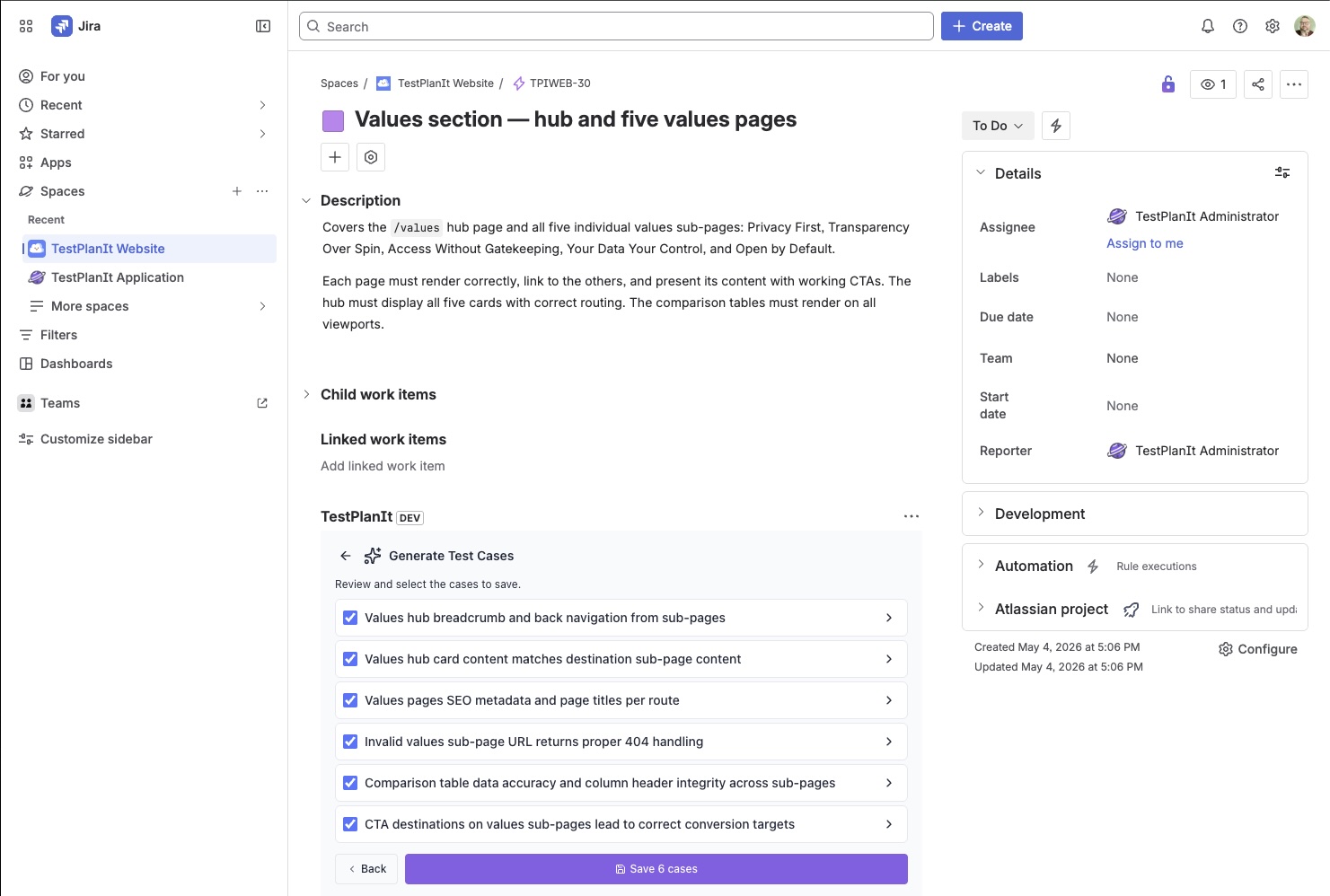
        <content type="html"><![CDATA[<figure><img src="https://docs-v1-2.testplanit.com/img/blog/jira_test_case_generation.jpg" alt="The TestPlanIt panel embedded in a Jira issue (TPIWEB-30), showing the Generate Test Cases review step: six AI-generated test cases with checkboxes — covering breadcrumb navigation, card content, SEO metadata, 404 handling, comparison-table integrity, and CTA destinations — above a purple Save 6 cases button."><figcaption>Generated cases stream into the TestPlanIt panel right inside the Jira issue — review, select, and save without leaving the ticket.</figcaption></figure>
<p>Your team plans and triages in Jira. Now AI test case generation happens there too. The <a class="" href="https://docs-v1-2.testplanit.com/docs/sdk/jira-forge-app/"><strong>TestPlanIt for Jira</strong></a> app's issue panel has a new <strong>Generate Test Cases</strong> button: open a ticket, generate a suite of test cases from it, review them as they stream in, and save them straight into TestPlanIt — linked back to the issue — without a single context switch.</p>
<h2 class="anchor anchorTargetStickyNavbar_cQvB" id="wherever-your-team-works">Wherever your team works<a href="https://docs-v1-2.testplanit.com/blog/generate-test-cases-in-jira/#wherever-your-team-works" class="hash-link" aria-label="Direct link to Wherever your team works" title="Direct link to Wherever your team works" translate="no">​</a></h2>
<p>Not everyone lives in the same tool. Testers and QA leads often spend their day in their test management system; developers, product owners, and the people triaging the backlog spend theirs in Jira. Turning a ticket into test coverage shouldn't depend on which window you happen to have open.</p>
<p>You could already generate test cases from an issue inside TestPlanIt. Now you can do it from the Jira issue panel too — same generator, same results. Whichever tool you're already in, you stay there.</p>
<h2 class="anchor anchorTargetStickyNavbar_cQvB" id="the-full-engine-in-the-panel">The full engine, in the panel<a href="https://docs-v1-2.testplanit.com/blog/generate-test-cases-in-jira/#the-full-engine-in-the-panel" class="hash-link" aria-label="Direct link to The full engine, in the panel" title="Direct link to The full engine, in the panel" translate="no">​</a></h2>
<p>This isn't a stripped-down sidecar. The panel runs the same generation pipeline as the in-app wizard:</p>
<ul>
<li class=""><strong>Your LLM, your data.</strong> Generation uses the LLM integration you've configured for the project — bring-your-own OpenAI, Anthropic, Gemini, Azure, or a self-hosted model. Nothing is sent to a third-party AI we picked for you.</li>
<li class=""><strong>The same rich context.</strong> It feeds the AI the issue's title, description, and comments, the <strong>linked Jira issues</strong> (one hop — Epics, blockers, related tickets) with their own bodies and comments, and the existing test cases in the destination folder so it complements your coverage instead of duplicating it.</li>
<li class=""><strong>Real permissions, real attribution.</strong> The panel maps your Jira account to your TestPlanIt user and enforces your project access. Generated cases are authored by <em>you</em>, not a faceless service account. If your account isn't linked or lacks access, the button simply doesn't appear.</li>
<li class=""><strong>Live streaming.</strong> Cases appear as they're generated, so you can start reviewing immediately instead of staring at a spinner.</li>
</ul>
<h2 class="anchor anchorTargetStickyNavbar_cQvB" id="why-this-is-different">Why this is different<a href="https://docs-v1-2.testplanit.com/blog/generate-test-cases-in-jira/#why-this-is-different" class="hash-link" aria-label="Direct link to Why this is different" title="Direct link to Why this is different" translate="no">​</a></h2>
<p>Plenty of tools can ask an AI to write test cases. The differentiator is what happens next. Here the output isn't a throwaway block of text you copy somewhere — each case is a first-class test case in your repository: versioned, templated, taggable, linked to the originating ticket, and ready to drop into a test run. The generation happens where the work already is, and the result lands where your test coverage already lives.</p>
<p>That round trip — ticket to reviewed, linked, runnable test cases — happens without ever leaving the issue.</p>
<h2 class="anchor anchorTargetStickyNavbar_cQvB" id="try-it">Try it<a href="https://docs-v1-2.testplanit.com/blog/generate-test-cases-in-jira/#try-it" class="hash-link" aria-label="Direct link to Try it" title="Direct link to Try it" translate="no">​</a></h2>
<p>Install the <a class="" href="https://docs-v1-2.testplanit.com/docs/sdk/jira-forge-app/"><strong>TestPlanIt for Jira</strong></a> app and start turning tickets into test coverage straight from the issue panel.</p>
<p><a class="" href="https://docs-v1-2.testplanit.com/docs/user-guide/llm-test-generation/#generating-from-the-jira-issue-panel">Read the full documentation →</a></p>]]></content>
        <author>
            <name>Brad DerManouelian</name>
            <uri>https://testplanit.com</uri>
        </author>
        <category label="Announcement" term="Announcement"/>
        <category label="Integration" term="Integration"/>
    </entry>
    <entry>
        <title type="html"><![CDATA[Introducing SCIM 2.0: Your IdP Just Got the Keys]]></title>
        <id>https://docs-v1-2.testplanit.com/blog/introducing-scim-provisioning/</id>
        <link href="https://docs-v1-2.testplanit.com/blog/introducing-scim-provisioning/"/>
        <updated>2026-06-09T00:00:00.000Z</updated>
        <summary type="html"><![CDATA[TestPlanIt v0.24.0 ships SCIM 2.0 provisioning. New hires get accounts on day one without anyone clicking 'Add User.' Departures take effect the moment HR closes the loop. Group membership shifts with reorgs. Audit trails write themselves.]]></summary>
        <content type="html"><![CDATA[<p>You hire someone. HR adds them to your identity provider. They walk into the office on Monday, sit down, open their laptop, and TestPlanIt is already there waiting for them — the right groups already attached, no "hey can you add me to the right project?" Slack DM.</p>
<p>That's the picture with SCIM 2.0. SAML put your IdP in charge of who can sign in to TestPlanIt; SCIM puts your IdP in charge of who exists at all.</p>
<h2 class="anchor anchorTargetStickyNavbar_cQvB" id="where-saml-left-off">Where SAML Left Off<a href="https://docs-v1-2.testplanit.com/blog/introducing-scim-provisioning/#where-saml-left-off" class="hash-link" aria-label="Direct link to Where SAML Left Off" title="Direct link to Where SAML Left Off" translate="no">​</a></h2>
<p>SAML has been in TestPlanIt for a while now, and if you've got it wired up to Okta, Entra, or any other IdP, sign-in is already a solved problem. New hires use their corporate account. Departures lose access the moment their IdP account is disabled.</p>
<p>SAML answers <em>who can sign in</em>. It doesn't answer <em>who exists, who they're grouped with, and whether they're active right now</em>.</p>
<p>The first time a user signs in via SAML, TestPlanIt creates an account for them — that's auto-provisioning. From that point on, the row is TestPlanIt's. Their group memberships are something an admin picked in TestPlanIt. Their role is something an admin picked in TestPlanIt. When someone changes teams or gets promoted, somebody opens <strong>Admin → Users</strong> and clicks. When someone leaves, the IdP closes the sign-in door, but the TestPlanIt row stays active and visible until an admin flips it inactive or deletes it. Audit history isn't at risk either way — TestPlanIt has always soft-deleted users so attribution survives — but somebody had to remember to do the tidy-up.</p>
<p>SCIM closes the gap. Where SAML gives the IdP the keys to the front door, SCIM gives it the keys to the user list. New hires get added. Group changes flow through. Departures get marked inactive automatically. The row still sticks around for audit purposes; it just stops showing up in active-user pickers without anyone clicking.</p>
<h2 class="anchor anchorTargetStickyNavbar_cQvB" id="what-that-buys-you">What That Buys You<a href="https://docs-v1-2.testplanit.com/blog/introducing-scim-provisioning/#what-that-buys-you" class="hash-link" aria-label="Direct link to What That Buys You" title="Direct link to What That Buys You" translate="no">​</a></h2>
<p>Your identity provider — Okta, Microsoft Entra, OneLogin, anything that speaks SCIM 2.0 — keeps TestPlanIt's user list in sync the same way it keeps every other enterprise tool's user list in sync. New hires show up in TestPlanIt automatically the instant they're added to the right IdP group, with the right groups already attached. Departures flip to inactive the moment HR closes the loop in the IdP. Reorgs that move someone from QA to Engineering shift their TestPlanIt group membership without anyone touching TestPlanIt.</p>
<p>You stop maintaining TestPlanIt's user list and start letting the IdP do its job — same way you already do for the other twenty SaaS tools in your stack.</p>
<h2 class="anchor anchorTargetStickyNavbar_cQvB" id="what-changes-for-admins">What Changes for Admins<a href="https://docs-v1-2.testplanit.com/blog/introducing-scim-provisioning/#what-changes-for-admins" class="hash-link" aria-label="Direct link to What Changes for Admins" title="Direct link to What Changes for Admins" translate="no">​</a></h2>
<p>A lot less work. A few specific things to know:</p>
<p><strong>You won't accidentally rename a SCIM-managed user.</strong> The Users and Groups admin pages add a small <strong>SCIM</strong> badge to anyone provisioned through the IdP, and the edit / delete / password actions go quiet for those rows. The IdP is the source of truth — if you need to change a SCIM user, change them where they came from. The lockdown isn't there to restrict you; it's there to prevent the kind of two-system disagreement that takes hours to debug because everything looks correct in isolation.</p>
<p><strong>Your auditors get a clean answer.</strong> "How do you provision and deprovision users?" — "SCIM 2.0, here's the audit log filtered to the SCIM source, here's the originating token, here's every change with a timestamp." Done.</p>
<p><strong>Bulk sync won't blow up your Slack channel.</strong> The first time your IdP runs a full push — 2,000 new users on Monday morning — the outbound webhook system folds the flood into summary events instead of 2,000 individual Slack pings. Routine day-to-day syncs stay 1:1.</p>
<p><strong>Setup is one page.</strong> Mint a token at <strong>Admin → Authentication → SCIM Provisioning</strong>, paste it into your IdP, click <strong>Test SCIM</strong>. If the test reports green, your IdP is going to work. If it reports red, you find out now instead of when payroll's 6 AM new-hire push runs and you have to explain why three people don't have access on their first day.</p>
<h2 class="anchor anchorTargetStickyNavbar_cQvB" id="what-doesnt-change">What Doesn't Change<a href="https://docs-v1-2.testplanit.com/blog/introducing-scim-provisioning/#what-doesnt-change" class="hash-link" aria-label="Direct link to What Doesn't Change" title="Direct link to What Doesn't Change" translate="no">​</a></h2>
<p>The good stuff. TestPlanIt is still TestPlanIt — the test cases, the runs, the sessions, the integrations, the reports, your data. SCIM only takes over the identity layer. Local accounts still work for the cases where they should (your demo logins, your admin-of-last-resort, your "we don't have an IdP" deployments). Self-registration, Magic Link, SSO — none of it goes away. SCIM is opt-in, layered on top.</p>
<h2 class="anchor anchorTargetStickyNavbar_cQvB" id="who-this-is-for">Who This Is For<a href="https://docs-v1-2.testplanit.com/blog/introducing-scim-provisioning/#who-this-is-for" class="hash-link" aria-label="Direct link to Who This Is For" title="Direct link to Who This Is For" translate="no">​</a></h2>
<p>If you're at a 50-person company already signing in via Okta SAML, SCIM is the obvious next step. The day you connect it, your onboarding checklist gets a line shorter, your offboarding cleanup goes from "check TestPlanIt for stale accounts" to "nothing to check," and group memberships stop being a thing somebody has to remember to set.</p>
<p>If you're at a 500-person company, the manual user management was already untenable. SCIM is the version of TestPlanIt you can stand behind in a security review.</p>
<p>If you're at a 5-person company, you probably don't need SCIM yet. We're still glad to have you. The local sign-up flow is right where you left it.</p>
<h2 class="anchor anchorTargetStickyNavbar_cQvB" id="how-to-get-it">How to Get It<a href="https://docs-v1-2.testplanit.com/blog/introducing-scim-provisioning/#how-to-get-it" class="hash-link" aria-label="Direct link to How to Get It" title="Direct link to How to Get It" translate="no">​</a></h2>
<ol>
<li class="">Update to TestPlanIt v0.24.0.</li>
<li class="">Open <strong>Admin → Authentication → SCIM Provisioning</strong> and mint a token.</li>
<li class="">Drop the token into your IdP's SCIM connector — Okta, Entra, and OneLogin all work out of the box, and any other spec-compliant client will too.</li>
<li class="">(Optional) Subscribe a Slack channel or a custom HMAC endpoint to the SCIM lifecycle events at <strong>Admin → Tools &amp; Integrations → System Webhooks</strong> so provisioning activity mirrors into your existing ops channels. Same machinery as the <a class="" href="https://docs-v1-2.testplanit.com/blog/introducing-webhooks/">project-level webhooks</a>, just scoped to system events.</li>
</ol>
<p>Full setup walkthroughs for the three IdPs we tested most heavily live at <a class="" href="https://docs-v1-2.testplanit.com/docs/user-guide/scim/">SCIM Provisioning</a> in the docs.</p>]]></content>
        <author>
            <name>Brad DerManouelian</name>
            <uri>https://testplanit.com</uri>
        </author>
        <category label="Release" term="Release"/>
        <category label="Announcement" term="Announcement"/>
        <category label="Integration" term="Integration"/>
    </entry>
    <entry>
        <title type="html"><![CDATA[Announcing the Playwright Reporter for TestPlanIt]]></title>
        <id>https://docs-v1-2.testplanit.com/blog/playwright-reporter/</id>
        <link href="https://docs-v1-2.testplanit.com/blog/playwright-reporter/"/>
        <updated>2026-06-06T00:00:00.000Z</updated>
        <summary type="html"><![CDATA[Automatically send your Playwright test results to TestPlanIt with our new official reporter package.]]></summary>
        <content type="html"><![CDATA[<figure><img src="https://docs-v1-2.testplanit.com/img/blog/playwright-reporter.png" alt="A playwright.config.ts file with @testplanit/playwright-reporter added to the reporter list, configured with a TestPlanIt domain, an apiToken from an environment variable, a projectId, and a runName."><figcaption>Add <code>@testplanit/playwright-reporter</code> to your <code>playwright.config.ts</code> — that's the whole setup.</figcaption></figure>
<p>We're excited to announce <code>@testplanit/playwright-reporter</code>, an official <a href="https://playwright.dev/" target="_blank" rel="noopener noreferrer" class="">Playwright</a> reporter that automatically sends your test results to TestPlanIt in real-time.</p>
<h2 class="anchor anchorTargetStickyNavbar_cQvB" id="why-a-playwright-reporter">Why a Playwright Reporter?<a href="https://docs-v1-2.testplanit.com/blog/playwright-reporter/#why-a-playwright-reporter" class="hash-link" aria-label="Direct link to Why a Playwright Reporter?" title="Direct link to Why a Playwright Reporter?" translate="no">​</a></h2>
<p>Playwright is one of the fastest-growing browser automation frameworks, and it's the engine behind countless teams' E2E suites. Until now, getting Playwright results into TestPlanIt meant exporting JUnit XML and importing it via the CLI. That works, but it adds steps and loses context.</p>
<p>The new reporter pushes results directly to TestPlanIt as your tests run — and because Playwright runs reporters in a single main process, there's nothing extra to wire up. One reporter sees every worker, project, and spec, and reports them all to a single test run. No launcher service, no worker-coordination flags.</p>
<h2 class="anchor anchorTargetStickyNavbar_cQvB" id="key-features">Key Features<a href="https://docs-v1-2.testplanit.com/blog/playwright-reporter/#key-features" class="hash-link" aria-label="Direct link to Key Features" title="Direct link to Key Features" translate="no">​</a></h2>
<h3 class="anchor anchorTargetStickyNavbar_cQvB" id="real-time-reporting">Real-Time Reporting<a href="https://docs-v1-2.testplanit.com/blog/playwright-reporter/#real-time-reporting" class="hash-link" aria-label="Direct link to Real-Time Reporting" title="Direct link to Real-Time Reporting" translate="no">​</a></h3>
<p>Results are sent to TestPlanIt as each test completes. You can watch your test run populate live.</p>
<h3 class="anchor anchorTargetStickyNavbar_cQvB" id="link-tests-to-test-cases--without-renaming-anything">Link Tests to Test Cases — Without Renaming Anything<a href="https://docs-v1-2.testplanit.com/blog/playwright-reporter/#link-tests-to-test-cases--without-renaming-anything" class="hash-link" aria-label="Direct link to Link Tests to Test Cases — Without Renaming Anything" title="Direct link to Link Tests to Test Cases — Without Renaming Anything" translate="no">​</a></h3>
<p>Established suites shouldn't have to rename every test to <code>[1234] …</code>. Use a Playwright annotation to attach the case ID as metadata and keep your titles clean:</p>
<div class="language-typescript codeBlockContainer_sE4S theme-code-block" style="--prism-color:#393A34;--prism-background-color:#f6f8fa"><div class="codeBlockContent_FTHb"><pre tabindex="0" class="prism-code language-typescript codeBlock_gTyK thin-scrollbar" style="color:#393A34;background-color:#f6f8fa"><code class="codeBlockLines_tlwV"><div class="token-line" style="color:#393A34"><span class="token keyword" style="color:#00009f">import</span><span class="token plain"> </span><span class="token punctuation" style="color:#393A34">{</span><span class="token plain"> test</span><span class="token punctuation" style="color:#393A34">,</span><span class="token plain"> expect </span><span class="token punctuation" style="color:#393A34">}</span><span class="token plain"> </span><span class="token keyword" style="color:#00009f">from</span><span class="token plain"> </span><span class="token string" style="color:#e3116c">'@playwright/test'</span><span class="token punctuation" style="color:#393A34">;</span><span class="token plain"></span><br></div><div class="token-line" style="color:#393A34"><span class="token plain" style="display:inline-block"></span><br></div><div class="token-line" style="color:#393A34"><span class="token plain"></span><span class="token function" style="color:#d73a49">test</span><span class="token punctuation" style="color:#393A34">(</span><span class="token string" style="color:#e3116c">'should login with valid credentials'</span><span class="token punctuation" style="color:#393A34">,</span><span class="token plain"> </span><span class="token punctuation" style="color:#393A34">{</span><span class="token plain"></span><br></div><div class="token-line" style="color:#393A34"><span class="token plain">  annotation</span><span class="token operator" style="color:#393A34">:</span><span class="token plain"> </span><span class="token punctuation" style="color:#393A34">{</span><span class="token plain"> type</span><span class="token operator" style="color:#393A34">:</span><span class="token plain"> </span><span class="token string" style="color:#e3116c">'testplanit'</span><span class="token punctuation" style="color:#393A34">,</span><span class="token plain"> description</span><span class="token operator" style="color:#393A34">:</span><span class="token plain"> </span><span class="token string" style="color:#e3116c">'1234'</span><span class="token plain"> </span><span class="token punctuation" style="color:#393A34">}</span><span class="token punctuation" style="color:#393A34">,</span><span class="token plain"></span><br></div><div class="token-line" style="color:#393A34"><span class="token plain"></span><span class="token punctuation" style="color:#393A34">}</span><span class="token punctuation" style="color:#393A34">,</span><span class="token plain"> </span><span class="token keyword" style="color:#00009f">async</span><span class="token plain"> </span><span class="token punctuation" style="color:#393A34">(</span><span class="token punctuation" style="color:#393A34">{</span><span class="token plain"> page </span><span class="token punctuation" style="color:#393A34">}</span><span class="token punctuation" style="color:#393A34">)</span><span class="token plain"> </span><span class="token operator" style="color:#393A34">=&gt;</span><span class="token plain"> </span><span class="token punctuation" style="color:#393A34">{</span><span class="token plain"></span><br></div><div class="token-line" style="color:#393A34"><span class="token plain">  </span><span class="token comment" style="color:#999988;font-style:italic">// Links to TestPlanIt case #1234 — no case ID in the title</span><span class="token plain"></span><br></div><div class="token-line" style="color:#393A34"><span class="token plain">  </span><span class="token keyword" style="color:#00009f">await</span><span class="token plain"> page</span><span class="token punctuation" style="color:#393A34">.</span><span class="token function" style="color:#d73a49">goto</span><span class="token punctuation" style="color:#393A34">(</span><span class="token string" style="color:#e3116c">'/login'</span><span class="token punctuation" style="color:#393A34">)</span><span class="token punctuation" style="color:#393A34">;</span><span class="token plain"></span><br></div><div class="token-line" style="color:#393A34"><span class="token plain">  </span><span class="token comment" style="color:#999988;font-style:italic">// ...</span><span class="token plain"></span><br></div><div class="token-line" style="color:#393A34"><span class="token plain"></span><span class="token punctuation" style="color:#393A34">}</span><span class="token punctuation" style="color:#393A34">)</span><span class="token punctuation" style="color:#393A34">;</span><br></div></code></pre></div></div>
<p>Prefer tags or titles? Those work too — a <code>@C1234</code> tag or a <code>[1234]</code> in the title are both matched by the configurable <code>caseIdPattern</code>. Mix and match; the reporter de-duplicates.</p>
<h3 class="anchor anchorTargetStickyNavbar_cQvB" id="auto-create-test-cases">Auto-Create Test Cases<a href="https://docs-v1-2.testplanit.com/blog/playwright-reporter/#auto-create-test-cases" class="hash-link" aria-label="Direct link to Auto-Create Test Cases" title="Direct link to Auto-Create Test Cases" translate="no">​</a></h3>
<p>Don't want to create test cases manually first? Enable <code>autoCreateTestCases</code> and the reporter will create them for you:</p>
<div class="language-typescript codeBlockContainer_sE4S theme-code-block" style="--prism-color:#393A34;--prism-background-color:#f6f8fa"><div class="codeBlockContent_FTHb"><pre tabindex="0" class="prism-code language-typescript codeBlock_gTyK thin-scrollbar" style="color:#393A34;background-color:#f6f8fa"><code class="codeBlockLines_tlwV"><div class="token-line" style="color:#393A34"><span class="token punctuation" style="color:#393A34">[</span><span class="token string" style="color:#e3116c">'@testplanit/playwright-reporter'</span><span class="token punctuation" style="color:#393A34">,</span><span class="token plain"> </span><span class="token punctuation" style="color:#393A34">{</span><span class="token plain"></span><br></div><div class="token-line" style="color:#393A34"><span class="token plain">  domain</span><span class="token operator" style="color:#393A34">:</span><span class="token plain"> </span><span class="token string" style="color:#e3116c">'https://testplanit.example.com'</span><span class="token punctuation" style="color:#393A34">,</span><span class="token plain"></span><br></div><div class="token-line" style="color:#393A34"><span class="token plain">  apiToken</span><span class="token operator" style="color:#393A34">:</span><span class="token plain"> process</span><span class="token punctuation" style="color:#393A34">.</span><span class="token plain">env</span><span class="token punctuation" style="color:#393A34">.</span><span class="token constant" style="color:#36acaa">TESTPLANIT_API_TOKEN</span><span class="token punctuation" style="color:#393A34">,</span><span class="token plain"></span><br></div><div class="token-line" style="color:#393A34"><span class="token plain">  projectId</span><span class="token operator" style="color:#393A34">:</span><span class="token plain"> </span><span class="token number" style="color:#36acaa">1</span><span class="token punctuation" style="color:#393A34">,</span><span class="token plain"></span><br></div><div class="token-line" style="color:#393A34"><span class="token plain">  autoCreateTestCases</span><span class="token operator" style="color:#393A34">:</span><span class="token plain"> </span><span class="token boolean" style="color:#36acaa">true</span><span class="token punctuation" style="color:#393A34">,</span><span class="token plain"></span><br></div><div class="token-line" style="color:#393A34"><span class="token plain">  parentFolderId</span><span class="token operator" style="color:#393A34">:</span><span class="token plain"> </span><span class="token string" style="color:#e3116c">'Automated Tests'</span><span class="token punctuation" style="color:#393A34">,</span><span class="token plain"></span><br></div><div class="token-line" style="color:#393A34"><span class="token plain">  templateId</span><span class="token operator" style="color:#393A34">:</span><span class="token plain"> </span><span class="token string" style="color:#e3116c">'Default Template'</span><span class="token punctuation" style="color:#393A34">,</span><span class="token plain"></span><br></div><div class="token-line" style="color:#393A34"><span class="token plain"></span><span class="token punctuation" style="color:#393A34">}</span><span class="token punctuation" style="color:#393A34">]</span><br></div></code></pre></div></div>
<p>On first run, test cases are created automatically. On subsequent runs, results link to the existing cases.</p>
<h3 class="anchor anchorTargetStickyNavbar_cQvB" id="attachment-uploads">Attachment Uploads<a href="https://docs-v1-2.testplanit.com/blog/playwright-reporter/#attachment-uploads" class="hash-link" aria-label="Direct link to Attachment Uploads" title="Direct link to Attachment Uploads" translate="no">​</a></h3>
<p>Playwright already captures rich evidence — screenshots, videos, and traces. The reporter uploads all of it to the matching result, including anything you add with <code>testInfo.attach()</code>:</p>
<div class="language-typescript codeBlockContainer_sE4S theme-code-block" style="--prism-color:#393A34;--prism-background-color:#f6f8fa"><div class="codeBlockContent_FTHb"><pre tabindex="0" class="prism-code language-typescript codeBlock_gTyK thin-scrollbar" style="color:#393A34;background-color:#f6f8fa"><code class="codeBlockLines_tlwV"><div class="token-line" style="color:#393A34"><span class="token comment" style="color:#999988;font-style:italic">// playwright.config.ts</span><span class="token plain"></span><br></div><div class="token-line" style="color:#393A34"><span class="token plain">use</span><span class="token operator" style="color:#393A34">:</span><span class="token plain"> </span><span class="token punctuation" style="color:#393A34">{</span><span class="token plain"></span><br></div><div class="token-line" style="color:#393A34"><span class="token plain">  screenshot</span><span class="token operator" style="color:#393A34">:</span><span class="token plain"> </span><span class="token string" style="color:#e3116c">'only-on-failure'</span><span class="token punctuation" style="color:#393A34">,</span><span class="token plain"></span><br></div><div class="token-line" style="color:#393A34"><span class="token plain">  video</span><span class="token operator" style="color:#393A34">:</span><span class="token plain"> </span><span class="token string" style="color:#e3116c">'retain-on-failure'</span><span class="token punctuation" style="color:#393A34">,</span><span class="token plain"></span><br></div><div class="token-line" style="color:#393A34"><span class="token plain">  trace</span><span class="token operator" style="color:#393A34">:</span><span class="token plain"> </span><span class="token string" style="color:#e3116c">'on-first-retry'</span><span class="token punctuation" style="color:#393A34">,</span><span class="token plain"></span><br></div><div class="token-line" style="color:#393A34"><span class="token plain"></span><span class="token punctuation" style="color:#393A34">}</span><span class="token punctuation" style="color:#393A34">,</span><br></div></code></pre></div></div>
<p>Want to keep uploads lean? Filter with <code>attachmentTypes: ['image/']</code> to upload screenshots only.</p>
<h3 class="anchor anchorTargetStickyNavbar_cQvB" id="folder-hierarchy-from-describe-blocks">Folder Hierarchy from Describe Blocks<a href="https://docs-v1-2.testplanit.com/blog/playwright-reporter/#folder-hierarchy-from-describe-blocks" class="hash-link" aria-label="Direct link to Folder Hierarchy from Describe Blocks" title="Direct link to Folder Hierarchy from Describe Blocks" translate="no">​</a></h3>
<p>With <code>createFolderHierarchy</code>, your nested <code>test.describe</code> blocks become folders in TestPlanIt:</p>
<div class="language-typescript codeBlockContainer_sE4S theme-code-block" style="--prism-color:#393A34;--prism-background-color:#f6f8fa"><div class="codeBlockContent_FTHb"><pre tabindex="0" class="prism-code language-typescript codeBlock_gTyK thin-scrollbar" style="color:#393A34;background-color:#f6f8fa"><code class="codeBlockLines_tlwV"><div class="token-line" style="color:#393A34"><span class="token plain">test</span><span class="token punctuation" style="color:#393A34">.</span><span class="token function" style="color:#d73a49">describe</span><span class="token punctuation" style="color:#393A34">(</span><span class="token string" style="color:#e3116c">'Authentication'</span><span class="token punctuation" style="color:#393A34">,</span><span class="token plain"> </span><span class="token punctuation" style="color:#393A34">(</span><span class="token punctuation" style="color:#393A34">)</span><span class="token plain"> </span><span class="token operator" style="color:#393A34">=&gt;</span><span class="token plain"> </span><span class="token punctuation" style="color:#393A34">{</span><span class="token plain"></span><br></div><div class="token-line" style="color:#393A34"><span class="token plain">  test</span><span class="token punctuation" style="color:#393A34">.</span><span class="token function" style="color:#d73a49">describe</span><span class="token punctuation" style="color:#393A34">(</span><span class="token string" style="color:#e3116c">'Login'</span><span class="token punctuation" style="color:#393A34">,</span><span class="token plain"> </span><span class="token punctuation" style="color:#393A34">(</span><span class="token punctuation" style="color:#393A34">)</span><span class="token plain"> </span><span class="token operator" style="color:#393A34">=&gt;</span><span class="token plain"> </span><span class="token punctuation" style="color:#393A34">{</span><span class="token plain"></span><br></div><div class="token-line" style="color:#393A34"><span class="token plain">    </span><span class="token function" style="color:#d73a49">test</span><span class="token punctuation" style="color:#393A34">(</span><span class="token string" style="color:#e3116c">'should login successfully'</span><span class="token punctuation" style="color:#393A34">,</span><span class="token plain"> </span><span class="token keyword" style="color:#00009f">async</span><span class="token plain"> </span><span class="token punctuation" style="color:#393A34">(</span><span class="token punctuation" style="color:#393A34">{</span><span class="token plain"> page </span><span class="token punctuation" style="color:#393A34">}</span><span class="token punctuation" style="color:#393A34">)</span><span class="token plain"> </span><span class="token operator" style="color:#393A34">=&gt;</span><span class="token plain"> </span><span class="token punctuation" style="color:#393A34">{</span><span class="token plain"></span><br></div><div class="token-line" style="color:#393A34"><span class="token plain">      </span><span class="token comment" style="color:#999988;font-style:italic">// Creates: Authentication &gt; Login &gt; "should login successfully"</span><span class="token plain"></span><br></div><div class="token-line" style="color:#393A34"><span class="token plain">    </span><span class="token punctuation" style="color:#393A34">}</span><span class="token punctuation" style="color:#393A34">)</span><span class="token punctuation" style="color:#393A34">;</span><span class="token plain"></span><br></div><div class="token-line" style="color:#393A34"><span class="token plain">  </span><span class="token punctuation" style="color:#393A34">}</span><span class="token punctuation" style="color:#393A34">)</span><span class="token punctuation" style="color:#393A34">;</span><span class="token plain"></span><br></div><div class="token-line" style="color:#393A34"><span class="token plain"></span><span class="token punctuation" style="color:#393A34">}</span><span class="token punctuation" style="color:#393A34">)</span><span class="token punctuation" style="color:#393A34">;</span><br></div></code></pre></div></div>
<h3 class="anchor anchorTargetStickyNavbar_cQvB" id="full-retry-history">Full Retry History<a href="https://docs-v1-2.testplanit.com/blog/playwright-reporter/#full-retry-history" class="hash-link" aria-label="Direct link to Full Retry History" title="Direct link to Full Retry History" translate="no">​</a></h3>
<p>Playwright reports each retry attempt, and so does the reporter — a flaky test that fails then passes records both results against the same case, so you keep the full attempt history.</p>
<h2 class="anchor anchorTargetStickyNavbar_cQvB" id="quick-start">Quick Start<a href="https://docs-v1-2.testplanit.com/blog/playwright-reporter/#quick-start" class="hash-link" aria-label="Direct link to Quick Start" title="Direct link to Quick Start" translate="no">​</a></h2>
<p>Install the package:</p>
<div class="language-bash codeBlockContainer_sE4S theme-code-block" style="--prism-color:#393A34;--prism-background-color:#f6f8fa"><div class="codeBlockContent_FTHb"><pre tabindex="0" class="prism-code language-bash codeBlock_gTyK thin-scrollbar" style="color:#393A34;background-color:#f6f8fa"><code class="codeBlockLines_tlwV"><div class="token-line" style="color:#393A34"><span class="token plain">npm install --save-dev @testplanit/playwright-reporter</span><br></div></code></pre></div></div>
<p>Add it to your Playwright config alongside your existing reporters:</p>
<div class="language-typescript codeBlockContainer_sE4S theme-code-block" style="--prism-color:#393A34;--prism-background-color:#f6f8fa"><div class="codeBlockContent_FTHb"><pre tabindex="0" class="prism-code language-typescript codeBlock_gTyK thin-scrollbar" style="color:#393A34;background-color:#f6f8fa"><code class="codeBlockLines_tlwV"><div class="token-line" style="color:#393A34"><span class="token comment" style="color:#999988;font-style:italic">// playwright.config.ts</span><span class="token plain"></span><br></div><div class="token-line" style="color:#393A34"><span class="token plain"></span><span class="token keyword" style="color:#00009f">import</span><span class="token plain"> </span><span class="token punctuation" style="color:#393A34">{</span><span class="token plain"> defineConfig </span><span class="token punctuation" style="color:#393A34">}</span><span class="token plain"> </span><span class="token keyword" style="color:#00009f">from</span><span class="token plain"> </span><span class="token string" style="color:#e3116c">'@playwright/test'</span><span class="token punctuation" style="color:#393A34">;</span><span class="token plain"></span><br></div><div class="token-line" style="color:#393A34"><span class="token plain" style="display:inline-block"></span><br></div><div class="token-line" style="color:#393A34"><span class="token plain"></span><span class="token keyword" style="color:#00009f">export</span><span class="token plain"> </span><span class="token keyword" style="color:#00009f">default</span><span class="token plain"> </span><span class="token function" style="color:#d73a49">defineConfig</span><span class="token punctuation" style="color:#393A34">(</span><span class="token punctuation" style="color:#393A34">{</span><span class="token plain"></span><br></div><div class="token-line" style="color:#393A34"><span class="token plain">  reporter</span><span class="token operator" style="color:#393A34">:</span><span class="token plain"> </span><span class="token punctuation" style="color:#393A34">[</span><span class="token plain"></span><br></div><div class="token-line" style="color:#393A34"><span class="token plain">    </span><span class="token punctuation" style="color:#393A34">[</span><span class="token string" style="color:#e3116c">'list'</span><span class="token punctuation" style="color:#393A34">]</span><span class="token punctuation" style="color:#393A34">,</span><span class="token plain"></span><br></div><div class="token-line" style="color:#393A34"><span class="token plain">    </span><span class="token punctuation" style="color:#393A34">[</span><span class="token string" style="color:#e3116c">'@testplanit/playwright-reporter'</span><span class="token punctuation" style="color:#393A34">,</span><span class="token plain"> </span><span class="token punctuation" style="color:#393A34">{</span><span class="token plain"></span><br></div><div class="token-line" style="color:#393A34"><span class="token plain">      domain</span><span class="token operator" style="color:#393A34">:</span><span class="token plain"> </span><span class="token string" style="color:#e3116c">'https://your-instance.testplanit.com'</span><span class="token punctuation" style="color:#393A34">,</span><span class="token plain"></span><br></div><div class="token-line" style="color:#393A34"><span class="token plain">      apiToken</span><span class="token operator" style="color:#393A34">:</span><span class="token plain"> process</span><span class="token punctuation" style="color:#393A34">.</span><span class="token plain">env</span><span class="token punctuation" style="color:#393A34">.</span><span class="token constant" style="color:#36acaa">TESTPLANIT_API_TOKEN</span><span class="token punctuation" style="color:#393A34">,</span><span class="token plain"></span><br></div><div class="token-line" style="color:#393A34"><span class="token plain">      projectId</span><span class="token operator" style="color:#393A34">:</span><span class="token plain"> </span><span class="token number" style="color:#36acaa">1</span><span class="token punctuation" style="color:#393A34">,</span><span class="token plain"></span><br></div><div class="token-line" style="color:#393A34"><span class="token plain">    </span><span class="token punctuation" style="color:#393A34">}</span><span class="token punctuation" style="color:#393A34">]</span><span class="token punctuation" style="color:#393A34">,</span><span class="token plain"></span><br></div><div class="token-line" style="color:#393A34"><span class="token plain">  </span><span class="token punctuation" style="color:#393A34">]</span><span class="token punctuation" style="color:#393A34">,</span><span class="token plain"></span><br></div><div class="token-line" style="color:#393A34"><span class="token plain"></span><span class="token punctuation" style="color:#393A34">}</span><span class="token punctuation" style="color:#393A34">)</span><span class="token punctuation" style="color:#393A34">;</span><br></div></code></pre></div></div>
<p>Run your tests:</p>
<div class="language-bash codeBlockContainer_sE4S theme-code-block" style="--prism-color:#393A34;--prism-background-color:#f6f8fa"><div class="codeBlockContent_FTHb"><pre tabindex="0" class="prism-code language-bash codeBlock_gTyK thin-scrollbar" style="color:#393A34;background-color:#f6f8fa"><code class="codeBlockLines_tlwV"><div class="token-line" style="color:#393A34"><span class="token plain">npx playwright test</span><br></div></code></pre></div></div>
<p>After completion, you'll see a summary:</p>
<div class="language-text codeBlockContainer_sE4S theme-code-block" style="--prism-color:#393A34;--prism-background-color:#f6f8fa"><div class="codeBlockContent_FTHb"><pre tabindex="0" class="prism-code language-text codeBlock_gTyK thin-scrollbar" style="color:#393A34;background-color:#f6f8fa"><code class="codeBlockLines_tlwV"><div class="token-line" style="color:#393A34"><span class="token plain">[TestPlanIt] Results Summary</span><br></div><div class="token-line" style="color:#393A34"><span class="token plain">[TestPlanIt] ═══════════════════════════════════════════════════════════</span><br></div><div class="token-line" style="color:#393A34"><span class="token plain">[TestPlanIt]   Test Run ID: 123</span><br></div><div class="token-line" style="color:#393A34"><span class="token plain">[TestPlanIt]   Duration: 45.2s</span><br></div><div class="token-line" style="color:#393A34"><span class="token plain">[TestPlanIt]</span><br></div><div class="token-line" style="color:#393A34"><span class="token plain">[TestPlanIt]   Test Results:</span><br></div><div class="token-line" style="color:#393A34"><span class="token plain">[TestPlanIt]     ✓ Passed:  15</span><br></div><div class="token-line" style="color:#393A34"><span class="token plain">[TestPlanIt]     ✗ Failed:  2</span><br></div><div class="token-line" style="color:#393A34"><span class="token plain">[TestPlanIt]     ○ Skipped: 1</span><br></div><div class="token-line" style="color:#393A34"><span class="token plain">[TestPlanIt]</span><br></div><div class="token-line" style="color:#393A34"><span class="token plain">[TestPlanIt]   View results: https://your-instance.testplanit.com/projects/runs/1/123</span><br></div><div class="token-line" style="color:#393A34"><span class="token plain">[TestPlanIt] ═══════════════════════════════════════════════════════════</span><br></div></code></pre></div></div>
<h2 class="anchor anchorTargetStickyNavbar_cQvB" id="cicd-ready">CI/CD Ready<a href="https://docs-v1-2.testplanit.com/blog/playwright-reporter/#cicd-ready" class="hash-link" aria-label="Direct link to CI/CD Ready" title="Direct link to CI/CD Ready" translate="no">​</a></h2>
<p>The reporter works seamlessly in CI/CD pipelines:</p>
<p><strong>GitHub Actions:</strong></p>
<div class="language-yaml codeBlockContainer_sE4S theme-code-block" style="--prism-color:#393A34;--prism-background-color:#f6f8fa"><div class="codeBlockContent_FTHb"><pre tabindex="0" class="prism-code language-yaml codeBlock_gTyK thin-scrollbar" style="color:#393A34;background-color:#f6f8fa"><code class="codeBlockLines_tlwV"><div class="token-line" style="color:#393A34"><span class="token punctuation" style="color:#393A34">-</span><span class="token plain"> </span><span class="token key atrule" style="color:#00a4db">name</span><span class="token punctuation" style="color:#393A34">:</span><span class="token plain"> Run E2E tests</span><br></div><div class="token-line" style="color:#393A34"><span class="token plain">  </span><span class="token key atrule" style="color:#00a4db">env</span><span class="token punctuation" style="color:#393A34">:</span><span class="token plain"></span><br></div><div class="token-line" style="color:#393A34"><span class="token plain">    </span><span class="token key atrule" style="color:#00a4db">TESTPLANIT_API_TOKEN</span><span class="token punctuation" style="color:#393A34">:</span><span class="token plain"> $</span><span class="token punctuation" style="color:#393A34">{</span><span class="token punctuation" style="color:#393A34">{</span><span class="token plain"> secrets.TESTPLANIT_API_TOKEN </span><span class="token punctuation" style="color:#393A34">}</span><span class="token punctuation" style="color:#393A34">}</span><span class="token plain"></span><br></div><div class="token-line" style="color:#393A34"><span class="token plain">  </span><span class="token key atrule" style="color:#00a4db">run</span><span class="token punctuation" style="color:#393A34">:</span><span class="token plain"> npx playwright test</span><br></div></code></pre></div></div>
<p>Include build information in your run names:</p>
<div class="language-typescript codeBlockContainer_sE4S theme-code-block" style="--prism-color:#393A34;--prism-background-color:#f6f8fa"><div class="codeBlockContent_FTHb"><pre tabindex="0" class="prism-code language-typescript codeBlock_gTyK thin-scrollbar" style="color:#393A34;background-color:#f6f8fa"><code class="codeBlockLines_tlwV"><div class="token-line" style="color:#393A34"><span class="token plain">runName</span><span class="token operator" style="color:#393A34">:</span><span class="token plain"> </span><span class="token template-string template-punctuation string" style="color:#e3116c">`</span><span class="token template-string string" style="color:#e3116c">Build #</span><span class="token template-string interpolation interpolation-punctuation punctuation" style="color:#393A34">${</span><span class="token template-string interpolation">process</span><span class="token template-string interpolation punctuation" style="color:#393A34">.</span><span class="token template-string interpolation">env</span><span class="token template-string interpolation punctuation" style="color:#393A34">.</span><span class="token template-string interpolation constant" style="color:#36acaa">GITHUB_RUN_NUMBER</span><span class="token template-string interpolation interpolation-punctuation punctuation" style="color:#393A34">}</span><span class="token template-string string" style="color:#e3116c"> - {browser} - {date}</span><span class="token template-string template-punctuation string" style="color:#e3116c">`</span><span class="token punctuation" style="color:#393A34">,</span><br></div></code></pre></div></div>
<h2 class="anchor anchorTargetStickyNavbar_cQvB" id="documentation">Documentation<a href="https://docs-v1-2.testplanit.com/blog/playwright-reporter/#documentation" class="hash-link" aria-label="Direct link to Documentation" title="Direct link to Documentation" translate="no">​</a></h2>
<p>For complete configuration options, examples, and advanced features like custom case ID patterns, attachment filtering, and milestone/configuration associations, see the <a class="" href="https://docs-v1-2.testplanit.com/docs/sdk/playwright-overview/">Playwright Reporter documentation</a>.</p>
<h2 class="anchor anchorTargetStickyNavbar_cQvB" id="get-started">Get Started<a href="https://docs-v1-2.testplanit.com/blog/playwright-reporter/#get-started" class="hash-link" aria-label="Direct link to Get Started" title="Direct link to Get Started" translate="no">​</a></h2>
<p>The <code>@testplanit/playwright-reporter</code> package is available on npm:</p>
<div class="language-bash codeBlockContainer_sE4S theme-code-block" style="--prism-color:#393A34;--prism-background-color:#f6f8fa"><div class="codeBlockContent_FTHb"><pre tabindex="0" class="prism-code language-bash codeBlock_gTyK thin-scrollbar" style="color:#393A34;background-color:#f6f8fa"><code class="codeBlockLines_tlwV"><div class="token-line" style="color:#393A34"><span class="token plain">npm install --save-dev @testplanit/playwright-reporter</span><br></div></code></pre></div></div>
<h2 class="anchor anchorTargetStickyNavbar_cQvB" id="get-involved">Get Involved<a href="https://docs-v1-2.testplanit.com/blog/playwright-reporter/#get-involved" class="hash-link" aria-label="Direct link to Get Involved" title="Direct link to Get Involved" translate="no">​</a></h2>
<ul>
<li class="">Star the repo on <a href="https://github.com/testplanit/testplanit" target="_blank" rel="noopener noreferrer" class="">GitHub</a></li>
<li class="">Follow <a href="https://x.com/TestPlanItHQ" target="_blank" rel="noopener noreferrer" class="">@TestPlanItHQ</a> for updates</li>
<li class="">Join our <a href="https://discord.gg/kpfha4W2JH" target="_blank" rel="noopener noreferrer" class="">Community Discord</a></li>
<li class="">Report issues and suggest features on GitHub</li>
</ul>
<p>Happy testing!</p>]]></content>
        <author>
            <name>TestPlanIt Team</name>
            <uri>https://testplanit.com</uri>
        </author>
        <category label="Announcement" term="Announcement"/>
        <category label="Integration" term="Integration"/>
    </entry>
    <entry>
        <title type="html"><![CDATA[Introducing Automation Candidates: Which Manual Test Should You Automate Next?]]></title>
        <id>https://docs-v1-2.testplanit.com/blog/introducing-automation-candidates/</id>
        <link href="https://docs-v1-2.testplanit.com/blog/introducing-automation-candidates/"/>
        <updated>2026-06-01T00:00:00.000Z</updated>
        <summary type="html"><![CDATA[TestPlanIt's new Automation Candidates report tells you which manual cases to automate next, with a per-case rationale grounded in real execution data — and still works without an LLM.]]></summary>
        <content type="html"><![CDATA[<p>You have hundreds of manual test cases and finite bandwidth to automate them. Which ones first? Most teams answer by gut feel — or by whichever case failed last regression. But the case that runs in every regression and recovers an hour of tester time each run beats the one that bit you last sprint and won't bite again for six months. You can't see that on a list.</p>
<p>TestPlanIt now ships <strong><a class="" href="https://docs-v1-2.testplanit.com/docs/user-guide/projects/reports/automation-candidates/">Automation Candidates</a></strong> — an AI-ranked report that tells you which manual cases to automate next, with a one-sentence rationale for every case explaining why it landed where it did. Pick a strategy, click Run.</p>
<h2 class="anchor anchorTargetStickyNavbar_cQvB" id="pick-the-strategy-not-the-cases">Pick the Strategy, Not the Cases<a href="https://docs-v1-2.testplanit.com/blog/introducing-automation-candidates/#pick-the-strategy-not-the-cases" class="hash-link" aria-label="Direct link to Pick the Strategy, Not the Cases" title="Direct link to Pick the Strategy, Not the Cases" translate="no">​</a></h2>
<p>What "next to automate" means depends on what your team is optimizing for this quarter, so you pick:</p>
<ul>
<li class=""><strong>Most Executed (highest ROI)</strong> — <em>default.</em> The most-run cases; every future regression that touches them recovers tester time.</li>
<li class=""><strong>Flakiest First</strong> — Cases whose outcomes flip the most. A deterministic oracle replaces a flaky manual judgment and stops eating time on every retry.</li>
<li class=""><strong>Longest to Execute</strong> — Highest manual-execution forecast. Automating a 45-minute case recovers far more than a 5-minute one.</li>
<li class=""><strong>Oldest First</strong> — Long-lived, settled cases. Safer to automate without rework.</li>
<li class=""><strong>Newest First</strong> — Recently authored cases, before new coverage accumulates.</li>
<li class=""><strong>Random Sample</strong> — An unbiased control to sanity-check the others.</li>
</ul>
<p>The strategy isn't just a filter — it's the primary signal the ranker uses. Switching strategies regenerates the report and gives a genuinely different recommendation.</p>
<h2 class="anchor anchorTargetStickyNavbar_cQvB" id="the-ai-reads-more-than-the-number">The AI Reads More Than the Number<a href="https://docs-v1-2.testplanit.com/blog/introducing-automation-candidates/#the-ai-reads-more-than-the-number" class="hash-link" aria-label="Direct link to The AI Reads More Than the Number" title="Direct link to The AI Reads More Than the Number" translate="no">​</a></h2>
<p>With an LLM integration configured, the report sends each eligible case's full context — name, custom field values resolved to human-readable names, step count, execution count, flakiness, manual-execution forecast, and any drilled-down metadata from issues linked in Jira, GitHub, Azure DevOps, GitLab, or Gitea/Forgejo.</p>
<p>The model doesn't just sort by your chosen metric — it reads each case and weighs the metric against business signals. A case tagged critical-area and linked to a high-severity issue ranks differently than one with the same execution count and no such context. Each gets a one-sentence rationale, which is what makes the report hand-to-a-planning-meeting actionable rather than a list you still have to interpret.</p>
<h2 class="anchor anchorTargetStickyNavbar_cQvB" id="works-even-without-an-llm">Works Even Without an LLM<a href="https://docs-v1-2.testplanit.com/blog/introducing-automation-candidates/#works-even-without-an-llm" class="hash-link" aria-label="Direct link to Works Even Without an LLM" title="Direct link to Works Even Without an LLM" translate="no">​</a></h2>
<p>Plenty of teams want this report before a project-level LLM is configured. So Automation Candidates ships with a <strong>heuristic fallback</strong>: it ranks deterministically by the selected strategy's metric, scores each case 0–100 against the eligible-set maximum, and labels the snapshot with a <strong>Heuristic</strong> badge so viewers know the reasoning is metric-only. The summary points to <em>Admin → AI Models</em> for the richer LLM reasoning when you're ready.</p>
<p>Heuristic rationales are localized to the generator's preferred language, matching how the LLM path responds in the prompt's language — a French QA lead sees French rationales, a Japanese tester sees Japanese.</p>
<h2 class="anchor anchorTargetStickyNavbar_cQvB" id="shared-snapshots-not-live-views">Shared Snapshots, Not Live Views<a href="https://docs-v1-2.testplanit.com/blog/introducing-automation-candidates/#shared-snapshots-not-live-views" class="hash-link" aria-label="Direct link to Shared Snapshots, Not Live Views" title="Direct link to Shared Snapshots, Not Live Views" translate="no">​</a></h2>
<p>This report benefits from being a snapshot. When your manager opens it Monday, they should see the ranking the QA lead shared Friday — even if execution data has shifted or five candidates have since been automated.</p>
<p>Every generation produces a snapshot; regenerating appends a new one to the history rather than replacing it. The history dropdown labels each with its strategy — "Automation Candidates ranked by Most Executed (highest ROI) — Jun 1, 2026 5:38 PM" — so you can compare lenses and pick the one that fits the conversation.</p>
<h2 class="anchor anchorTargetStickyNavbar_cQvB" id="where-to-find-it">Where to Find It<a href="https://docs-v1-2.testplanit.com/blog/introducing-automation-candidates/#where-to-find-it" class="hash-link" aria-label="Direct link to Where to Find It" title="Direct link to Where to Find It" translate="no">​</a></h2>
<p>Open any project, go to <strong>Reports</strong>, and pick <strong>Automation Candidates</strong> from the top of the report type dropdown. Set your strategy, pick how many cases to rank, and click <strong>Run Report</strong>. First-time generation with a thinking-capable model and 100 cases can take a couple of minutes; smaller sets and lighter models are much faster, and the heuristic fallback finishes in seconds. Full reference in the <a class="" href="https://docs-v1-2.testplanit.com/docs/user-guide/projects/reports/automation-candidates/">Automation Candidates guide</a>.</p>
<h2 class="anchor anchorTargetStickyNavbar_cQvB" id="get-involved">Get Involved<a href="https://docs-v1-2.testplanit.com/blog/introducing-automation-candidates/#get-involved" class="hash-link" aria-label="Direct link to Get Involved" title="Direct link to Get Involved" translate="no">​</a></h2>
<ul>
<li class="">Star the repo on <a href="https://github.com/testplanit/testplanit" target="_blank" rel="noopener noreferrer" class="">GitHub</a></li>
<li class="">Follow <a href="https://x.com/TestPlanItHQ" target="_blank" rel="noopener noreferrer" class="">@TestPlanItHQ</a> for updates</li>
<li class="">Join our <a href="https://discord.gg/kpfha4W2JH" target="_blank" rel="noopener noreferrer" class="">Community Discord</a></li>
<li class="">Report issues and suggest features on GitHub</li>
</ul>
<p>Thank you for using TestPlanIt!</p>]]></content>
        <author>
            <name>Brad DerManouelian</name>
            <uri>https://testplanit.com</uri>
        </author>
        <category label="Release" term="Release"/>
        <category label="Announcement" term="Announcement"/>
    </entry>
    <entry>
        <title type="html"><![CDATA[Stream test data straight into your data lake]]></title>
        <id>https://docs-v1-2.testplanit.com/blog/data-lake-export/</id>
        <link href="https://docs-v1-2.testplanit.com/blog/data-lake-export/"/>
        <updated>2026-05-30T00:00:00.000Z</updated>
        <summary type="html"><![CDATA[TestPlanIt's new NDJSON bulk-export endpoints turn test execution into a first-class analytics source for Snowflake, BigQuery, Databricks, and any pipeline that speaks chunked JSON.]]></summary>
        <content type="html"><![CDATA[<p>If your data team treats test execution like any other event stream — coverage trends in Snowflake, defect heatmaps in BigQuery, regression dashboards in Databricks — you've probably written a custom ETL job to scrape pages of paginated JSON out of your test management tool.</p>
<p>We just made that job a one-liner.</p>
<h2 class="anchor anchorTargetStickyNavbar_cQvB" id="three-new-endpoints-one-wire-format">Three new endpoints, one wire format<a href="https://docs-v1-2.testplanit.com/blog/data-lake-export/#three-new-endpoints-one-wire-format" class="hash-link" aria-label="Direct link to Three new endpoints, one wire format" title="Direct link to Three new endpoints, one wire format" translate="no">​</a></h2>
<p>TestPlanIt now ships three GET endpoints designed for analytics ingestion:</p>
<ul>
<li class=""><code>/api/export/test-run-results</code> — the execution <strong>fact table</strong> (one row per recorded result)</li>
<li class=""><code>/api/export/repository-cases</code> — the test-case <strong>dimension table</strong></li>
<li class=""><code>/api/export/audit-log</code> — the <strong>compliance feed</strong> (one row per audited mutation)</li>
</ul>
<p>Each one streams <strong>NDJSON</strong> (newline-delimited JSON) over HTTP chunked transfer encoding. That's the wire format Spark, Snowflake <code>COPY INTO</code>, BigQuery <code>bq load</code>, Databricks Auto Loader, Airbyte, Fivetran, Logstash, and Vector all natively understand. No client library, no intermediate parsing, no need to materialize the whole response — your pipeline consumes one record at a time, all the way through.</p>
<h2 class="anchor anchorTargetStickyNavbar_cQvB" id="what-it-looks-like">What it looks like<a href="https://docs-v1-2.testplanit.com/blog/data-lake-export/#what-it-looks-like" class="hash-link" aria-label="Direct link to What it looks like" title="Direct link to What it looks like" translate="no">​</a></h2>
<p>Pull every result executed since the last sync:</p>
<div class="language-bash codeBlockContainer_sE4S theme-code-block" style="--prism-color:#393A34;--prism-background-color:#f6f8fa"><div class="codeBlockContent_FTHb"><pre tabindex="0" class="prism-code language-bash codeBlock_gTyK thin-scrollbar" style="color:#393A34;background-color:#f6f8fa"><code class="codeBlockLines_tlwV"><div class="token-line" style="color:#393A34"><span class="token plain">curl -H "Authorization: Bearer $TOKEN" \</span><br></div><div class="token-line" style="color:#393A34"><span class="token plain">  "https://testplanit.example.com/api/export/test-run-results?since=2026-05-01T00:00:00Z&amp;pageSize=1000"</span><br></div></code></pre></div></div>
<p>The response opens with a manifest line, streams rows, and closes with an end-trailer:</p>
<div class="language-ndjson codeBlockContainer_sE4S theme-code-block" style="--prism-color:#393A34;--prism-background-color:#f6f8fa"><div class="codeBlockContent_FTHb"><pre tabindex="0" class="prism-code language-ndjson codeBlock_gTyK thin-scrollbar" style="color:#393A34;background-color:#f6f8fa"><code class="codeBlockLines_tlwV"><div class="token-line" style="color:#393A34"><span class="token plain">{"type":"manifest","schemaVersion":1,"resource":"test-run-results","exportedAt":"...","since":"2026-05-01T00:00:00.000Z","pageSize":1000,"projectId":null}</span><br></div><div class="token-line" style="color:#393A34"><span class="token plain">{"id":12345,"testRunId":42,"testCaseId":200,"statusName":"Passed","isPass":true,"executedAt":"2026-05-30T10:00:00.000Z",...}</span><br></div><div class="token-line" style="color:#393A34"><span class="token plain">{"id":12346,"testRunId":42,"testCaseId":201,"statusName":"Failed","isPass":false,"executedAt":"2026-05-30T10:00:01.000Z",...}</span><br></div><div class="token-line" style="color:#393A34"><span class="token plain">...</span><br></div><div class="token-line" style="color:#393A34"><span class="token plain">{"type":"end","count":1000,"cursor":"eyJrIjoi..."}</span><br></div></code></pre></div></div>
<p>The trailer carries a base64url cursor. Hit the same endpoint with <code>?cursor=&lt;value&gt;</code> to get the next page. The cursor is <code>null</code> when you've exhausted the dataset — that's the signal to stop.</p>
<h2 class="anchor anchorTargetStickyNavbar_cQvB" id="stable-forward-iteration">Stable forward iteration<a href="https://docs-v1-2.testplanit.com/blog/data-lake-export/#stable-forward-iteration" class="hash-link" aria-label="Direct link to Stable forward iteration" title="Direct link to Stable forward iteration" translate="no">​</a></h2>
<p>The cursor encodes the <code>(executedAt, id)</code> tuple of the last row. The next page's WHERE clause is <strong>strict-forward</strong> with a tiebreaker:</p>
<div class="language-sql codeBlockContainer_sE4S theme-code-block" style="--prism-color:#393A34;--prism-background-color:#f6f8fa"><div class="codeBlockContent_FTHb"><pre tabindex="0" class="prism-code language-sql codeBlock_gTyK thin-scrollbar" style="color:#393A34;background-color:#f6f8fa"><code class="codeBlockLines_tlwV"><div class="token-line" style="color:#393A34"><span class="token keyword" style="color:#00009f">WHERE</span><span class="token plain"> </span><span class="token punctuation" style="color:#393A34">(</span><span class="token plain">executedAt </span><span class="token operator" style="color:#393A34">&gt;</span><span class="token plain"> c</span><span class="token punctuation" style="color:#393A34">.</span><span class="token plain">executedAt</span><span class="token punctuation" style="color:#393A34">)</span><span class="token plain"></span><br></div><div class="token-line" style="color:#393A34"><span class="token plain">   </span><span class="token operator" style="color:#393A34">OR</span><span class="token plain"> </span><span class="token punctuation" style="color:#393A34">(</span><span class="token plain">executedAt </span><span class="token operator" style="color:#393A34">=</span><span class="token plain"> c</span><span class="token punctuation" style="color:#393A34">.</span><span class="token plain">executedAt </span><span class="token operator" style="color:#393A34">AND</span><span class="token plain"> id </span><span class="token operator" style="color:#393A34">&gt;</span><span class="token plain"> c</span><span class="token punctuation" style="color:#393A34">.</span><span class="token plain">id</span><span class="token punctuation" style="color:#393A34">)</span><br></div></code></pre></div></div>
<p>That's a deliberate choice. Naïve <code>WHERE executedAt &gt; c.executedAt</code> skips rows with identical timestamps; <code>WHERE executedAt &gt;= c.executedAt</code> duplicates the boundary row. The composite tuple is the only way to walk the table without either. Combined with the indexed sort key, page fetches stay fast at millions of rows.</p>
<h2 class="anchor anchorTargetStickyNavbar_cQvB" id="real-time-too-the-webhook-event-catalog">Real-time too: the webhook event catalog<a href="https://docs-v1-2.testplanit.com/blog/data-lake-export/#real-time-too-the-webhook-event-catalog" class="hash-link" aria-label="Direct link to Real-time too: the webhook event catalog" title="Direct link to Real-time too: the webhook event catalog" translate="no">​</a></h2>
<p>For workloads that need push, not pull, TestPlanIt's outbound webhooks fire on every meaningful state change. We now also publish the <strong>catalog</strong> of triggers — <code>case.created</code>, <code>test_run.completed</code>, <code>iteration.result.recorded</code>, <code>issue.updated</code>, the whole list — at <code>/api/webhooks/events</code>:</p>
<div class="language-bash codeBlockContainer_sE4S theme-code-block" style="--prism-color:#393A34;--prism-background-color:#f6f8fa"><div class="codeBlockContent_FTHb"><pre tabindex="0" class="prism-code language-bash codeBlock_gTyK thin-scrollbar" style="color:#393A34;background-color:#f6f8fa"><code class="codeBlockLines_tlwV"><div class="token-line" style="color:#393A34"><span class="token plain">curl -H "Authorization: Bearer $TOKEN" \</span><br></div><div class="token-line" style="color:#393A34"><span class="token plain">  "https://testplanit.example.com/api/webhooks/events?category=test-run"</span><br></div></code></pre></div></div>
<p>Drive your downstream subscription config from this catalog. No more reading source to figure out what events exist.</p>
<h2 class="anchor anchorTargetStickyNavbar_cQvB" id="the-architecture-pick">The architecture pick<a href="https://docs-v1-2.testplanit.com/blog/data-lake-export/#the-architecture-pick" class="hash-link" aria-label="Direct link to The architecture pick" title="Direct link to The architecture pick" translate="no">​</a></h2>
<p>We deliberately stopped short of shipping a native Kafka/Kinesis/Pub-Sub producer. The reason: <strong>almost everyone already has a webhook → event-bus bridge</strong> they trust — Kafka Connect REST source, AWS API Gateway → Kinesis Firehose, Google Pub/Sub HTTP push, even a 20-line Vector pipeline. Adding three SDK adapters to TestPlanIt would mean three runbooks, three sets of CVEs, three "why isn't it delivering" failure modes — for ergonomics most of our customers don't need.</p>
<p>What customers DO need is the <strong>format</strong> their data lake speaks and the <strong>schema</strong> of every event. That's what these endpoints give you.</p>
<h2 class="anchor anchorTargetStickyNavbar_cQvB" id="try-it">Try it<a href="https://docs-v1-2.testplanit.com/blog/data-lake-export/#try-it" class="hash-link" aria-label="Direct link to Try it" title="Direct link to Try it" translate="no">​</a></h2>
<p>The endpoints ship in the next release. To preview today, pull <code>main</code> and follow the <a class="" href="https://docs-v1-2.testplanit.com/docs/data-lake-export/">Data Lake Export</a> docs page for end-to-end recipes — curl, Python, Spark, Snowflake <code>COPY INTO</code>, and Databricks Auto Loader are all covered.</p>
<p>Feedback or a request for a built-in Kafka adapter? We're listening — open a discussion on <a href="https://github.com/TestPlanIt/testplanit/discussions" target="_blank" rel="noopener noreferrer" class="">GitHub</a> and tell us what you'd want.</p>]]></content>
        <author>
            <name>TestPlanIt Team</name>
            <uri>https://testplanit.com</uri>
        </author>
        <category label="API" term="API"/>
        <category label="Data Lake" term="Data Lake"/>
        <category label="Analytics" term="Analytics"/>
        <category label="Integration" term="Integration"/>
    </entry>
    <entry>
        <title type="html"><![CDATA[Results You Can Defend: Required Fields, Edit Windows, and Justified Flips]]></title>
        <id>https://docs-v1-2.testplanit.com/blog/governed-test-results/</id>
        <link href="https://docs-v1-2.testplanit.com/blog/governed-test-results/"/>
        <updated>2026-05-26T00:00:00.000Z</updated>
        <summary type="html"><![CDATA[Result governance you can turn on where it counts: required result fields, a configurable edit window for corrections, and an optional explanation when a completed outcome is flipped — every change recorded with before-and-after detail.]]></summary>
        <content type="html"><![CDATA[<p>A test result is a claim: "this passed," "this run is done." When a release manager — or an auditor — asks who said so, when, and whether anyone changed it afterward, the answer needs to live in the tool.</p>
<p>This release gives that claim a backbone: required result fields that must be filled in, a configurable window for editing a recorded result, and an optional explanation when a completed outcome is flipped — with every edit captured in full, before-and-after detail.</p>
<h2 class="anchor anchorTargetStickyNavbar_cQvB" id="required-fields-enforced-when-you-save">Required Fields, Enforced When You Save<a href="https://docs-v1-2.testplanit.com/blog/governed-test-results/#required-fields-enforced-when-you-save" class="hash-link" aria-label="Direct link to Required Fields, Enforced When You Save" title="Direct link to Required Fields, Enforced When You Save" translate="no">​</a></h2>
<p>If a template has a result field marked <strong>Required</strong>, results can't be saved without it — checked on the server, so it holds for the Add Result form, the API, and connected agents alike.</p>
<p>The quick <strong>Pass &amp; Next</strong> and per-iteration buttons can't capture custom fields, so for a case with a required field they open the full <strong>Add Result</strong> dialog (pre-set to your chosen status) for you to fill it in and save. See <a class="" href="https://docs-v1-2.testplanit.com/docs/user-guide/templates-fields/#required-result-fields">Required Result Fields</a>.</p>
<h2 class="anchor anchorTargetStickyNavbar_cQvB" id="an-edit-window-you-control">An Edit Window You Control<a href="https://docs-v1-2.testplanit.com/blog/governed-test-results/#an-edit-window-you-control" class="hash-link" aria-label="Direct link to An Edit Window You Control" title="Direct link to An Edit Window You Control" translate="no">​</a></h2>
<p>The system-wide edit window for results now has a dedicated control on the <strong>Statuses</strong> page — no restriction, disable in-place editing everywhere, or allow editing up to a maximum number of minutes. And each project can <strong>tighten</strong> it in its Advanced settings (a shorter window, or none at all), never loosening it past the system ceiling.</p>
<p>Once the window closes, a correction is recorded as a new attempt rather than overwriting the original, so both stay on the record. System administrators can always edit, and every edit lands in the audit log with before-and-after values. See the <a class="" href="https://docs-v1-2.testplanit.com/docs/user-guide/statuses/#result-editing-policy">Result Editing Policy</a> and <a class="" href="https://docs-v1-2.testplanit.com/docs/user-guide/projects/#advanced-settings">Advanced settings</a>.</p>
<h2 class="anchor anchorTargetStickyNavbar_cQvB" id="flips-that-explain-themselves">Flips That Explain Themselves<a href="https://docs-v1-2.testplanit.com/blog/governed-test-results/#flips-that-explain-themselves" class="hash-link" aria-label="Direct link to Flips That Explain Themselves" title="Direct link to Flips That Explain Themselves" translate="no">​</a></h2>
<p>Turn on <strong>Require justification on result flip</strong> and changing one completed outcome to a different one — Passed to Failed — prompts for <strong>Result Details</strong> before it saves. It fires only on a genuine flip; a first result, or any move involving a non-completed status like Untested or In Progress, is never blocked. The note is required, but the flip is never prevented. Automated imports (CLI and CI) aren't affected.</p>
<h2 class="anchor anchorTargetStickyNavbar_cQvB" id="everything-on-the-record">Everything On the Record<a href="https://docs-v1-2.testplanit.com/blog/governed-test-results/#everything-on-the-record" class="hash-link" aria-label="Direct link to Everything On the Record" title="Direct link to Everything On the Record" translate="no">​</a></h2>
<p>The audit log records every result edit with the exact fields that changed and their old and new values — sensitive values masked — whether the edit came from a tester inside the window or an admin afterward. More in the <a class="" href="https://docs-v1-2.testplanit.com/docs/user-guide/audit-logs/">Audit Logs guide</a>.</p>
<h2 class="anchor anchorTargetStickyNavbar_cQvB" id="what-your-testers-will-notice">What Your Testers Will Notice<a href="https://docs-v1-2.testplanit.com/blog/governed-test-results/#what-your-testers-will-notice" class="hash-link" aria-label="Direct link to What Your Testers Will Notice" title="Direct link to What Your Testers Will Notice" translate="no">​</a></h2>
<p>Most of this stays invisible until an administrator turns it on, but flag these to your team:</p>
<ul>
<li class=""><strong>Pass &amp; Next may open the Add Result dialog</strong> — when the case has a required result field. That's expected, not a bug.</li>
<li class=""><strong>The notes box is now labeled "Result Details"</strong> everywhere. Same box, one name.</li>
<li class=""><strong>A submission can ask for more</strong> — Result Details on a flip, or a new attempt once the edit window has closed.</li>
</ul>
<h2 class="anchor anchorTargetStickyNavbar_cQvB" id="safe-to-turn-on">Safe to Turn On<a href="https://docs-v1-2.testplanit.com/blog/governed-test-results/#safe-to-turn-on" class="hash-link" aria-label="Direct link to Safe to Turn On" title="Direct link to Safe to Turn On" translate="no">​</a></h2>
<p>Everything here is opt-in. Flip justification is off until a project enables it, the edit window defaults to "projects decide," and required-field enforcement does nothing unless a field is actually marked required. Roll it out to one project, then widen.</p>
<h2 class="anchor anchorTargetStickyNavbar_cQvB" id="upgrade">Upgrade<a href="https://docs-v1-2.testplanit.com/blog/governed-test-results/#upgrade" class="hash-link" aria-label="Direct link to Upgrade" title="Direct link to Upgrade" translate="no">​</a></h2>
<p>Pull the latest, install, generate, and build. Docker users can pull the latest image. Full upgrade notes are in the <a class="" href="https://docs-v1-2.testplanit.com/docs/">release notes</a>.</p>
<h2 class="anchor anchorTargetStickyNavbar_cQvB" id="get-involved">Get Involved<a href="https://docs-v1-2.testplanit.com/blog/governed-test-results/#get-involved" class="hash-link" aria-label="Direct link to Get Involved" title="Direct link to Get Involved" translate="no">​</a></h2>
<ul>
<li class="">Star the repo on <a href="https://github.com/testplanit/testplanit" target="_blank" rel="noopener noreferrer" class="">GitHub</a></li>
<li class="">Follow <a href="https://x.com/TestPlanItHQ" target="_blank" rel="noopener noreferrer" class="">@TestPlanItHQ</a> for updates</li>
<li class="">Join our <a href="https://discord.gg/kpfha4W2JH" target="_blank" rel="noopener noreferrer" class="">Community Discord</a></li>
<li class="">Report issues and suggest features on GitHub</li>
</ul>
<p>Thank you for using TestPlanIt!</p>]]></content>
        <author>
            <name>Brad DerManouelian</name>
            <uri>https://testplanit.com</uri>
        </author>
        <category label="Release" term="Release"/>
        <category label="Announcement" term="Announcement"/>
    </entry>
    <entry>
        <title type="html"><![CDATA[Introducing Review & Approval: Sign-Off, Built Into the Workflow]]></title>
        <id>https://docs-v1-2.testplanit.com/blog/introducing-review-and-approval/</id>
        <link href="https://docs-v1-2.testplanit.com/blog/introducing-review-and-approval/"/>
        <updated>2026-05-25T00:00:00.000Z</updated>
        <summary type="html"><![CDATA[TestPlanIt v0.30.0 ships review & approval. Any workflow state — Active, Done, Approved — can require a designated reviewer's sign-off before a test case, run, or session can land there.]]></summary>
        <content type="html"><![CDATA[<figure><img src="https://docs-v1-2.testplanit.com/img/screenshots/user-guide/review-approvals/reviewer-inbox.png" alt="The reviewer inbox showing four pending review requests with their requesters, target workflow states, and approve / request changes / reject row actions."><figcaption>The reviewer inbox surfaces pending approvals across every project a reviewer is assigned to — directly or via a role they hold.</figcaption></figure>
<p>Every QA team has the same rule, and every QA team breaks it. "Don't mark a case Active until the lead has looked at it." "Don't complete the sprint test run until the PM signs off." "Don't approve the session report unless someone double-checked the evidence."</p>
<p>The rule is in the wiki. It's in the new-hire onboarding. It's in someone's Slack DM history from last quarter. And every release cycle, somebody clicks the wrong button and a half-finished case ships as "Active," or a not-quite-done test run gets stamped "Complete" thirty seconds before the audit meeting starts.</p>
<p>It's not a tooling problem you can fix with another Confluence page. It's a tooling problem you fix by putting the gate inside the tool.</p>
<p>TestPlanIt v0.30.0 ships <strong><a class="" href="https://docs-v1-2.testplanit.com/docs/user-guide/review-approvals/">Review &amp; Approval</a></strong>. Any workflow state can be marked as <strong>requires review</strong>. After that, transitioning into (or across) that state isn't a one-click operation anymore — it's a request that a designated reviewer either approves, sends back, or rejects.</p>
<h2 class="anchor anchorTargetStickyNavbar_cQvB" id="stop-documenting-the-rule--enforce-it">Stop Documenting the Rule — Enforce It<a href="https://docs-v1-2.testplanit.com/blog/introducing-review-and-approval/#stop-documenting-the-rule--enforce-it" class="hash-link" aria-label="Direct link to Stop Documenting the Rule — Enforce It" title="Direct link to Stop Documenting the Rule — Enforce It" translate="no">​</a></h2>
<p>The checkpoints you already care about — Active, Done, Approved, whatever your team calls them — can now refuse to be reached without sign-off. Mark a workflow state as <strong>Requires review</strong> and TestPlanIt does the rest. Authors see the gate. Reviewers see the gate. Nobody has to remember it's there.</p>
<h2 class="anchor anchorTargetStickyNavbar_cQvB" id="every-decision-attributed">Every Decision, Attributed<a href="https://docs-v1-2.testplanit.com/blog/introducing-review-and-approval/#every-decision-attributed" class="hash-link" aria-label="Direct link to Every Decision, Attributed" title="Direct link to Every Decision, Attributed" translate="no">​</a></h2>
<p>Approvals are tied to a specific reviewer, on a specific date, for a specific transition. Assignees can be named individuals or roles — "QA Lead," "Compliance Reviewer" — and a new <strong>Can approve</strong> permission lets administrators decide exactly who's eligible per area: Test Cases, Test Runs, Sessions. Approvals are one-shot and consumed by the transition they were granted for. The record an auditor sees is the record that actually happened.</p>
<h2 class="anchor anchorTargetStickyNavbar_cQvB" id="each-gate-its-own-signature">Each Gate, Its Own Signature<a href="https://docs-v1-2.testplanit.com/blog/introducing-review-and-approval/#each-gate-its-own-signature" class="hash-link" aria-label="Direct link to Each Gate, Its Own Signature" title="Direct link to Each Gate, Its Own Signature" translate="no">​</a></h2>
<p>If your workflow has two gated states, a case that crosses both gates needs both signatures — not just the last one. When your compliance posture says "tech lead approves Active, release manager approves Done," that's what shows up on the record. We considered the looser model and rejected it. The auditors who matter would too.</p>
<h2 class="anchor anchorTargetStickyNavbar_cQvB" id="nobody-has-to-chase-anyone">Nobody Has to Chase Anyone<a href="https://docs-v1-2.testplanit.com/blog/introducing-review-and-approval/#nobody-has-to-chase-anyone" class="hash-link" aria-label="Direct link to Nobody Has to Chase Anyone" title="Direct link to Nobody Has to Chase Anyone" translate="no">​</a></h2>
<p>Reviewers know the moment work lands on their plate. Requesters know the moment a decision lands on theirs. Requests that sit too long get nudged automatically — in-app, by email, and over webhooks into Slack — until they're decided. No spreadsheet of pending reviews. No Friday-afternoon "hey, did you ever look at…" DMs. The workflow chases itself.</p>
<h2 class="anchor anchorTargetStickyNavbar_cQvB" id="safe-to-turn-on">Safe to Turn On<a href="https://docs-v1-2.testplanit.com/blog/introducing-review-and-approval/#safe-to-turn-on" class="hash-link" aria-label="Direct link to Safe to Turn On" title="Direct link to Safe to Turn On" translate="no">​</a></h2>
<p>Gating workflow transitions is a meaningful behavior change, so the feature ships <strong>off by default</strong> at every level. A system admin opts the org in. Each project administrator opts that project in — pilot one team without disturbing the rest. Only the states you explicitly mark Requires review trigger anything. And every switch is non-destructive: turn the feature off mid-flight and in-flight requests wait quietly until you turn it back on.</p>
<p>Full reference in the <a class="" href="https://docs-v1-2.testplanit.com/docs/user-guide/review-approvals/">Review &amp; Approval guide</a>.</p>
<h2 class="anchor anchorTargetStickyNavbar_cQvB" id="upgrade-to-v0300">Upgrade to v0.30.0<a href="https://docs-v1-2.testplanit.com/blog/introducing-review-and-approval/#upgrade-to-v0300" class="hash-link" aria-label="Direct link to Upgrade to v0.30.0" title="Direct link to Upgrade to v0.30.0" translate="no">​</a></h2>
<p>Pull the latest, install, generate, and build. Docker users can pull the latest image. Full upgrade notes are in the <a class="" href="https://docs-v1-2.testplanit.com/docs/">release notes</a>.</p>
<h2 class="anchor anchorTargetStickyNavbar_cQvB" id="get-involved">Get Involved<a href="https://docs-v1-2.testplanit.com/blog/introducing-review-and-approval/#get-involved" class="hash-link" aria-label="Direct link to Get Involved" title="Direct link to Get Involved" translate="no">​</a></h2>
<ul>
<li class="">Star the repo on <a href="https://github.com/testplanit/testplanit" target="_blank" rel="noopener noreferrer" class="">GitHub</a></li>
<li class="">Follow <a href="https://x.com/TestPlanItHQ" target="_blank" rel="noopener noreferrer" class="">@TestPlanItHQ</a> for updates</li>
<li class="">Join our <a href="https://discord.gg/kpfha4W2JH" target="_blank" rel="noopener noreferrer" class="">Community Discord</a></li>
<li class="">Report issues and suggest features on GitHub</li>
</ul>
<p>Thank you for using TestPlanIt!</p>]]></content>
        <author>
            <name>Brad DerManouelian</name>
            <uri>https://testplanit.com</uri>
        </author>
        <category label="Release" term="Release"/>
        <category label="Announcement" term="Announcement"/>
    </entry>
    <entry>
        <title type="html"><![CDATA[Introducing Parameterized Test Cases: One Case, Many Runs, Real Coverage]]></title>
        <id>https://docs-v1-2.testplanit.com/blog/introducing-parameterized-test-cases/</id>
        <link href="https://docs-v1-2.testplanit.com/blog/introducing-parameterized-test-cases/"/>
        <updated>2026-05-18T00:00:00.000Z</updated>
        <summary type="html"><![CDATA[TestPlanIt v0.29.0 ships parameterized test cases. Drive a single case from a table of input rows, see per-row results, and tell your bug tracker exactly which combination failed — without duplicating cases.]]></summary>
        <content type="html"><![CDATA[<figure><img src="https://docs-v1-2.testplanit.com/img/blog/iteration-matrix-blog.jpg" alt="The Parameterized Test Iteration Matrix report focused on a Login case with seven parameter rows (Valid user, Locked account, Wrong password, Empty password, SSO user, Expired credentials, Maintenance mode) and configuration columns including CRM Oracle, CRM Salesforce, Edge Windows, and Galaxy S20. A hover popover on the Empty password / no-config cell shows the four runs that contributed: UAT param run, async dup-key repro, async dup-key verify, and Sprint 24 regression."><figcaption>The Parameterized Test Iteration Matrix — one Login case, seven input scenarios, every configuration, every run that has ever touched it.</figcaption></figure>
<p>Every test team has the same shelf of near-duplicate test cases. "Login — valid user." "Login — empty password." "Login — wrong password." "Login — locked account." "Login — SSO user." Same steps, same expected outcomes, different inputs. Multiply that pattern across a typical product and the repository fills up with copies of the same test case wearing slightly different hats.</p>
<p>It's not a quality problem — those scenarios all matter. It's a maintenance problem. When the flow changes, you edit one case and forget the other six. When someone joins the team they can't tell which "Login" case is canonical. When a run completes, the report doesn't surface "which input combinations did we actually cover this sprint?"</p>
<p>TestPlanIt v0.29.0 ships <strong><a class="" href="https://docs-v1-2.testplanit.com/docs/user-guide/projects/parameterized-test-cases/">parameterized test cases</a></strong>. Write the case once. Attach a table of input rows. Each row becomes an iteration with its own status — and the results roll up to a single case in your report.</p>
<p>If you're already using <a class="" href="https://docs-v1-2.testplanit.com/docs/user-guide/shared-steps/">shared steps</a>, this is the missing other half: shared steps reuse the <em>same steps</em> across many cases when the flow is identical; <a class="" href="https://docs-v1-2.testplanit.com/docs/user-guide/projects/parameterized-test-cases/">parameterized cases</a> reuse the <em>same case</em> across many input rows when the steps stay the same but the data changes.</p>
<h2 class="anchor anchorTargetStickyNavbar_cQvB" id="one-case-many-rows">One Case, Many Rows<a href="https://docs-v1-2.testplanit.com/blog/introducing-parameterized-test-cases/#one-case-many-rows" class="hash-link" aria-label="Direct link to One Case, Many Rows" title="Direct link to One Case, Many Rows" translate="no">​</a></h2>
<p>Open any test case and click <strong>Configure Parameters</strong>. Declare the named inputs your case needs — <code>username</code>, <code>attempts</code>, <code>country_code</code>, whatever the case uses. Drop the parameter names into your step text wherever you used to hard-code a value. Add a table of rows: one column per parameter, one row per scenario you want to cover.</p>
<figure><img src="https://docs-v1-2.testplanit.com/img/blog/dataset-tab-blog.png" alt="The Configure Parameters sheet on a Login test case, with seven dataset rows for scenarios like Valid user, Locked account, and SSO sign-in. Sensitive password column masked as bullets. Last result per row colored green / red / gray."><figcaption>One Login case driven by a 7-row dataset. Sensitive password values are masked, last result is rolled up per row.</figcaption></figure>
<p>When the case runs in a test run, every row becomes an <strong>iteration</strong> — a separate result line with its own status from your project's workflow, its own notes, its own evidence. A row labeled "Locked account" shows up as a discrete result. So does "SSO user." So does "Wrong password attempt #3." Open the case in the run and you see them stacked: which inputs passed, which failed, which still need testing.</p>
<figure><img src="https://docs-v1-2.testplanit.com/img/blog/run-iteration-blog.png" alt="The test run drill-down on a parameterized case. Iterations 1-7 listed in the left rail with colored status dots; the right panel shows iteration 1's steps with @username and @password chips substituted with this row's values."><figcaption>Iterations on the left, the case's steps on the right — with parameter chips rendering this row's values.</figcaption></figure>
<p>Maintenance collapses. Change the steps once, the iterations all pick up the change. Add a new input combination, it's one new row. Retire a scenario, delete a row.</p>
<h2 class="anchor anchorTargetStickyNavbar_cQvB" id="shared-datasets-the-network-effect">Shared Datasets: The Network Effect<a href="https://docs-v1-2.testplanit.com/blog/introducing-parameterized-test-cases/#shared-datasets-the-network-effect" class="hash-link" aria-label="Direct link to Shared Datasets: The Network Effect" title="Direct link to Shared Datasets: The Network Effect" translate="no">​</a></h2>
<p>A lot of those input tables aren't unique to one case. Your list of supported browser/OS combinations gets used in five different flows. Your roster of test users gets reused everywhere. Your set of edge-case email addresses shows up in every signup-related case.</p>
<p>Shared datasets let you author that table <strong>once</strong> at the project level and assign it to every case that needs it. Each case maps the shared dataset's columns to whatever names it uses internally — same table, different parameter names, no duplication.</p>
<p>When the shared dataset is updated, every case picks it up on the next run. Need to add a new browser to the matrix? Edit one row, everything tested against it next sprint.</p>
<p>Datasets are also <strong>versioned</strong>. Every save creates an immutable snapshot, so a test run completed last quarter stays readable even after the dataset has been edited and republished. You can pin a case to a known dataset version when you're in the middle of a migration and don't want surprises.</p>
<h2 class="anchor anchorTargetStickyNavbar_cQvB" id="the-iteration-matrix-report">The Iteration Matrix Report<a href="https://docs-v1-2.testplanit.com/blog/introducing-parameterized-test-cases/#the-iteration-matrix-report" class="hash-link" aria-label="Direct link to The Iteration Matrix Report" title="Direct link to The Iteration Matrix Report" translate="no">​</a></h2>
<p>Per-row results unlock a kind of report you couldn't really build before: a <strong>matrix</strong> of cases × configurations × input rows, color-coded by status, all in one view.</p>
<figure><img src="https://docs-v1-2.testplanit.com/img/blog/iteration-matrix-blog.jpg" alt="The Parameterized Test Iteration Matrix report focused on a Login case with seven parameter rows (Valid user, Locked account, Wrong password, Empty password, SSO user, Expired credentials, Maintenance mode) and configuration columns including CRM Oracle, CRM Salesforce, Edge Windows, and Galaxy S20. A hover popover on the Empty password / no-config cell shows the four runs that contributed: UAT param run, async dup-key repro, async dup-key verify, and Sprint 24 regression."><figcaption>One view, every row across every configuration. Green is a passed iteration; red is a failure; gray is untested. Hover any cell to see which runs contributed.</figcaption></figure>
<p>Did Chrome on Windows pass every login scenario this regression? One look. Did the "Locked account" row fail across every browser? One look. Are there configurations you've never actually tested for a critical case? They show up empty.</p>
<p>The matrix is part of TestPlanIt's Report Builder. Drag it onto any report dashboard, point at the test runs you want to summarize, and export to CSV when you want to bring it into a meeting or attach it to a release sign-off.</p>
<h2 class="anchor anchorTargetStickyNavbar_cQvB" id="ci-already-knows-which-row-failed">CI Already Knows Which Row Failed<a href="https://docs-v1-2.testplanit.com/blog/introducing-parameterized-test-cases/#ci-already-knows-which-row-failed" class="hash-link" aria-label="Direct link to CI Already Knows Which Row Failed" title="Direct link to CI Already Knows Which Row Failed" translate="no">​</a></h2>
<p>If you're running parameterized tests in JUnit, TestNG, xUnit, NUnit, or MSTest, your test framework already emits a property or attribute that says which row of the data provider this result belongs to. TestPlanIt reads that signal directly. Upload your JUnit XML from CI and each iteration lands in the right row of the right test case automatically — no scripts, no hand-mapping.</p>
<p>Different teams call this property different things — <code>iteration</code>, <code>dataRow</code>, <code>iterationIndex</code>, whatever your CI emitter uses. The project settings let you configure the names TestPlanIt should recognize. Out of the box it looks for the most common name; add yours if you've standardized on something else.</p>
<h2 class="anchor anchorTargetStickyNavbar_cQvB" id="linked-issues-that-carry-the-context">Linked Issues That Carry the Context<a href="https://docs-v1-2.testplanit.com/blog/introducing-parameterized-test-cases/#linked-issues-that-carry-the-context" class="hash-link" aria-label="Direct link to Linked Issues That Carry the Context" title="Direct link to Linked Issues That Carry the Context" translate="no">​</a></h2>
<p>The single most annoying part of triaging a parameterized test failure used to be reproducing it. "Login failed" is not a bug report. "Login failed for user <code>[REDACTED]</code> on iteration 3 of 7, with these parameter values, in this test run" — that's a bug report.</p>
<p>When you link an issue from a failed iteration, TestPlanIt pre-fills the description with exactly that: the iteration's title, a table of parameter values for that row, and a deep link back to the iteration in TestPlanIt. Jira gets a real Jira table. GitHub gets a real markdown table. Azure DevOps gets a real HTML structured description. You edit before submit if you want; otherwise click Create and the ticket lands with everything the developer needs.</p>
<p>The description is translated to the issue-filer's preferred language, so a French QA engineer files a French description for the French developer who's about to read it.</p>
<h2 class="anchor anchorTargetStickyNavbar_cQvB" id="sensitive-values-handled">Sensitive Values, Handled<a href="https://docs-v1-2.testplanit.com/blog/introducing-parameterized-test-cases/#sensitive-values-handled" class="hash-link" aria-label="Direct link to Sensitive Values, Handled" title="Direct link to Sensitive Values, Handled" translate="no">​</a></h2>
<p>Test data sometimes includes passwords, API tokens, payment card numbers, customer PII. We give you a <strong>Sensitive</strong> flag per parameter. Mark the column once and TestPlanIt masks the value as <code>••••••</code> everywhere in the UI for users who don't have explicit permission to read it, and replaces it with <code>[REDACTED]</code> in CSV exports and pre-filled issue bodies.</p>
<p>There's no new permission to teach your team. The existing <strong>Test Case Restricted Fields</strong> and <strong>Test Run Result Restricted Fields</strong> role permissions you already use for masking other fields gate this too. Grant once at the role level and the right people see the right things across every surface.</p>
<p>For everyday "share-my-screen-in-a-meeting" privacy, this is exactly what you need. For real production secrets, fetch them at execution time from your secrets manager rather than embedding them in test data — same rule as always.</p>
<h2 class="anchor anchorTargetStickyNavbar_cQvB" id="where-to-find-it">Where to Find It<a href="https://docs-v1-2.testplanit.com/blog/introducing-parameterized-test-cases/#where-to-find-it" class="hash-link" aria-label="Direct link to Where to Find It" title="Direct link to Where to Find It" translate="no">​</a></h2>
<p>The whole feature surface lives under one menu entry: <strong>Project Settings → Test Case Parameters</strong>. Shared datasets are managed there. CI iteration property names are configured there. Per-case parameters and inline owner-bound datasets are authored from inside each test case via <strong>Configure Parameters</strong>. Run results, the matrix report, and issue linking all light up automatically as soon as a case has parameters.</p>
<p>The full user guide is at <a class="" href="https://docs-v1-2.testplanit.com/docs/user-guide/projects/parameterized-test-cases/">Parameterized Test Cases</a>.</p>
<h2 class="anchor anchorTargetStickyNavbar_cQvB" id="upgrade-to-v0290">Upgrade to v0.29.0<a href="https://docs-v1-2.testplanit.com/blog/introducing-parameterized-test-cases/#upgrade-to-v0290" class="hash-link" aria-label="Direct link to Upgrade to v0.29.0" title="Direct link to Upgrade to v0.29.0" translate="no">​</a></h2>
<p>Pull the latest, install, generate, and build. Docker users can pull the latest image. Full upgrade notes are in the <a class="" href="https://docs-v1-2.testplanit.com/docs/">release notes</a>.</p>
<h2 class="anchor anchorTargetStickyNavbar_cQvB" id="get-involved">Get Involved<a href="https://docs-v1-2.testplanit.com/blog/introducing-parameterized-test-cases/#get-involved" class="hash-link" aria-label="Direct link to Get Involved" title="Direct link to Get Involved" translate="no">​</a></h2>
<ul>
<li class="">Star the repo on <a href="https://github.com/testplanit/testplanit" target="_blank" rel="noopener noreferrer" class="">GitHub</a></li>
<li class="">Follow <a href="https://x.com/TestPlanItHQ" target="_blank" rel="noopener noreferrer" class="">@TestPlanItHQ</a> for updates</li>
<li class="">Join our <a href="https://discord.gg/kpfha4W2JH" target="_blank" rel="noopener noreferrer" class="">Community Discord</a></li>
<li class="">Report issues and suggest features on GitHub</li>
</ul>
<p>Thank you for using TestPlanIt!</p>]]></content>
        <author>
            <name>Brad DerManouelian</name>
            <uri>https://testplanit.com</uri>
        </author>
        <category label="Release" term="Release"/>
        <category label="Announcement" term="Announcement"/>
    </entry>
    <entry>
        <title type="html"><![CDATA[TestPlanIt Now Speaks 13 Languages]]></title>
        <id>https://docs-v1-2.testplanit.com/blog/multilingual-support/</id>
        <link href="https://docs-v1-2.testplanit.com/blog/multilingual-support/"/>
        <updated>2026-05-12T00:00:00.000Z</updated>
        <summary type="html"><![CDATA[v0.27.0 ships full UI localization in 13 languages, including German, Italian, Japanese, Korean, Chinese, and more — with a single source of truth that makes adding new languages straightforward.]]></summary>
        <content type="html"><![CDATA[<p>Test management is a global discipline. Your QA team might be spread across São Paulo, Amsterdam, Warsaw, and Tokyo, and until now they've all been working in English whether they wanted to or not. That changes today.</p>
<p>TestPlanIt v0.27.0 ships full UI localization in <strong>13 languages</strong>.</p>
<h2 class="anchor anchorTargetStickyNavbar_cQvB" id="the-languages">The Languages<a href="https://docs-v1-2.testplanit.com/blog/multilingual-support/#the-languages" class="hash-link" aria-label="Direct link to The Languages" title="Direct link to The Languages" translate="no">​</a></h2>
<p>The full list, in the language picker order you'll see in your profile:</p>
<table><thead><tr><th>Language</th><th>Locale</th></tr></thead><tbody><tr><td>Deutsch (German)</td><td>de-DE</td></tr><tr><td>English (US)</td><td>en-US</td></tr><tr><td>Español (Spanish)</td><td>es-ES</td></tr><tr><td>Français (French)</td><td>fr-FR</td></tr><tr><td>Italiano (Italian)</td><td>it-IT</td></tr><tr><td>Nederlands (Dutch)</td><td>nl-NL</td></tr><tr><td>Polski (Polish)</td><td>pl-PL</td></tr><tr><td>Português (Brazilian Portuguese)</td><td>pt-BR</td></tr><tr><td>Tiếng Việt (Vietnamese)</td><td>vi-VN</td></tr><tr><td>中文（简体）(Chinese Simplified)</td><td>zh-CN</td></tr><tr><td>中文（繁體）(Chinese Traditional)</td><td>zh-TW</td></tr><tr><td>日本語 (Japanese)</td><td>ja-JP</td></tr><tr><td>한국어 (Korean)</td><td>ko-KR</td></tr></tbody></table>
<h2 class="anchor anchorTargetStickyNavbar_cQvB" id="how-it-works">How It Works<a href="https://docs-v1-2.testplanit.com/blog/multilingual-support/#how-it-works" class="hash-link" aria-label="Direct link to How It Works" title="Direct link to How It Works" translate="no">​</a></h2>
<p>Switch languages under <strong>Profile → Preferences → Locale</strong>. The entire UI — navigation, forms, tables, and notifications — updates to match your selected language.</p>
<p>Date format, time format, and timezone are separate preferences you control independently, so you can use German UI with US date formatting, or any other combination that fits how you work.</p>
<p>Translations are managed through <a href="https://crowdin.com/" target="_blank" rel="noopener noreferrer" class="">Crowdin</a> using machine pre-translation as a baseline. The source strings are always English, and we use a Crowdin glossary to protect brand names and technical terms from being altered during translation.</p>
<h2 class="anchor anchorTargetStickyNavbar_cQvB" id="contributing-translations">Contributing Translations<a href="https://docs-v1-2.testplanit.com/blog/multilingual-support/#contributing-translations" class="hash-link" aria-label="Direct link to Contributing Translations" title="Direct link to Contributing Translations" translate="no">​</a></h2>
<p>If you spot an awkward translation or want to improve coverage in your language, we welcome contributions through our <a href="https://crowdin.com/project/testplanit" target="_blank" rel="noopener noreferrer" class="">Crowdin project</a>. No pull request needed — join the project directly and suggest improvements in the Crowdin editor.</p>
<p>If you'd like to see a language that isn't listed yet, open a GitHub issue and we'll add it to the Crowdin project.</p>
<h2 class="anchor anchorTargetStickyNavbar_cQvB" id="upgrade-to-v0270">Upgrade to v0.27.0<a href="https://docs-v1-2.testplanit.com/blog/multilingual-support/#upgrade-to-v0270" class="hash-link" aria-label="Direct link to Upgrade to v0.27.0" title="Direct link to Upgrade to v0.27.0" translate="no">​</a></h2>
<p>Pull the latest, install, and build. No database migrations are required beyond what the standard upgrade process covers. Full upgrade steps are in the <a class="" href="https://docs-v1-2.testplanit.com/docs/installation/">upgrade guide</a>.</p>
<h2 class="anchor anchorTargetStickyNavbar_cQvB" id="get-involved">Get Involved<a href="https://docs-v1-2.testplanit.com/blog/multilingual-support/#get-involved" class="hash-link" aria-label="Direct link to Get Involved" title="Direct link to Get Involved" translate="no">​</a></h2>
<ul>
<li class="">Star the repo on <a href="https://github.com/testplanit/testplanit" target="_blank" rel="noopener noreferrer" class="">GitHub</a></li>
<li class="">Follow <a href="https://x.com/TestPlanItHQ" target="_blank" rel="noopener noreferrer" class="">@TestPlanItHQ</a> for updates</li>
<li class="">Join our <a href="https://discord.gg/kpfha4W2JH" target="_blank" rel="noopener noreferrer" class="">Community Discord</a></li>
<li class="">Report issues and suggest features on GitHub</li>
</ul>
<p>Thank you for using TestPlanIt!</p>]]></content>
        <author>
            <name>Brad DerManouelian</name>
            <uri>https://testplanit.com</uri>
        </author>
        <category label="Release" term="Release"/>
        <category label="Announcement" term="Announcement"/>
    </entry>
    <entry>
        <title type="html"><![CDATA[Introducing the TestPlanIt MCP Server: Talk to Your Test Data]]></title>
        <id>https://docs-v1-2.testplanit.com/blog/introducing-mcp-server/</id>
        <link href="https://docs-v1-2.testplanit.com/blog/introducing-mcp-server/"/>
        <updated>2026-05-07T00:00:00.000Z</updated>
        <summary type="html"><![CDATA[The TestPlanIt MCP Server lets AI assistants like Claude and Cursor read and act on your test data directly — no copy-pasting, no context switching, no manual lookups.]]></summary>
        <content type="html"><![CDATA[<p>Most of the time, your AI assistant and your test management tool live in completely separate worlds. You're in Claude or Cursor, you want to know something about your test coverage, and you either have to go look it up yourself or paste a wall of data into the chat and hope the AI makes sense of it. The AI is smart but blind — it can't see your TestPlanIt data, so it can't actually help you with it.</p>
<p>The TestPlanIt MCP Server changes that.</p>
<h2 class="anchor anchorTargetStickyNavbar_cQvB" id="what-it-is">What it is<a href="https://docs-v1-2.testplanit.com/blog/introducing-mcp-server/#what-it-is" class="hash-link" aria-label="Direct link to What it is" title="Direct link to What it is" translate="no">​</a></h2>
<p>MCP stands for Model Context Protocol — a standard that lets AI assistants connect to external tools and read or act on live data. With the TestPlanIt MCP Server installed, Claude, Cursor, or any MCP-compatible AI client can query your TestPlanIt account directly during a conversation.</p>
<p>You don't paste anything. You don't switch tabs. The AI asks TestPlanIt, gets real data, and uses it to answer your question.</p>
<h2 class="anchor anchorTargetStickyNavbar_cQvB" id="what-you-can-actually-do">What you can actually do<a href="https://docs-v1-2.testplanit.com/blog/introducing-mcp-server/#what-you-can-actually-do" class="hash-link" aria-label="Direct link to What you can actually do" title="Direct link to What you can actually do" translate="no">​</a></h2>
<p>Here are the kinds of conversations you can have once it's set up.</p>
<p><strong>When a ticket lands:</strong></p>
<blockquote>
<p>"Add test cases for JIRA-1234 and put together a test run for those cases, plus any other cases that validate that nothing it touches has regressed."</p>
</blockquote>
<p>The AI looks up the ticket, reads what it describes, and creates test cases for the new behavior — writing them directly into your repository. Then it searches your existing test suite for cases in folders related to what the ticket describes, builds a run with the new cases and the relevant regression cases together, and links everything back to JIRA-1234. You go from ticket to test run without opening the TestPlanIt UI.</p>
<p><strong>Before a release:</strong></p>
<blockquote>
<p>"Which test cases in the Authentication folder haven't been run in the last two weeks?"</p>
</blockquote>
<p>The AI checks your repository and test run history, finds the cases that are overdue for execution, and gives you a prioritized list — without you building a filter or exporting a report.</p>
<p><strong>During a sprint:</strong></p>
<blockquote>
<p>"How much test coverage do we have for the checkout flow? What's failing?"</p>
</blockquote>
<p>Instead of navigating to the repository, building a filter, switching to test runs, and correlating the results yourself, you get a summary in the chat.</p>
<p><strong>After a QA session:</strong></p>
<blockquote>
<p>"Summarize everything we found in today's exploratory sessions. Any patterns across sessions?"</p>
</blockquote>
<p>The AI reads the session results and notes, finds the common themes, and drafts a summary you can paste into a ticket or a standup.</p>
<p><strong>When planning:</strong></p>
<blockquote>
<p>"How much work is left in the current milestone? Which milestones are at risk?"</p>
</blockquote>
<p>It looks at milestone completion status, linked test runs, and open sessions and gives you a straight answer.</p>
<h2 class="anchor anchorTargetStickyNavbar_cQvB" id="why-this-matters-for-qa-teams">Why this matters for QA teams<a href="https://docs-v1-2.testplanit.com/blog/introducing-mcp-server/#why-this-matters-for-qa-teams" class="hash-link" aria-label="Direct link to Why this matters for QA teams" title="Direct link to Why this matters for QA teams" translate="no">​</a></h2>
<p>QA teams spend a lot of time translating between systems. A developer asks a question in Slack, you go look it up in TestPlanIt, come back with an answer, and then get asked a follow-up that requires another lookup. It's not a problem with TestPlanIt — it's a problem with information living in one place and conversations happening in another.</p>
<p>The MCP Server collapses that gap. When your AI assistant can read your test data in real time, it becomes a useful participant in planning conversations instead of a writing tool you have to separately feed information to.</p>
<p>It also means you can ask questions you'd normally skip because the lookup cost isn't worth it. "How many test cases did I write last month?" is a simple question, but getting the answer manually requires a filter, maybe building a report, and a few minutes. With the MCP Server, it's one sentence.</p>
<h2 class="anchor anchorTargetStickyNavbar_cQvB" id="what-the-mcp-server-can-do">What the MCP Server can do<a href="https://docs-v1-2.testplanit.com/blog/introducing-mcp-server/#what-the-mcp-server-can-do" class="hash-link" aria-label="Direct link to What the MCP Server can do" title="Direct link to What the MCP Server can do" translate="no">​</a></h2>
<p>The initial release covers the full read and write surface of TestPlanIt:</p>
<ul>
<li class=""><strong>Test cases</strong> — search, filter by folder, tag, status, creator, date range; create, update, delete</li>
<li class=""><strong>Test runs</strong> — create runs, add cases, submit results, update state; read details, case results, step results, and linked issues</li>
<li class=""><strong>Sessions</strong> — create and update exploratory test sessions; read results and notes</li>
<li class=""><strong>Milestones</strong> — create, update, and mark complete; read completion status, linked runs, and descendant structure</li>
<li class=""><strong>Repositories and issues</strong> — linked cases, external issue connections</li>
<li class=""><strong>Issue links</strong> — link or unlink test cases, sessions, test runs, and results to issues in a single call</li>
</ul>
<p>Together these close the loop on the full testing workflow in a single conversation: find an issue, create cases for it, and build a test run — without leaving the chat.</p>
<p>All operations are scoped to your API token's permissions. The AI can only see and modify what your account can access.</p>
<h2 class="anchor anchorTargetStickyNavbar_cQvB" id="getting-started">Getting started<a href="https://docs-v1-2.testplanit.com/blog/introducing-mcp-server/#getting-started" class="hash-link" aria-label="Direct link to Getting started" title="Direct link to Getting started" translate="no">​</a></h2>
<p>The MCP Server is a standalone package you install once. It authenticates with your existing TestPlanIt API token and works with any MCP-compatible client — Claude Desktop, Cursor, and others.</p>
<p>Full setup instructions are in the <a class="" href="https://docs-v1-2.testplanit.com/docs/sdk/mcp-overview/">MCP Server documentation</a>.</p>
<hr>
<p>The MCP Server is open source alongside the rest of TestPlanIt. If there's a query pattern or action you'd like to see added, open an issue or discussion on GitHub.</p>
<ul>
<li class="">Star the repo on <a href="https://github.com/testplanit/testplanit" target="_blank" rel="noopener noreferrer" class="">GitHub</a></li>
<li class="">Follow <a href="https://x.com/TestPlanItHQ" target="_blank" rel="noopener noreferrer" class="">@TestPlanItHQ</a> for updates</li>
<li class="">Join our <a href="https://discord.gg/kpfha4W2JH" target="_blank" rel="noopener noreferrer" class="">Community Discord</a></li>
</ul>]]></content>
        <author>
            <name>Brad DerManouelian</name>
            <uri>https://testplanit.com</uri>
        </author>
        <category label="Release" term="Release"/>
        <category label="Announcement" term="Announcement"/>
    </entry>
    <entry>
        <title type="html"><![CDATA[Introducing Webhooks: Two-Way Sync with Your Issue Tracker and Anywhere Else]]></title>
        <id>https://docs-v1-2.testplanit.com/blog/introducing-webhooks/</id>
        <link href="https://docs-v1-2.testplanit.com/blog/introducing-webhooks/"/>
        <updated>2026-05-02T00:00:00.000Z</updated>
        <summary type="html"><![CDATA[TestPlanIt v0.24.0 ships a full webhook system. Linked issues stay in sync with Jira, GitHub, and Azure DevOps in real time, and TestPlanIt events fan out to Slack or any signed URL the moment they happen.]]></summary>
        <content type="html"><![CDATA[<p>Until now, the link between a TestPlanIt test case and a Jira ticket worked one direction at a time. You could click <strong>Sync</strong> to pull the latest status, or wait for the on-demand refresh. If a developer moved a ticket while you were running a test session, you wouldn't know until you went looking. And on the other side, telling Slack that a regression run failed, or letting a custom service know that a milestone closed, meant writing custom integration code that nobody had time to write.</p>
<p>This release ships <strong>webhooks</strong>. Issues sync the moment they change in your tracker, badges and lists update live without a page refresh, and TestPlanIt events fan out to Slack or any signed URL automatically.</p>
<h2 class="anchor anchorTargetStickyNavbar_cQvB" id="inbound-webhooks-issues-that-just-stay-current">Inbound Webhooks: Issues That Just Stay Current<a href="https://docs-v1-2.testplanit.com/blog/introducing-webhooks/#inbound-webhooks-issues-that-just-stay-current" class="hash-link" aria-label="Direct link to Inbound Webhooks: Issues That Just Stay Current" title="Direct link to Inbound Webhooks: Issues That Just Stay Current" translate="no">​</a></h2>
<p>Connect an inbound webhook to your project's issue integration and the conversation flips from pull to push. When someone updates a Jira ticket, a GitHub issue, or an Azure DevOps work item, the linked TestPlanIt issue updates within seconds. Status badges flip color. Lists reorder. Detail panes refresh themselves while you're still on the page.</p>
<p>If an event comes in for an issue that hasn't been imported yet, TestPlanIt creates it for you. No empty states, no "issue not found," no manual import.</p>
<p>Setup is a few clicks per project. TestPlanIt walks you through it for each provider.</p>
<h2 class="anchor anchorTargetStickyNavbar_cQvB" id="outbound-webhooks-push-anywhere">Outbound Webhooks: Push Anywhere<a href="https://docs-v1-2.testplanit.com/blog/introducing-webhooks/#outbound-webhooks-push-anywhere" class="hash-link" aria-label="Direct link to Outbound Webhooks: Push Anywhere" title="Direct link to Outbound Webhooks: Push Anywhere" translate="no">​</a></h2>
<p>Outbound webhooks go the other way. Test runs, sessions, cases, and issue activity all become events you can ship to any URL.</p>
<p>Two destinations are supported on day one:</p>
<ul>
<li class=""><strong>Slack.</strong> Paste a Slack channel URL and TestPlanIt posts formatted updates with links back to the relevant page. Great for QA channels that want a feed of run completions or regression failures.</li>
<li class=""><strong>Any signed HTTPS URL.</strong> Point at a CI gate, a dashboard, an automation tool, or anything else that can verify a signed POST. The receiver gets a JSON payload signed with a shared secret you control.</li>
</ul>
<p>Each project can run as many outbound webhooks as it needs. Pick which event types each one subscribes to. Want a "regressions only" Slack post and a separate "everything" feed to a custom dashboard? Two configs, done.</p>
<h2 class="anchor anchorTargetStickyNavbar_cQvB" id="live-ui-updates">Live UI Updates<a href="https://docs-v1-2.testplanit.com/blog/introducing-webhooks/#live-ui-updates" class="hash-link" aria-label="Direct link to Live UI Updates" title="Direct link to Live UI Updates" translate="no">​</a></h2>
<p>Inbound webhooks would be half a feature if you still had to refresh the page to see the result. So you don't. Every browser tab viewing a project receives updates the instant TestPlanIt does, with no extra clicks.</p>
<p>If your deployment was already configured for our existing real-time notifications, this works out of the box. If not, <a class="" href="https://docs-v1-2.testplanit.com/docs/sse-notifications/">the deployment doc</a> covers what's needed.</p>
<h2 class="anchor anchorTargetStickyNavbar_cQvB" id="health-deliveries-and-replay">Health, Deliveries, and Replay<a href="https://docs-v1-2.testplanit.com/blog/introducing-webhooks/#health-deliveries-and-replay" class="hash-link" aria-label="Direct link to Health, Deliveries, and Replay" title="Direct link to Health, Deliveries, and Replay" translate="no">​</a></h2>
<p>A webhook that silently fails for a week is worse than no webhook. Every webhook gets a <strong>health badge</strong> (Healthy, Degraded, or Disabled), a <strong>delivery log</strong> showing recent activity and any errors, and a <strong>Replay</strong> button on outbound deliveries so a Slack outage or transient 502 doesn't lose a notification permanently. Bulk replay is available too. If an endpoint goes dark long enough to auto-disable, one click brings it back.</p>
<h2 class="anchor anchorTargetStickyNavbar_cQvB" id="security-defaults-that-mean-it">Security Defaults That Mean It<a href="https://docs-v1-2.testplanit.com/blog/introducing-webhooks/#security-defaults-that-mean-it" class="hash-link" aria-label="Direct link to Security Defaults That Mean It" title="Direct link to Security Defaults That Mean It" translate="no">​</a></h2>
<p>Webhook security is the kind of thing teams either nail on day one or paper over forever. We picked the former.</p>
<ul>
<li class="">Secrets are encrypted at rest and only revealed once at creation, so a leaked log doesn't expose them.</li>
<li class="">Webhook URLs containing access tokens are redacted before they ever hit a log file.</li>
<li class="">Outbound URLs are HTTPS-only.</li>
<li class="">Every outbound payload is signed; replay attacks are blocked by deduplication.</li>
<li class="">Rotating an outbound secret is a zero-downtime operation: the new secret takes effect immediately while the old one stays valid until you retire it.</li>
</ul>
<p>If you switch your project's issue integration to a different provider, or remove the integration entirely, the inbound webhook is removed in the same step. This stops a stale webhook from sitting around for a provider it no longer matches.</p>
<h2 class="anchor anchorTargetStickyNavbar_cQvB" id="getting-started">Getting Started<a href="https://docs-v1-2.testplanit.com/blog/introducing-webhooks/#getting-started" class="hash-link" aria-label="Direct link to Getting Started" title="Direct link to Getting Started" translate="no">​</a></h2>
<p>Webhooks live under <strong>Project Settings</strong> → <strong>Webhooks</strong>. The full per-provider walkthrough, including the exact events to subscribe to in Jira, GitHub, Azure DevOps, and Slack, lives in the <a class="" href="https://docs-v1-2.testplanit.com/docs/user-guide/webhooks/">webhooks user guide</a>.</p>
<h2 class="anchor anchorTargetStickyNavbar_cQvB" id="upgrade-to-v0240">Upgrade to v0.24.0<a href="https://docs-v1-2.testplanit.com/blog/introducing-webhooks/#upgrade-to-v0240" class="hash-link" aria-label="Direct link to Upgrade to v0.24.0" title="Direct link to Upgrade to v0.24.0" translate="no">​</a></h2>
<p>Pull the latest, install, generate, and build. Docker users can pull the latest image. Full upgrade steps and notes for SSE-aware deployments are in the <a class="" href="https://docs-v1-2.testplanit.com/docs/">release notes</a> and <a class="" href="https://docs-v1-2.testplanit.com/docs/sse-notifications/">SSE deployment guide</a>.</p>
<h2 class="anchor anchorTargetStickyNavbar_cQvB" id="get-involved">Get Involved<a href="https://docs-v1-2.testplanit.com/blog/introducing-webhooks/#get-involved" class="hash-link" aria-label="Direct link to Get Involved" title="Direct link to Get Involved" translate="no">​</a></h2>
<ul>
<li class="">Star the repo on <a href="https://github.com/testplanit/testplanit" target="_blank" rel="noopener noreferrer" class="">GitHub</a></li>
<li class="">Follow <a href="https://x.com/TestPlanItHQ" target="_blank" rel="noopener noreferrer" class="">@TestPlanItHQ</a> for updates</li>
<li class="">Join our <a href="https://discord.gg/kpfha4W2JH" target="_blank" rel="noopener noreferrer" class="">Community Discord</a></li>
<li class="">Report issues and suggest features on GitHub</li>
</ul>
<p>Thank you for using TestPlanIt!</p>]]></content>
        <author>
            <name>Brad DerManouelian</name>
            <uri>https://testplanit.com</uri>
        </author>
        <category label="Release" term="Release"/>
        <category label="Announcement" term="Announcement"/>
        <category label="Integration" term="Integration"/>
    </entry>
    <entry>
        <title type="html"><![CDATA[Why Your Test Scripts Don't Belong in Your Test Case Management Tool]]></title>
        <id>https://docs-v1-2.testplanit.com/blog/test-scripts-dont-belong-in-your-tms/</id>
        <link href="https://docs-v1-2.testplanit.com/blog/test-scripts-dont-belong-in-your-tms/"/>
        <updated>2026-04-20T00:00:00.000Z</updated>
        <summary type="html"><![CDATA[Codeless automation and AI-generated scripts hosted inside a TMS sound appealing — until UI drift, framework lock-in, and the regenerate trap quietly erode the work you've done.]]></summary>
        <content type="html"><![CDATA[<figure><img src="https://docs-v1-2.testplanit.com/img/blog/manage-cases-separate-from-scripts.png" alt="Manage test cases separately from test scripts"><figcaption>Keep test cases in your TMS and test scripts in your source repository.</figcaption></figure>
<p>If you've evaluated a test management tool lately, you've seen this pitch: "Generate automated tests inside the tool." "Codeless automation — no scripting required." "AI-powered test creation."</p>
<p>And honestly? The pitch lands. One system, one login, one place to look. For a small team on a greenfield project, it even works for a while.</p>
<p>But it creates problems that only become obvious once you're deep enough in to care.</p>
<h2 class="anchor anchorTargetStickyNavbar_cQvB" id="what-this-is-actually-about">What This Is Actually About<a href="https://docs-v1-2.testplanit.com/blog/test-scripts-dont-belong-in-your-tms/#what-this-is-actually-about" class="hash-link" aria-label="Direct link to What This Is Actually About" title="Direct link to What This Is Actually About" translate="no">​</a></h2>
<p>At its core, this is an argument about <strong>separation of concerns</strong> — the same principle that shapes every other layer of modern software. A test management tool and an automation framework are two different concerns, with different audiences, different lifecycles, and different tooling requirements. Collapsing them into one system feels tidy, but so does putting your database, your web server, and your logs on a single box. It works until it doesn't, and by the time it doesn't you've built a lot on top of it.</p>
<p>This isn't an argument against test management tools, or even against tools that integrate with automation. Plenty of tools do the right thing: you run your test scripts in CI, they post results back, the TMS shows you coverage and trends against your test cases. A handful of tools work this way. It's the pattern the industry has mostly converged on for good reasons — and it's exactly the separation of concerns that makes it work.</p>
<p>The pattern worth pushing back on is different: tools that <em>host</em> your scripts in their own database, tools that <em>generate</em> scripts inside a proprietary editor, and tools whose big AI feature is "we'll write your automation and keep it here." Low-code and no-code automation platforms are the clearest examples, and they're the ones most aggressively marketed to teams that don't already have a framework in place. Those have deeper problems, and most don't show up in a two-week trial.</p>
<h2 class="anchor anchorTargetStickyNavbar_cQvB" id="low-code-and-no-code-are-the-worst-offenders">Low-Code and No-Code Are the Worst Offenders<a href="https://docs-v1-2.testplanit.com/blog/test-scripts-dont-belong-in-your-tms/#low-code-and-no-code-are-the-worst-offenders" class="hash-link" aria-label="Direct link to Low-Code and No-Code Are the Worst Offenders" title="Direct link to Low-Code and No-Code Are the Worst Offenders" translate="no">​</a></h2>
<p>Before getting into the specifics, it's worth being blunt about the category. Record-and-playback tools, visual script builders, drag-and-drop flow editors — Katalon Studio, Testim, Mabl, Leapwork, TestComplete, BrowserStack Low-Code, and the long tail of similar products — are the archetype of this anti-pattern. The pitch is always the same: "your QA team doesn't need to write code." The reality, consistently, is that you end up with a growing library of test scripts stored in a format only that vendor understands, maintained through a UI that was designed to look friendly in a demo rather than to scale to hundreds of scripts — sometimes thousands.</p>
<p>The appeal is real: scripts come together quickly, manual QA can contribute directly, and the first month looks fantastic. But the tradeoff is baked in from day one. The tool can't show you what a script does without the UI. Your version control system sees a binary blob or nothing at all. Teammates can't review changes. CI can't lint or type-check anything. And when the vendor's abstractions don't fit — which happens the moment your app does something nontrivial — the tool either adds a custom-scripting escape hatch (congratulations, you're writing code now, just in a worse editor) or quietly caps what your script suite can do.</p>
<p>The same critique applies to low-code features that some test management tools bolt on. Even when the TMS itself is otherwise well-designed, the moment you start storing test scripts in its database you've inherited the whole problem. This is a separate issue from whether a TMS is useful — it's very much useful — but it's a strong argument for keeping the scripts somewhere else.</p>
<h2 class="anchor anchorTargetStickyNavbar_cQvB" id="the-regenerate-trap">The Regenerate Trap<a href="https://docs-v1-2.testplanit.com/blog/test-scripts-dont-belong-in-your-tms/#the-regenerate-trap" class="hash-link" aria-label="Direct link to The Regenerate Trap" title="Direct link to The Regenerate Trap" translate="no">​</a></h2>
<p>Here's the cycle that burns teams who go all-in on low-code, no-code, or AI-generated automation hosted in the vendor's tool.</p>
<p>You record or generate a test script. It works. You tweak it — add waits where the app is slow, handle a dynamic element, set up test data, tighten an assertion. You've made it yours.</p>
<p>Then the UI drifts. A button moves, a form gets restructured, a page gets a redesign. The script breaks. And because the scripts live in a format that's hard to edit structurally, the path of least resistance is to regenerate. Regenerate, and your tweaks are gone.</p>
<p>Do this enough times and you notice it's not a one-time event. It's a cycle. Every UI change costs you the work you did last time. Productivity in month one looks incredible; productivity in year two looks a lot like treading water.</p>
<h2 class="anchor anchorTargetStickyNavbar_cQvB" id="a-framework-beats-a-generator">A Framework Beats a Generator<a href="https://docs-v1-2.testplanit.com/blog/test-scripts-dont-belong-in-your-tms/#a-framework-beats-a-generator" class="hash-link" aria-label="Direct link to A Framework Beats a Generator" title="Direct link to A Framework Beats a Generator" translate="no">​</a></h2>
<p>Compare this to what a team running a modern automation framework does when the UI drifts.</p>
<p>You have a page object for the page that changed. You update the locator in one place. Every script that touches that page is now fixed. Your tweaks — waits, assertions, data setup — are untouched because they live in the script itself, where structured code separates "how to find things on the page" from "what this script is checking."</p>
<p>This is what Playwright's page object model looks like. It's what Cypress custom commands look like. It's what a well-structured WebDriverIO or Selenium suite looks like. The whole automation industry converged on this pattern because it works: localized changes, persistent tweaks, scripts that survive UI churn. Generators can't give you that. Their output is flat — each script is a standalone recording with locators inlined and waits hardcoded. Refactoring means regenerating. That's fine for a throwaway smoke script. It's not fine for a regression suite you'll maintain for years.</p>
<h2 class="anchor anchorTargetStickyNavbar_cQvB" id="framework-lock-in-is-the-other-kind-of-lock-in">Framework Lock-In Is the Other Kind of Lock-In<a href="https://docs-v1-2.testplanit.com/blog/test-scripts-dont-belong-in-your-tms/#framework-lock-in-is-the-other-kind-of-lock-in" class="hash-link" aria-label="Direct link to Framework Lock-In Is the Other Kind of Lock-In" title="Direct link to Framework Lock-In Is the Other Kind of Lock-In" translate="no">​</a></h2>
<p>Most of the lock-in conversation focuses on the vendor — you can't leave this specific tool without rewriting your automation. Real problem. But there's a second kind of lock-in: to whatever <em>framework</em> and <em>language</em> the tool decided to support.</p>
<p>A lot of teams are moving from Selenium to Playwright right now. Good reasons — faster execution, better async handling, network interception, TypeScript ergonomics. If your automation lives in your repo, you can migrate incrementally: new scripts in Playwright, old Selenium scripts keep running, switch at your own pace. Same for language migrations — Java to TypeScript, Python to Go. You own the code, you control the migration.</p>
<p>If your automation lives in a test management tool that only generates Selenium Java, you can't. You can start writing Playwright scripts in a separate repo, but now you've got two parallel systems and the TMS has no idea the Playwright scripts exist. Every new script you generate in the tool digs the Selenium hole a little deeper. The migration path isn't "gradual" — it's "rewrite everything at once, probably never."</p>
<p>This is the kind of decision that doesn't feel like a decision when you make it. You pick a tool in 2023 that only generates Selenium. In 2026, the team wants Playwright. Now you're discovering that three years of recorded automation is tied to a framework you've outgrown.</p>
<h2 class="anchor anchorTargetStickyNavbar_cQvB" id="when-the-ai-cant-see-your-code">When the AI Can't See Your Code<a href="https://docs-v1-2.testplanit.com/blog/test-scripts-dont-belong-in-your-tms/#when-the-ai-cant-see-your-code" class="hash-link" aria-label="Direct link to When the AI Can't See Your Code" title="Direct link to When the AI Can't See Your Code" translate="no">​</a></h2>
<p>A newer version of this problem shows up in AI-generated automation. Some tools sync generated scripts directly into a vendor's broader automation platform — one vendor owning both the generation and the execution.</p>
<p>The issue isn't AI. AI-assisted test script writing is genuinely useful. The issue is <em>where</em> the AI runs and <em>what</em> it can see. An AI generating scripts in a vendor's hosted editor doesn't see your existing page objects, custom commands, data helpers, or naming conventions. It produces generic code, not code that fits your project — because it has no visibility into your project. You either accept its patterns and drift from your own, or spend meaningful time adapting every output and wonder what the AI actually saved you. Either way, you can't take the work with you.</p>
<p>Contrast this with AI that runs against your actual repo and reads your actual code. Same technology, different position in the stack, completely different outcome.</p>
<h2 class="anchor anchorTargetStickyNavbar_cQvB" id="a-note-on-gherkin">A Note on Gherkin<a href="https://docs-v1-2.testplanit.com/blog/test-scripts-dont-belong-in-your-tms/#a-note-on-gherkin" class="hash-link" aria-label="Direct link to A Note on Gherkin" title="Direct link to A Note on Gherkin" translate="no">​</a></h2>
<p>One case complicates this picture: Gherkin feature files stored in a TMS, with step definitions in the repo. Usually Cucumber-style BDD integrated with Jira.</p>
<p>If you're genuinely practicing BDD — three-amigos sessions, scenarios written before code, Gherkin as a collaboration artifact — storing feature files in the TMS is defensible. Scenarios are documentation that happens to be testable. For teams actually doing BDD, it can work.</p>
<p>The honest issue is that most teams using Gherkin aren't doing BDD. They're writing imperative Gherkin — <code>Given I click the "Login" button / And I enter "user" in the field</code> — which is Selenium in Gherkin clothing. Cucumber's own creators call this an anti-pattern. Hosting it in the TMS is the same proprietary-storage problem, with extra ceremony. And even for real BDD, split storage creates a silent coupling: rename a step in the TMS, step def matching in the repo breaks at the next CI run. Two sources of truth, no tooling to enforce sync.</p>
<h2 class="anchor anchorTargetStickyNavbar_cQvB" id="test-scripts-belong-with-the-application-code-they-exercise">Test Scripts Belong With the Application Code They Exercise<a href="https://docs-v1-2.testplanit.com/blog/test-scripts-dont-belong-in-your-tms/#test-scripts-belong-with-the-application-code-they-exercise" class="hash-link" aria-label="Direct link to Test Scripts Belong With the Application Code They Exercise" title="Direct link to Test Scripts Belong With the Application Code They Exercise" translate="no">​</a></h2>
<p>A quick terminology note before this section, because it matters here: <strong>test cases</strong> are the human-readable descriptions of what to verify — the artifacts a TMS is built for. <strong>Test scripts</strong> are the automation code that executes those checks against a real system. This section is about <em>test scripts</em>, not test cases. Test cases can happily live in a TMS. Test scripts should not.</p>
<p>There's a stronger version of "keep your scripts in your repo" that's worth stating directly: <strong>test script code should live in the same repository as the application it's exercising.</strong> Not a sibling repo, not a separate "automation" project owned by QA — the same repo as the application source.</p>
<p>This matters for reasons the TMS-hosting pattern can't touch:</p>
<ul>
<li class=""><strong>It shifts automated testing left without a memo.</strong> When the test scripts are right there in the codebase, developers run them before handing code to QA. They don't have to remember to go check another system. A failing script shows up in the same terminal as the compile error. That nudge is worth more than any process document.</li>
<li class=""><strong>It treats test scripts like what they are — code.</strong> Scripts get reviewed in the same pull request as the feature they verify. They get refactored when the code underneath them is refactored. They move through the same CI, the same linters, the same type checker, the same coverage tooling. The whole discipline that has made application code maintainable over the last thirty years applies to test scripts, for free, the moment they live in the same repo.</li>
<li class=""><strong>It keeps script and application versions in lockstep.</strong> This is the one most teams underestimate until they're burned by it. You need to know which version of the test scripts ran against which version of the application. If the scripts live in a separate system with its own versioning, you're constantly asking "wait, does this script suite match the build we deployed?" When the scripts live in the repo, a <code>git checkout</code> gets you the exact scripts that shipped with that release. No ambiguity, no drift, no archaeology.</li>
</ul>
<p>None of this is possible when the scripts live in a TMS database. The scripts aren't in the diff. They aren't in the PR. They aren't tagged with the release. They're in a separate universe, with a separate versioning story, maintained by people who may not even see the code change that broke them.</p>
<h2 class="anchor anchorTargetStickyNavbar_cQvB" id="what-you-actually-lose">What You Actually Lose<a href="https://docs-v1-2.testplanit.com/blog/test-scripts-dont-belong-in-your-tms/#what-you-actually-lose" class="hash-link" aria-label="Direct link to What You Actually Lose" title="Direct link to What You Actually Lose" translate="no">​</a></h2>
<p>When scripts live in a vendor's database instead of version control, here's what you quietly don't have:</p>
<ul>
<li class=""><strong>Diffs, blame, and bisect</strong> — no "who changed this assertion six months ago, and why."</li>
<li class=""><strong>Code review</strong> — modifications to code that decides whether your software ships go in without another pair of eyes.</li>
<li class=""><strong>IDE tooling</strong> — no autocomplete across files, type checking, structural rename, or jump-to-definition.</li>
<li class=""><strong>Local debugging</strong> — no breakpoints, no stepping through, no inspecting state.</li>
<li class=""><strong>CI-native workflows</strong> — your pipeline runs against a checkout of a repo; scripts in a TMS have to be reached into from outside.</li>
<li class=""><strong>Portability</strong> — your cases are exportable; your scripts are a rewrite.</li>
</ul>
<h2 class="anchor anchorTargetStickyNavbar_cQvB" id="what-to-look-for-in-a-test-management-tool">What to Look For in a Test Management Tool<a href="https://docs-v1-2.testplanit.com/blog/test-scripts-dont-belong-in-your-tms/#what-to-look-for-in-a-test-management-tool" class="hash-link" aria-label="Direct link to What to Look For in a Test Management Tool" title="Direct link to What to Look For in a Test Management Tool" translate="no">​</a></h2>
<p>If you're evaluating tools, here's the lens that cuts through most of the noise: <strong>a test management tool should make your automation visible, not own it.</strong> It should know which test scripts exist, which requirements they cover, and what happened when they ran. It shouldn't be the canonical home of the scripts themselves.</p>
<p>Look for:</p>
<ul>
<li class="">Results ingestion from your CI pipeline — whatever framework, whatever language.</li>
<li class="">A way to link cases to automation without hosting it — stable IDs, tags, annotations.</li>
<li class="">Portable export — your cases leave as structured data; your scripts were never in the tool in the first place.</li>
<li class="">Framework and language agnosticism — today's choice shouldn't block next year's migration.</li>
</ul>
<p>Avoid:</p>
<ul>
<li class="">Proprietary script editors sold as a feature.</li>
<li class="">Codeless automation stored in formats you can't export to real code.</li>
<li class="">AI generation that outputs to the vendor's ecosystem instead of your repo.</li>
<li class="">Tight coupling between the TMS and one specific framework or language.</li>
</ul>
<h2 class="anchor anchorTargetStickyNavbar_cQvB" id="the-bottom-line">The Bottom Line<a href="https://docs-v1-2.testplanit.com/blog/test-scripts-dont-belong-in-your-tms/#the-bottom-line" class="hash-link" aria-label="Direct link to The Bottom Line" title="Direct link to The Bottom Line" translate="no">​</a></h2>
<p>Test management is valuable. Automation is valuable. The problem is when one tries to own the other — when a tool ignores separation of concerns and stuffs everything into a single system because a unified demo sells better than a well-designed seam.</p>
<p>Keep the scripts in your repo. Let version control, code review, and your IDE do what they've been good at for decades. Let CI run the test scripts. Let the test management tool do what only it can do: aggregate script results across frameworks, link test cases and scripts back to requirements, track coverage, give you structured visibility a code repo alone can't. That's the seam worth defending.</p>
<p>Tools that own your automation own you. Tools that respect the separation between test management and test code — and make the two talk to each other through stable, boring interfaces — give you leverage.</p>]]></content>
        <author>
            <name>Brad DerManouelian</name>
            <uri>https://testplanit.com</uri>
        </author>
        <category label="Best Practices" term="Best Practices"/>
        <category label="Thought Leadership" term="Thought Leadership"/>
    </entry>
    <entry>
        <title type="html"><![CDATA[Password Policy & Security Hardening]]></title>
        <id>https://docs-v1-2.testplanit.com/blog/password-policy-security-hardening/</id>
        <link href="https://docs-v1-2.testplanit.com/blog/password-policy-security-hardening/"/>
        <updated>2026-04-17T00:00:00.000Z</updated>
        <summary type="html"><![CDATA[TestPlanIt v0.22.0 adds a dedicated Security admin page with configurable password policies, account lockout, forced password changes, password revocation, and a real-time password strength indicator.]]></summary>
        <content type="html"><![CDATA[<p>TestPlanIt v0.22.0 introduces a dedicated <strong>Security</strong> page in the admin panel, giving administrators full control over password policy, account lockout rules, and enforcement actions — plus a real-time password strength indicator for end users.</p>
<h2 class="anchor anchorTargetStickyNavbar_cQvB" id="why-a-security-page">Why a Security Page?<a href="https://docs-v1-2.testplanit.com/blog/password-policy-security-hardening/#why-a-security-page" class="hash-link" aria-label="Direct link to Why a Security Page?" title="Direct link to Why a Security Page?" translate="no">​</a></h2>
<p>Until now, password requirements were limited to a minimum length check during signup. There was no way to enforce character complexity, prevent password reuse, expire old passwords, or lock out accounts after failed login attempts.</p>
<p>For teams managing sensitive test data — especially those working toward SOC 2 or ISO 27001 compliance — these are table-stakes controls. v0.22.0 fills that gap with a single admin page that covers the full lifecycle of password security.</p>
<h2 class="anchor anchorTargetStickyNavbar_cQvB" id="whats-new">What's New<a href="https://docs-v1-2.testplanit.com/blog/password-policy-security-hardening/#whats-new" class="hash-link" aria-label="Direct link to What's New" title="Direct link to What's New" translate="no">​</a></h2>
<h3 class="anchor anchorTargetStickyNavbar_cQvB" id="configurable-password-policy">Configurable Password Policy<a href="https://docs-v1-2.testplanit.com/blog/password-policy-security-hardening/#configurable-password-policy" class="hash-link" aria-label="Direct link to Configurable Password Policy" title="Direct link to Configurable Password Policy" translate="no">​</a></h3>
<p>Navigate to <strong>Admin → Security</strong> to configure:</p>
<ul>
<li class=""><strong>Minimum password length</strong> (8–128 characters)</li>
<li class=""><strong>Character requirements</strong> — uppercase, lowercase, numbers, and custom special characters</li>
<li class=""><strong>Password history</strong> — prevent reuse of the last N passwords (up to 24)</li>
<li class=""><strong>Password expiration</strong> — force password changes after a configurable number of days (up to 365)</li>
</ul>
<p>All settings use slider controls for quick adjustment, with the current value displayed alongside each slider.</p>
<h3 class="anchor anchorTargetStickyNavbar_cQvB" id="account-lockout">Account Lockout<a href="https://docs-v1-2.testplanit.com/blog/password-policy-security-hardening/#account-lockout" class="hash-link" aria-label="Direct link to Account Lockout" title="Direct link to Account Lockout" translate="no">​</a></h3>
<p>Protect against brute-force attacks with configurable lockout rules:</p>
<ul>
<li class=""><strong>Lockout threshold</strong> — lock accounts after 1–20 consecutive failed attempts</li>
<li class=""><strong>Lockout duration</strong> — keep accounts locked for 1–60 minutes</li>
</ul>
<h3 class="anchor anchorTargetStickyNavbar_cQvB" id="enforcement-actions">Enforcement Actions<a href="https://docs-v1-2.testplanit.com/blog/password-policy-security-hardening/#enforcement-actions" class="hash-link" aria-label="Direct link to Enforcement Actions" title="Direct link to Enforcement Actions" translate="no">​</a></h3>
<p>Sometimes you need to act immediately — after a security incident, a compliance audit, or when offboarding a user from credential-based access.</p>
<ul>
<li class=""><strong>Force Password Change</strong> — require an individual user or all internal users to set a new password on their next login. Available from the user table's three-dot menu and as a bulk action on the Security page.</li>
<li class=""><strong>Revoke Password</strong> — remove a user's password entirely, limiting them to SSO or Magic Link authentication. Useful for transitioning users away from password-based login.</li>
</ul>
<p>Both actions include confirmation dialogs, guard against self-lockout (you can't force-change or revoke your own password), and are fully audit-logged.</p>
<h3 class="anchor anchorTargetStickyNavbar_cQvB" id="password-strength-indicator">Password Strength Indicator<a href="https://docs-v1-2.testplanit.com/blog/password-policy-security-hardening/#password-strength-indicator" class="hash-link" aria-label="Direct link to Password Strength Indicator" title="Direct link to Password Strength Indicator" translate="no">​</a></h3>
<p>Every password form — signup, change password, and forced password change — now displays a real-time strength indicator:</p>
<ul>
<li class="">A <strong>four-level strength bar</strong> (Weak, Fair, Strong, Very Strong) powered by <a href="https://github.com/zxcvbn-ts/zxcvbn" target="_blank" rel="noopener noreferrer" class="">zxcvbn</a>, which evaluates password strength using pattern matching and entropy estimation rather than simple rule checks</li>
<li class="">A <strong>policy checklist</strong> that shows which requirements are met as the user types</li>
</ul>
<p>This gives users immediate, actionable feedback before they submit — reducing failed submissions and encouraging stronger passwords.</p>
<h2 class="anchor anchorTargetStickyNavbar_cQvB" id="server-side-enforcement">Server-Side Enforcement<a href="https://docs-v1-2.testplanit.com/blog/password-policy-security-hardening/#server-side-enforcement" class="hash-link" aria-label="Direct link to Server-Side Enforcement" title="Direct link to Server-Side Enforcement" translate="no">​</a></h2>
<p>All policy checks are enforced server-side, not just in the UI. The password validation pipeline runs on every password change endpoint, checking minimum length, character classes, special characters, and password history. Slider ranges in the UI match the server-side validation bounds, so there's no mismatch between what the admin configures and what the server enforces.</p>
<h2 class="anchor anchorTargetStickyNavbar_cQvB" id="try-it-out">Try It Out<a href="https://docs-v1-2.testplanit.com/blog/password-policy-security-hardening/#try-it-out" class="hash-link" aria-label="Direct link to Try It Out" title="Direct link to Try It Out" translate="no">​</a></h2>
<p>Upgrade to v0.22.0 and navigate to <strong>Admin → Security</strong> to configure your password policy. See the <a class="" href="https://docs-v1-2.testplanit.com/docs/user-guide/security-settings/">Security Settings documentation</a> for a full walkthrough of every setting.</p>]]></content>
        <author>
            <name>Brad DerManouelian</name>
            <uri>https://testplanit.com</uri>
        </author>
        <category label="Release" term="Release"/>
        <category label="Announcement" term="Announcement"/>
        <category label="Security" term="Security"/>
    </entry>
    <entry>
        <title type="html"><![CDATA[Generate Test Cases from Any URL]]></title>
        <id>https://docs-v1-2.testplanit.com/blog/generate-test-cases-from-url/</id>
        <link href="https://docs-v1-2.testplanit.com/blog/generate-test-cases-from-url/"/>
        <updated>2026-04-06T00:00:00.000Z</updated>
        <summary type="html"><![CDATA[TestPlanIt v0.21.0 adds URL-based test case generation — point the AI at a web page, crawl linked pages, and generate test cases with real-time streaming.]]></summary>
        <content type="html"><![CDATA[<p>TestPlanIt v0.21.0 adds a third source for AI-powered test case generation: any publicly accessible URL. Point the wizard at a web page, optionally crawl linked pages, and watch test cases stream in as the AI analyzes each page.</p>
<h2 class="anchor anchorTargetStickyNavbar_cQvB" id="why-generate-from-a-url">Why Generate from a URL?<a href="https://docs-v1-2.testplanit.com/blog/generate-test-cases-from-url/#why-generate-from-a-url" class="hash-link" aria-label="Direct link to Why Generate from a URL?" title="Direct link to Why Generate from a URL?" translate="no">​</a></h2>
<p>The Generate Test Cases wizard already supports issues (Jira, GitHub, Azure DevOps) and pasted requirements documents. But not every feature starts with a ticket. Sometimes the spec is a product page, an API reference, a competitor's app, or a staging deployment with no linked issues.</p>
<p>With URL-based generation, you skip the copy-paste step entirely. Give TestPlanIt the URL and let the AI read the page directly.</p>
<h2 class="anchor anchorTargetStickyNavbar_cQvB" id="how-it-works">How It Works<a href="https://docs-v1-2.testplanit.com/blog/generate-test-cases-from-url/#how-it-works" class="hash-link" aria-label="Direct link to How It Works" title="Direct link to How It Works" translate="no">​</a></h2>
<p>Open the Generate Test Cases wizard from any repository folder, select the <strong>From URL</strong> tab, and enter a URL.</p>
<h3 class="anchor anchorTargetStickyNavbar_cQvB" id="two-modes">Two Modes<a href="https://docs-v1-2.testplanit.com/blog/generate-test-cases-from-url/#two-modes" class="hash-link" aria-label="Direct link to Two Modes" title="Direct link to Two Modes" translate="no">​</a></h3>
<ul>
<li class=""><strong>Application</strong> — Treats the page as a live application. The AI generates functional test cases for the UI, workflows, and features it finds.</li>
<li class=""><strong>Requirements</strong> — Treats the page content as a requirements or specification document. The AI generates test cases that verify the described functionality.</li>
</ul>
<h3 class="anchor anchorTargetStickyNavbar_cQvB" id="multi-page-crawling">Multi-Page Crawling<a href="https://docs-v1-2.testplanit.com/blog/generate-test-cases-from-url/#multi-page-crawling" class="hash-link" aria-label="Direct link to Multi-Page Crawling" title="Direct link to Multi-Page Crawling" translate="no">​</a></h3>
<p>Enable <strong>Follow Links</strong> to crawl beyond the seed page. TestPlanIt follows same-domain links up to your configured depth and page limits (max 5 levels deep, up to 50 pages).</p>
<p>As the URL is crawled you'll see a progress bar as each page is fetched. Once crawling finishes, the AI processes each page sequentially, streaming test cases into the review step as they're generated.</p>
<p>Crawled pages respect <code>robots.txt</code>, skip duplicate content, and detect single-page applications that may need JavaScript rendering.</p>
<h3 class="anchor anchorTargetStickyNavbar_cQvB" id="real-time-streaming">Real-Time Streaming<a href="https://docs-v1-2.testplanit.com/blog/generate-test-cases-from-url/#real-time-streaming" class="hash-link" aria-label="Direct link to Real-Time Streaming" title="Direct link to Real-Time Streaming" translate="no">​</a></h3>
<p>Test cases appear as collapsible cards the moment the AI starts generating them — you don't have to wait for the entire batch to finish. Each card shows the test case name and expands to reveal all fields, steps, tags, etc. You can immediately start reviewing test cases.</p>
<p>For multi-page crawls, the footer shows which page is being processed and how many test cases have been generated so far.</p>
<h3 class="anchor anchorTargetStickyNavbar_cQvB" id="per-page-folders">Per-Page Folders<a href="https://docs-v1-2.testplanit.com/blog/generate-test-cases-from-url/#per-page-folders" class="hash-link" aria-label="Direct link to Per-Page Folders" title="Direct link to Per-Page Folders" translate="no">​</a></h3>
<p>When importing test cases from multiple pages, each page's cases are placed in their own subfolder (named after the page). This keeps things organized when a crawl produces dozens of test cases across different sections of a site.</p>
<h3 class="anchor anchorTargetStickyNavbar_cQvB" id="safe-to-close">Safe to Close<a href="https://docs-v1-2.testplanit.com/blog/generate-test-cases-from-url/#safe-to-close" class="hash-link" aria-label="Direct link to Safe to Close" title="Direct link to Safe to Close" translate="no">​</a></h3>
<p>Progress is saved after each page completes. If you close the wizard mid-generation, the test cases from completed pages are preserved. When you reopen the wizard, the <strong>Recent Generations</strong> list shows your previous crawls with page counts, test case counts, and timestamps. Click any entry to review the generated test cases.</p>
<p>Results are cached for 7 days. You can remove entries you no longer need from the list.</p>
<h2 class="anchor anchorTargetStickyNavbar_cQvB" id="streaming-for-all-sources">Streaming for All Sources<a href="https://docs-v1-2.testplanit.com/blog/generate-test-cases-from-url/#streaming-for-all-sources" class="hash-link" aria-label="Direct link to Streaming for All Sources" title="Direct link to Streaming for All Sources" translate="no">​</a></h2>
<p>While building the URL feature, we brought the same real-time streaming experience to issue and document generation. Previously, test cases from issues and documents appeared all at once after the AI finished. Now they stream in incrementally — you see partial field values as they arrive, just like with URL generation.</p>
<h2 class="anchor anchorTargetStickyNavbar_cQvB" id="performance">Performance<a href="https://docs-v1-2.testplanit.com/blog/generate-test-cases-from-url/#performance" class="hash-link" aria-label="Direct link to Performance" title="Direct link to Performance" translate="no">​</a></h2>
<p>Generating lots test cases used to cause browser rendering/memory issues. Now hundreds of test cases are rendered smoothly each their own collapsible cards. The collapsed view shows the name, folder label, and tags. Click the chevron to expand and see all template fields and steps. This makes it much easier to scan through a large batch before importing.</p>
<h2 class="anchor anchorTargetStickyNavbar_cQvB" id="interactive-tag-editing">Interactive Tag Editing<a href="https://docs-v1-2.testplanit.com/blog/generate-test-cases-from-url/#interactive-tag-editing" class="hash-link" aria-label="Direct link to Interactive Tag Editing" title="Direct link to Interactive Tag Editing" translate="no">​</a></h2>
<p>Tags in edit mode now use interactive badges instead of a comma-separated text input. Each tag appears as a removable badge — click the X to remove it. Type and press Enter or comma to add a new tag. Backspace removes the last tag when the input is empty.</p>
<h2 class="anchor anchorTargetStickyNavbar_cQvB" id="try-it-out">Try It Out<a href="https://docs-v1-2.testplanit.com/blog/generate-test-cases-from-url/#try-it-out" class="hash-link" aria-label="Direct link to Try It Out" title="Direct link to Try It Out" translate="no">​</a></h2>
<p>Open the Generate Test Cases wizard from any repository folder, switch to the <strong>From URL</strong> tab, and paste a URL. Start with a single page to see the quality, then try multi-page crawling for broader coverage.</p>
<p><a class="" href="https://docs-v1-2.testplanit.com/docs/user-guide/llm-test-generation/">Read the full documentation</a></p>]]></content>
        <author>
            <name>Brad DerManouelian</name>
            <uri>https://testplanit.com</uri>
        </author>
        <category label="Release" term="Release"/>
        <category label="Announcement" term="Announcement"/>
    </entry>
    <entry>
        <title type="html"><![CDATA[Multi-Configuration Sessions, Session Duplication, and PDF Export]]></title>
        <id>https://docs-v1-2.testplanit.com/blog/sessions-multi-config-pdf-export/</id>
        <link href="https://docs-v1-2.testplanit.com/blog/sessions-multi-config-pdf-export/"/>
        <updated>2026-04-01T00:00:00.000Z</updated>
        <summary type="html"><![CDATA[TestPlanIt v0.20.0 brings multi-configuration support and duplication to Sessions (matching Test Runs), plus PDF export for both Sessions and Test Runs.]]></summary>
        <content type="html"><![CDATA[<p>TestPlanIt v0.20.0 brings three features that make session-based and exploratory testing faster to set up and easier to share.</p>
<h2 class="anchor anchorTargetStickyNavbar_cQvB" id="multi-configuration-sessions">Multi-Configuration Sessions<a href="https://docs-v1-2.testplanit.com/blog/sessions-multi-config-pdf-export/#multi-configuration-sessions" class="hash-link" aria-label="Direct link to Multi-Configuration Sessions" title="Direct link to Multi-Configuration Sessions" translate="no">​</a></h2>
<p>Test Runs have supported multiple configurations since day one — select Chrome, Firefox, and Safari when creating a run, and TestPlanIt creates one run per environment, all linked together. Sessions now work the same way.</p>
<p>When creating a session, the <strong>Configurations</strong> field is now a multi-select. Pick two or more configurations and TestPlanIt creates one session per configuration, sharing the same name, template, milestone, tags, and issues. A configuration group ID links them so you can see they belong together — look for the link icon next to the session name in the list.</p>
<p>On the session detail page, a <strong>configuration selector</strong> appears above the results area (just like on test run details). Select a different configuration to navigate to that sibling session instantly.</p>
<p><a class="" href="https://docs-v1-2.testplanit.com/docs/user-guide/projects/sessions-add/#multi-configuration-support">Learn more about multi-configuration sessions</a></p>
<h2 class="anchor anchorTargetStickyNavbar_cQvB" id="session-duplication">Session Duplication<a href="https://docs-v1-2.testplanit.com/blog/sessions-multi-config-pdf-export/#session-duplication" class="hash-link" aria-label="Direct link to Session Duplication" title="Direct link to Session Duplication" translate="no">​</a></h2>
<p>Need to re-run an exploratory session for a new sprint or milestone? Click <strong>Duplicate</strong> from the session's context menu. The Add Session dialog opens pre-populated with all the original session's metadata — name, template, configuration, milestone, state, assigned user, description, mission, tags, issues, and custom field values. Modify what you need and create.</p>
<p>Results are never copied. The duplicate starts fresh.</p>
<p>You can also select multiple configurations during duplication to create one session per environment in a single step.</p>
<p><a class="" href="https://docs-v1-2.testplanit.com/docs/user-guide/projects/sessions-add/#session-duplication">Learn more about session duplication</a></p>
<h2 class="anchor anchorTargetStickyNavbar_cQvB" id="pdf-export-for-sessions-and-test-runs">PDF Export for Sessions and Test Runs<a href="https://docs-v1-2.testplanit.com/blog/sessions-multi-config-pdf-export/#pdf-export-for-sessions-and-test-runs" class="hash-link" aria-label="Direct link to PDF Export for Sessions and Test Runs" title="Direct link to PDF Export for Sessions and Test Runs" translate="no">​</a></h2>
<p>Both Sessions and Test Runs now have an <strong>Export PDF</strong> button on their detail pages. One click generates a portable PDF that includes:</p>
<p><strong>Session PDFs:</strong></p>
<ul>
<li class="">All metadata (template, configuration, milestone, state, assigned user, estimate, elapsed time)</li>
<li class="">Description and mission</li>
<li class="">Tags, linked issues (with keys and titles), and custom field values</li>
<li class="">Every session result with status, notes, elapsed time, custom fields, linked issues, and embedded image attachments</li>
</ul>
<p><strong>Test Run PDFs:</strong></p>
<ul>
<li class="">All metadata (configuration, milestone, state, forecasts)</li>
<li class="">Description and documentation</li>
<li class="">Tags, linked issues, and custom field values</li>
<li class="">Every test case (ordered by run order) with execution status, assignee, results, step-by-step details, comments, custom fields, and embedded attachments</li>
</ul>
<p>The export button appears in the header alongside Edit, Complete, and Duplicate — shown as compact icon buttons that expand to reveal their label on hover. Export is available on both active and completed items, including JUnit/automated test runs.</p>
<p><a class="" href="https://docs-v1-2.testplanit.com/docs/user-guide/projects/sessions-details/">Learn more about session export</a> | <a class="" href="https://docs-v1-2.testplanit.com/docs/user-guide/projects/run-details/">Test run export</a></p>
<h2 class="anchor anchorTargetStickyNavbar_cQvB" id="other-improvements">Other Improvements<a href="https://docs-v1-2.testplanit.com/blog/sessions-multi-config-pdf-export/#other-improvements" class="hash-link" aria-label="Direct link to Other Improvements" title="Direct link to Other Improvements" translate="no">​</a></h2>
<ul>
<li class=""><strong>MultiAsyncCombobox fixes</strong>: "Select All" now shows the accurate total count across all pages (not just the current page). Selected items display with readable names and ellipsis truncation instead of clipped icons.</li>
<li class=""><strong>Session list</strong>: A new Configuration column shows each session's configuration, matching the Test Run list layout.</li>
<li class=""><strong>Prompt config editor</strong>: Fixed a bug where LLM integration selections weren't persisting after save when editing prompt configurations.</li>
<li class=""><strong>Copy/move collision detection</strong>: Improved name collision detection for the copy-move preflight check.</li>
</ul>
<p>Try it out and <a href="https://github.com/testplanit/testplanit/discussions" target="_blank" rel="noopener noreferrer" class="">let us know what you think</a>.</p>]]></content>
        <author>
            <name>Brad DerManouelian</name>
            <uri>https://testplanit.com</uri>
        </author>
        <category label="Release" term="Release"/>
        <category label="Announcement" term="Announcement"/>
    </entry>
</feed>