
34 posts tagged with "Announcement"

Important announcements and news

View All Tags

Introducing Parameterized Test Cases: One Case, Many Runs, Real Coverage

· 8 min read
Brad DerManouelian
TestPlanIt Contributor
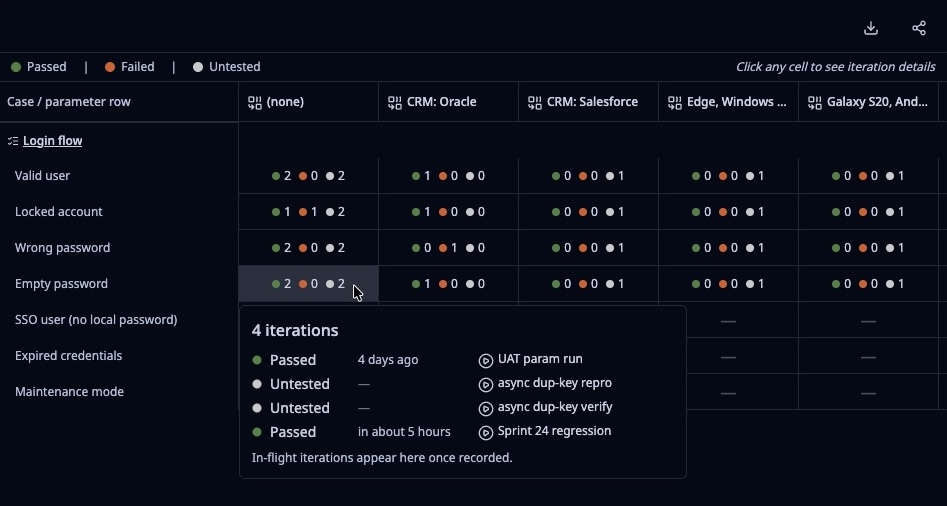
The Parameterized Test Iteration Matrix report focused on a Login case with seven parameter rows (Valid user, Locked account, Wrong password, Empty password, SSO user, Expired credentials, Maintenance mode) and configuration columns including CRM Oracle, CRM Salesforce, Edge Windows, and Galaxy S20. A hover popover on the Empty password / no-config cell shows the four runs that contributed: UAT param run, async dup-key repro, async dup-key verify, and Sprint 24 regression.
The Parameterized Test Iteration Matrix — one Login case, seven input scenarios, every configuration, every run that has ever touched it.

Every test team has the same shelf of near-duplicate test cases. "Login — valid user." "Login — empty password." "Login — wrong password." "Login — locked account." "Login — SSO user." Same steps, same expected outcomes, different inputs. Multiply that pattern across a typical product and the repository fills up with copies of the same test case wearing slightly different hats.

It's not a quality problem — those scenarios all matter. It's a maintenance problem. When the flow changes, you edit one case and forget the other six. When someone joins the team they can't tell which "Login" case is canonical. When a run completes, the report doesn't surface "which input combinations did we actually cover this sprint?"

TestPlanIt v0.29.0 ships parameterized test cases. Write the case once. Attach a table of input rows. Each row becomes an iteration with its own status — and the results roll up to a single case in your report.

If you're already using shared steps, this is the missing other half: shared steps reuse the same steps across many cases when the flow is identical; parameterized cases reuse the same case across many input rows when the steps stay the same but the data changes.

TestPlanIt Now Speaks 13 Languages

· 2 min read
Brad DerManouelian
TestPlanIt Contributor

Test management is a global discipline. Your QA team might be spread across São Paulo, Amsterdam, Warsaw, and Tokyo, and until now they've all been working in English whether they wanted to or not. That changes today.

TestPlanIt v0.27.0 ships full UI localization in 13 languages.

Introducing the TestPlanIt MCP Server: Talk to Your Test Data

· 5 min read
Brad DerManouelian
TestPlanIt Contributor

Most of the time, your AI assistant and your test management tool live in completely separate worlds. You're in Claude or Cursor, you want to know something about your test coverage, and you either have to go look it up yourself or paste a wall of data into the chat and hope the AI makes sense of it. The AI is smart but blind — it can't see your TestPlanIt data, so it can't actually help you with it.

The TestPlanIt MCP Server changes that.

Introducing Webhooks: Two-Way Sync with Your Issue Tracker and Anywhere Else

· 4 min read
Brad DerManouelian
TestPlanIt Contributor

Until now, the link between a TestPlanIt test case and a Jira ticket worked one direction at a time. You could click Sync to pull the latest status, or wait for the on-demand refresh. If a developer moved a ticket while you were running a test session, you wouldn't know until you went looking. And on the other side, telling Slack that a regression run failed, or letting a custom service know that a milestone closed, meant writing custom integration code that nobody had time to write.

This release ships webhooks. Issues sync the moment they change in your tracker, badges and lists update live without a page refresh, and TestPlanIt events fan out to Slack or any signed URL automatically.

Copy and Move Test Cases Between Projects

· 2 min read
Brad DerManouelian
TestPlanIt Contributor

TestPlanIt v0.17.0 ships Copy/Move — select test cases or an entire folder, pick a target project, and transfer them directly. No export file, no import wizard, no field mapping. The cases arrive in the target project with their steps, custom fields, tags, issue links, and attachments intact.